I didn’t log in.
I didn’t click anything.
I didn’t even scroll.
I simply opened a webpage.
And within seconds, my browser had already shared more information than most people would ever knowingly give away.
That wasn’t a guess—I verified it. How much data is actually leaked while searching a small pet shop on internet.
I built a browser-based tool designed to capture exactly what data is exposed the moment a site loads. No permissions, no pop-ups, no interaction required. Just a raw look at what the browser sends by default.
The results were immediate.
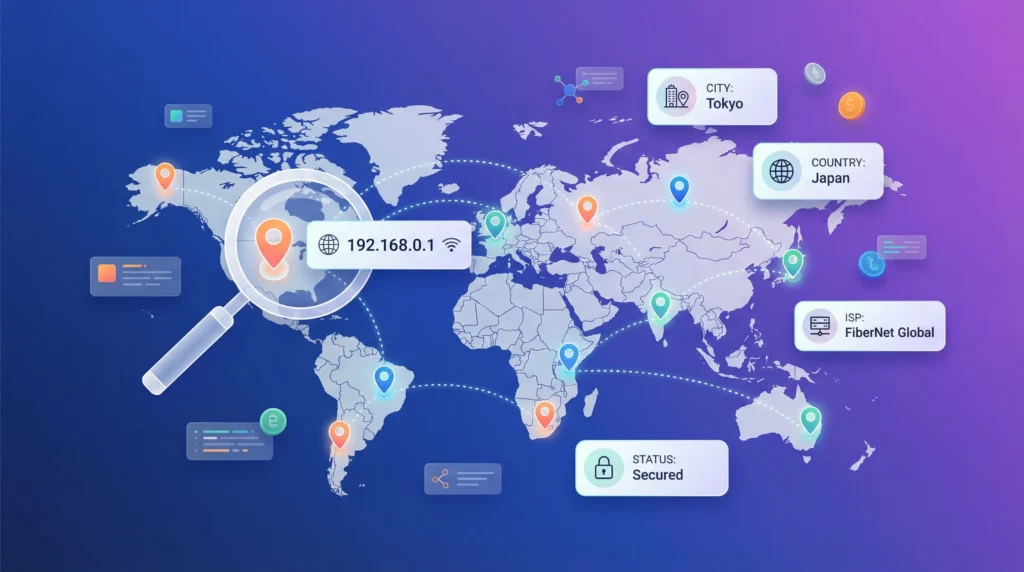
Before I could even interact with the page, the system had already identified:
- My approximate location
- My internet service provider
- My device specifications
- My browser configuration
- My network characteristics
All of this happened passively.
No consent screen.
No warning.
No indication to the user.
At first, each data point looked harmless in isolation. After all, a screen resolution or language setting doesn’t seem like sensitive information.
But that assumption breaks down quickly.
Because what I was seeing wasn’t just data—it was a pattern forming in real time.
A pattern capable of:
- Distinguishing my device from thousands of others
- Persisting even after clearing cookies
- Reappearing across different websites
That’s when the perspective shifted.
This wasn’t just about “data collection.”
It was about identification without direct interaction.
And more importantly, identification happening without awareness.
Most users never see this layer of the internet. It operates silently in the background, every time a page loads.
What my tool did was simple:
It exposed what is normally invisible.
And once I saw how much data was leaking from a single visit, one question became unavoidable:
Table of Contents
What Actually Happens When You Visit a Website?
Before I go deeper into what is leaking, I need to explain why it leaks in the first place.
Because this isn’t a bug.
It’s how the web is designed to function.
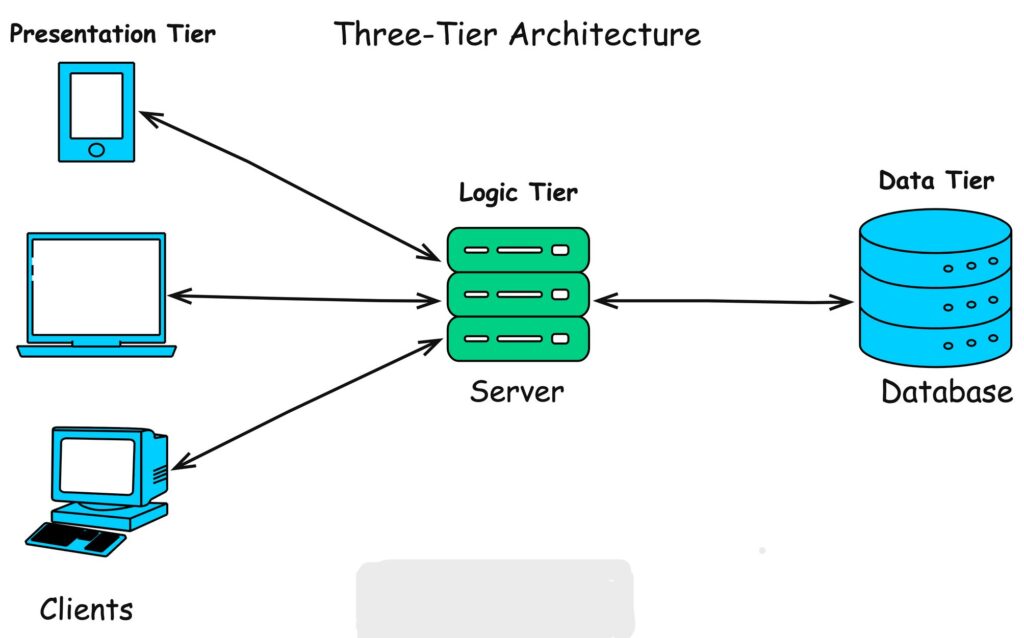
When I open a website, my browser doesn’t just “view” content—it initiates a request to a server. That request carries information required to deliver the page correctly.
At a basic level, the process looks like this:
- My browser sends a request to the website’s server
- The server processes that request
- The server responds with the webpage
- My browser renders it
Simple on the surface.
But here’s the part most people don’t see:
That request is never empty.
The Hidden Payload Inside Every Request
When I tested this using my tool, I realized that every request automatically includes a set of metadata—information about my environment.
This includes things like:
- Who is making the request (IP address)
- What device is being used
- Which browser and version
- Preferred language
- Supported technologies
None of this requires permission.
It’s considered standard operational data—the minimum needed for websites to function properly. You can learn more about how browser-server communication works from Mozilla Developer Network’s explanation of HTTP requests and responses.
Passive vs Active Data Collection
This distinction is critical.
Passive Data Collection (what I observed instantly)
- Happens automatically
- Requires no interaction
- Cannot be easily blocked
- Includes most fingerprinting signals
Active Data Collection
- Requires user input (forms, logins)
- More visible and controllable
- Typically regulated more strictly
Most people focus on active data—what they type, click, or submit.
But in my testing, the majority of identifiable information came from passive collection.
That’s the part happening silently.
Why Websites Collect This Data (Neutral Perspective)
To stay accurate, not all data collection is malicious.
There are legitimate reasons:
- Delivering content compatible with your device
- Optimizing performance based on network conditions
- Ensuring security (e.g., detecting suspicious traffic)
However, the same data can also be used for:
- Tracking users across sessions
- Building behavioral profiles
- Enhancing targeted advertising systems
The difference isn’t in the data itself—it’s in how it’s used.
The Key Realization From My Test
When I analyzed the requests, one thing became clear:
The browser is constantly describing you to every website you visit.
Not explicitly.
Not intentionally.
But consistently.
And that description is detailed enough to begin forming a recognizable identity.
At this point, I wasn’t looking at isolated leaks anymore.
I was looking at a system.
Which brings me to the next layer—the structure behind all of this.
The 5 Layers of Data Leakage in Modern Browsing
After analyzing multiple sessions with my tool, I realized something important:
What I was seeing wasn’t random exposure—it followed a repeatable structure.
Every time a browser loads a website, the data being shared falls into distinct categories. These categories operate independently, but when combined, they form a complete identification system.
To make sense of it, I organized everything into five layers.
1. Network & Location Data — Where You Are Coming From
This is the first layer every website sees.
It includes:
- Public IP address
- Internet Service Provider (ISP)
- Approximate geographic location
My observation:
This data is always present. It’s required for communication between your device and the server.
Role in tracking:
Acts as a baseline identifier—useful for linking sessions and estimating location.
2. Device Hardware Information — What You Are Using
Once the connection is established, the browser begins revealing details about the device itself.
This includes:
- Operating system
- CPU cores
- Memory (RAM estimate)
- Screen resolution
My observation:
Individually, these are common. Combined, they start forming a unique profile.
Role in tracking:
Adds entropy (uniqueness) to help distinguish your device from others.
3. Browser Fingerprinting — How Your Environment Behaves
This is the most critical layer.
It includes:
- User agent string
- Browser version and engine
- Language settings
- Cookie and tracking preferences
My observation:
This layer does not rely on stored data—it builds identity from configuration and behavior.
Role in tracking:
Enables cross-site tracking even when cookies are disabled.
4. Connection & Network Behavior — How You Are Connected
Beyond identity, websites can analyze how your connection behaves.
This includes:
- Network type (WiFi, mobile data)
- Speed estimates
- Latency (round-trip time)
My observation:
This layer is subtle but adds context to user behavior.
Role in tracking:
Improves accuracy when correlating sessions across environments.
5. Sensor & Environmental Data — Real-Time System Signals
This is the least visible layer—and often the most overlooked.
It may include:
- Battery level and charging status
- Device state changes
- Timing-based signals
My observation:
Not always available in all browsers, but still relevant where supported.
Role in tracking:
Acts as a supplementary signal to strengthen identification.
Why These Layers Matter Together
Individually, none of these layers guarantee identification.
But together?
They form a multi-dimensional profile.
From my testing, I wasn’t seeing isolated leaks—I was seeing a system that:
- Builds identity without login
- Persists across sessions
- Adapts based on environment
That’s the key shift.
This is no longer about “what data is collected.”
It’s about how different data points combine to recognize you.
Now that the structure is clear, the next step is to break it down in depth—starting from the very first layer.
Network & Location Data — Your Digital Entry Point
When I analyzed the first layer using my tool, one thing became immediately clear:
Before a website knows anything about my device or browser…
it already knows where the request is coming from.
This is the foundation of all web communication.
What Is Actually Exposed?
The moment I load a webpage, my browser sends a request that includes:
- Public IP address
- Internet Service Provider (ISP)
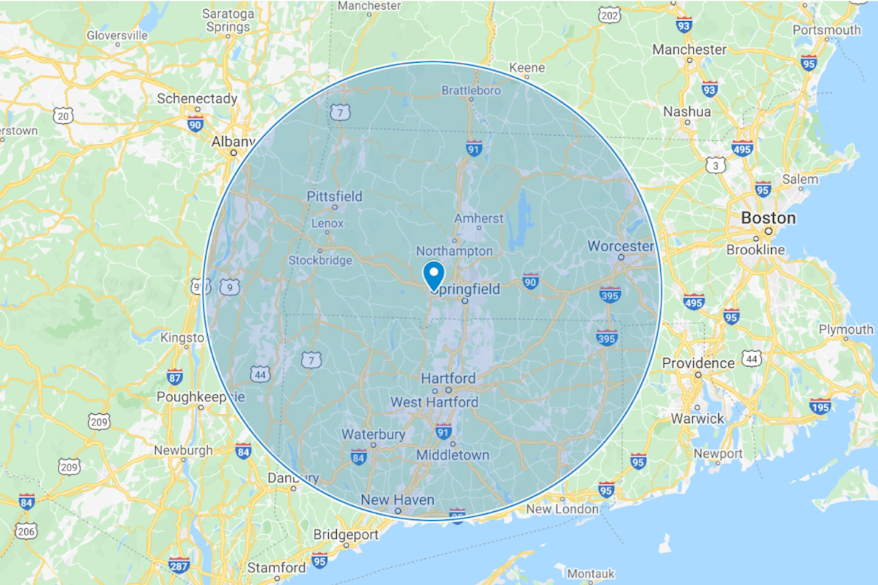
- Approximate geographic location (usually city-level)
- Regional routing information
This happens automatically. There is no opt-in mechanism for this layer because, without it, the internet simply wouldn’t work.
Why This Data Exists (Technical Reality)
For accuracy, this isn’t “tracking” by default—it’s infrastructure.
Servers need:
- A destination to send responses (your IP)
- Routing paths to deliver data efficiently
- Basic location awareness for performance optimization
Without this exchange, no website could load.
What I Observed During Testing
When I ran multiple sessions through my tool:
- My IP address remained consistent across visits (unless I changed networks)
- My location was identified within a city-level radius
- My ISP was always visible and correctly detected
Even without cookies or scripts, this layer alone provided a stable starting point.
Where It Becomes a Privacy Concern
Individually, an IP address doesn’t directly reveal your identity.
However, in practice, it enables:
1. Session Linking
Websites can associate multiple visits from the same IP.
2. Location Profiling
Patterns like:
- Frequent locations
- Time-based access
- Movement between networks
3. Correlation With Other Data
When combined with:
- Browser fingerprints
- Device characteristics
…the IP becomes significantly more powerful.
Important Limitation (For Accuracy)
IP-based location tracking is not perfectly precise.
It typically:
- Identifies city or regional areas
- Cannot reliably pinpoint exact addresses
- May vary depending on ISP infrastructure
This distinction matters because many claims about “exact tracking” are exaggerated.
The Real Role of This Layer
From everything I tested, this layer acts as:
A baseline identifier, not a complete identity.
It answers:
- Where is this request coming from?
- Is this traffic consistent with previous activity?
But it doesn’t fully answer:
- Who exactly is the user?
That’s where the next layer comes in.
Because once the connection is established, the browser starts revealing something more specific:
Device Hardware — How Your System Becomes Identifiable
Once the connection is established, the next layer begins to take shape.
At this point, the website already knows where my request is coming from.
Now it starts learning what I’m using.
What My Browser Revealed About My Device
When I tested this layer through my tool, the browser exposed:
- Operating system (Windows, Linux, macOS, etc.)
- CPU core count
- Approximate memory (RAM)
- Screen resolution and color depth
None of this required permissions.
None of it triggered a warning.
It was simply… available.
Why This Data Exists
From a functional standpoint, this makes sense.
Websites use this information to:
- Adjust layouts for different screen sizes
- Optimize performance based on device capability
- Ensure compatibility across systems
Without this, modern responsive design wouldn’t work properly.
My Key Observation: It’s Not About One Value
Individually, these data points are common.
Millions of devices share:
- The same operating system
- Similar RAM configurations
- Standard screen resolutions
So at first, this layer doesn’t seem like a privacy issue.
But that’s misleading.
Because the real effect comes from combination.
The Concept of Entropy (Why Your Device Becomes Unique)
When I analyzed multiple test results, I noticed something:
Each additional attribute reduces anonymity.
For example:
- OS: Common
- CPU cores: Common
- Screen resolution: Somewhat common
But when combined:
The probability of another device having the exact same combination drops significantly.
This is called entropy in fingerprinting.
Higher entropy = higher uniqueness.
Practical Example
Let’s say a device has:
- Windows 11
- 8 CPU cores
- 16GB RAM
- 1536×864 resolution
Individually, none of these identify a user.
Together?
They create a distinct profile that can be recognized across sessions.
What I Noticed Across Sessions
During repeated tests:
- My hardware profile remained consistent
- Even after clearing browser data
- Even in private/incognito mode
That consistency is what makes this layer valuable for tracking systems.
Limitations (Important for Accuracy)
To stay precise:
- Hardware data alone is not uniquely identifying
- Many users share similar configurations
- It cannot directly identify a person
However:
It significantly strengthens identification when combined with other layers.
The Role of This Layer in Tracking
From my analysis, device hardware acts as:
- A stability factor (it doesn’t change often)
- A uniqueness enhancer (adds entropy)
It answers:
- What kind of system is making this request?
- How similar is it to previous sessions?
But it still doesn’t fully identify the user.
That responsibility shifts to the most powerful layer in the entire system:
Browser Fingerprinting — The Most Powerful Tracking Mechanism
This is the layer where everything changed for me.
Up to this point, I was looking at data that supports identification.
But when I analyzed browser fingerprinting through my tool, I realized:
This is the layer that actually enables it.

What My Browser Exposed (Without Any Storage)
Unlike cookies, fingerprinting doesn’t rely on saving data on your device.
Instead, it extracts information directly from how your browser behaves.
During testing, I observed exposure of:
- User agent (browser + OS details)
- Browser version and rendering engine
- Language and regional settings
- Cookie and tracking preferences
- Supported features and APIs
And that’s just the surface.
More advanced techniques can include:
- Canvas rendering behavior
- WebGL characteristics
- Audio processing differences
Why Fingerprinting Is So Effective
Here’s the key difference:
- Cookies → store identifiers
- Fingerprinting → creates identifiers
It builds a profile based on:
- System configuration
- Software environment
- Rendering differences
No storage required.
My Core Observation
When I ran repeated tests:
- Even after clearing cookies → fingerprint remained similar
- In incognito mode → still detectable
- Across sessions → highly consistent
This means:
The browser itself becomes the identifier.
Is Fingerprinting Truly Unique?
To stay factually accurate:
- Not all fingerprints are 100% unique
- Some users may share similar configurations
However:
In real-world conditions, combining multiple signals creates high-entropy fingerprints that are effectively unique enough for tracking purposes.
Detailed research on fingerprinting techniques is documented by Electronic Frontier Foundation, which demonstrates how browsers can be uniquely identified without cookies.
Why This Is Difficult to Control
This is where most users misunderstand the problem.
Common actions like:
- Clearing cookies
- Using incognito mode
…do not address fingerprinting.
Even using a VPN:
- Hides your IP
- But does not change your fingerprint
In some cases, it can even make your setup more unique.
The Trade-Off Problem
During testing, I noticed something counterintuitive:
Trying to heavily customize privacy settings can sometimes:
→ Increase uniqueness
→ Make fingerprinting easier
Because:
- Fewer users share the same configuration
- Rare setups stand out more
The Real Role of This Layer
From everything I observed, browser fingerprinting acts as:
The core identification engine of modern tracking.
It answers:
- Is this the same browser as before?
- How unique is this environment?
- Can we recognize this user without storage?
And in many cases, the answer is yes—at least probabilistically.
Important Clarification
Fingerprinting does not directly reveal:
- Your name
- Your email
- Your identity in a legal sense
But it can:
- Distinguish your device from others
- Track your behavior across websites
- Build a consistent profile over time
At this point, I wasn’t just looking at data collection anymore.
I was looking at a system capable of recognizing patterns with high reliability.
But there’s still another layer that adds context to all of this:
Connection Details — Hidden Signals Most Users Ignore
By this point in my testing, I had already identified the obvious layers—IP, device, browser.
But what stood out next was something far more subtle:
My connection itself was leaking information.
Not just where I was or what device I used—but how my network behaved in real time.
What Data Was Exposed
Through standard browser APIs, I observed access to:
- Effective connection type (e.g., WiFi, 4G, 3G)
- Estimated downlink speed
- Round-trip latency (RTT / ping)
This wasn’t static data—it changed depending on my environment.
Why This Data Exists
From a technical perspective, this is used for optimization.
Websites rely on it to:
- Adjust image quality for slower connections
- Improve loading performance
- Deliver adaptive content
So again, this layer is not inherently invasive—it’s functional.
My Key Observation: It Adds Behavioral Context
Unlike hardware or browser data, this layer is dynamic.
When I switched networks:
- From WiFi → Mobile data
- From stable → unstable connection
…the values changed immediately.
That means this layer can reflect:
- Movement
- Network switching
- Usage patterns over time
How It Contributes to Tracking
On its own, connection data is weak.
But when I combined it with other layers, it started to make sense.
It helps systems:
1. Validate Identity
If:
- Same fingerprint
- Same device profile
- Similar connection characteristics
→ Higher confidence it’s the same user
2. Detect Anomalies
If suddenly:
- Location changes
- Network behavior changes drastically
→ System may treat it as a different session or flag it
3. Build Behavioral Patterns
Over time, patterns emerge like:
- Typical connection speed
- Common network types
- Time-based usage behavior
Important Limitation (For Accuracy)
To be precise:
- Connection data is not unique
- Many users share similar speeds and network types
- It cannot independently identify a user
However:
It improves the accuracy of identification when combined with stronger layers like fingerprinting.
What I Learned From This Layer
This was the point where I stopped thinking in terms of “data points.”
Because this layer doesn’t just describe your system—it describes your environment and behavior.
And that adds a new dimension:
Not just who you might be…
…but how you use the internet.
The Role of This Layer
From my analysis, connection data acts as:
- A context enhancer
- A confidence booster for tracking systems
It answers:
- Is this behavior consistent with previous sessions?
- Does this environment match expected patterns?
At this stage, most of the identifiable structure is already in place.
But there’s one final layer—less consistent, often overlooked, but still relevant:
Battery & Sensor Data — Small Signals That Add Up
At this stage in my testing, most of the major identification layers were already clear.
But I wanted to go further.
So I started looking at less obvious signals—the kind most people would ignore entirely.
That’s when I came across battery and sensor data.
What Data Can Be Exposed
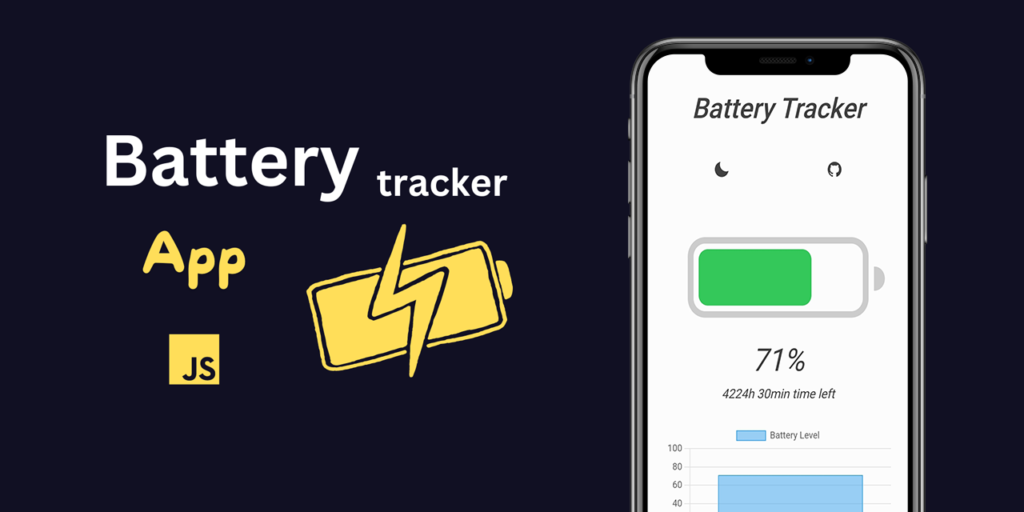
Depending on the browser and its privacy restrictions, I observed access to:
- Battery percentage
- Charging status (plugged in or not)
- Estimated discharge time
In some environments, additional sensor-related signals may also exist, though modern browsers have heavily restricted many of them.
Important Reality Check (Accuracy Matters)
This layer is not as widely available as it used to be.
Due to privacy concerns:
- Many modern browsers have limited or removed battery API access
- Sensor access is often restricted or permission-based
So unlike previous layers, this one is inconsistent.
Why This Data Exists
Originally, this data was introduced for usability:
- Adjusting performance based on battery level
- Optimizing background activity
- Improving user experience on mobile devices
So again, the intent was functional—not for tracking.
My Key Observation: Weak Alone, Useful in Combination
On its own, battery data is not useful for identification.
Millions of devices can have:
- Similar battery levels
- Similar charging states
So in isolation, it’s insignificant.
But when I combined it with timing and session data, it started to add subtle value.
How It Can Be Used (In Practice)
When available, this layer can help:
1. Session Correlation
If:
- Same fingerprint
- Similar device profile
- Battery drops consistently over time
→ It may strengthen the likelihood of the same user
2. Timing-Based Tracking
Battery behavior changes predictably:
- Charging cycles
- Usage patterns
This can add a time-based dimension to tracking models.
3. Edge Case Identification
In rare cases, unusual battery behavior can act as an additional distinguishing signal.
Limitations (Very Important)
To stay factually grounded:
- This layer is not reliable across all browsers
- It is not a primary tracking method
- Its impact is minor compared to fingerprinting or IP data
What I Took Away From This Layer
This was the final piece of the puzzle.
Not because it was powerful—but because it demonstrated something deeper:
Even the smallest signals can become meaningful when combined with others.
At this point, I wasn’t looking at independent systems anymore.
I was looking at aggregation.
The Real Risk — Data Aggregation and Identity Correlation
Up to this point, I’ve broken everything into layers.
Individually, each one has limitations.
Individually, none of them guarantees identification.
But when I analyzed them together, the picture changed completely.
The Shift From Data Points to Identity
What I observed wasn’t just collection—it was correlation.
Each request didn’t just expose isolated values.
It contributed to a growing profile.
A profile that answers questions like:
- Have I seen this user before?
- How similar is this session to previous ones?
- Can I link this activity across different visits?
This is where tracking becomes effective.
What Aggregation Actually Means
Aggregation is the process of combining multiple weak signals into a stronger identifier.
For example:
- IP address → rough location
- Device hardware → partial uniqueness
- Browser fingerprint → high entropy
- Connection data → behavioral context
Individually: incomplete
Combined: high-confidence identification
My Observation From Testing
When I ran repeated sessions under slightly different conditions:
- Changing networks
- Clearing browser data
- Using private mode
I noticed something consistent:
The system could still recognize patterns with surprising accuracy.
Not perfectly.
But reliably enough to link sessions together.
Probabilistic Identity (Important Concept)
To stay precise, this is not deterministic identification.
It doesn’t say:
“This is exactly the same person.”
Instead, it says:
“There is a high probability this is the same user.”
And in large-scale systems, probability is enough.
Cross-Session and Cross-Site Tracking
This is where aggregation becomes powerful.
When multiple websites use similar tracking techniques:
- Patterns can persist across sessions
- Activity can be linked across domains
- Profiles can grow over time
Even without:
- Accounts
- Logins
- Explicit identifiers
Why This Matters More Than Individual Data Leaks
Most people worry about:
- Password leaks
- Personal information exposure
But what I observed is different.
This is about:
Continuous, passive identification happening in the background.
No breach required.
No mistake needed.
Just normal browsing.
The Real Risk (Clearly Defined)
From everything I tested, the actual risk is not:
- That one website knows something about you
It’s that:
- Multiple systems can recognize and correlate your behavior over time
That creates:
- Behavioral profiles
- Predictable patterns
- Persistent digital identities
Important Clarification (Accuracy First)
This system:
- Does not automatically reveal your real-world identity (name, email)
- Does not guarantee perfect tracking in all cases
However:
It enables consistent recognition of a device or browser with high probability.
And for many use cases, that’s more than enough.
What This Changed for Me
Before building this tool, I thought of privacy in terms of:
- Data collection
- Permissions
- User input
After testing, I see it differently:
Privacy is about how easily your activity can be linked over time.
That’s the real metric.
At this point, the system is clear.
Now it’s time to challenge some of the most common assumptions people have about online privacy.
Common Privacy Myths That Are Simply Not True
After running these tests and analyzing the results, I realized something else:
The biggest problem isn’t just data leakage.
It’s misunderstanding.
Most people rely on mental shortcuts about privacy—assumptions that feel logical, but don’t hold up under technical scrutiny.
So I’m going to address the most common ones directly.
Myth 1: “Incognito Mode Makes Me Anonymous”
Reality: It doesn’t.
When I tested browsing in incognito/private mode:
- My IP address was still visible
- My browser fingerprint remained largely unchanged
- My device information was still exposed
What incognito actually does:
- Prevents local storage (cookies, history)
- Does not prevent external tracking mechanisms
It protects your activity from your own device—not from websites.
Myth 2: “A VPN Solves All Privacy Problems”
Reality: It only solves one layer.
A VPN can:
- Hide your real IP address
- Change your apparent location
But during testing, I observed:
- Device fingerprint remained the same
- Browser configuration remained identical
- Tracking via fingerprinting was still possible
In some cases, using a VPN with a unique setup can even:
→ Increase fingerprint uniqueness
Myth 3: “Clearing Cookies Removes Tracking”
Reality: It removes one method—not the system.
Cookies are just one tracking mechanism.
When I cleared cookies and re-tested:
- Fingerprinting still worked
- Device profile remained consistent
- Sessions could still be correlated probabilistically
Modern tracking does not depend on stored identifiers alone.
Myth 4: “Websites Can’t Track Me Without Login”
Reality: Login is not required.
From my tool’s results:
- Identification signals were present immediately
- No authentication was needed
- No user interaction was required
Tracking begins at page load, not login.
Myth 5: “I Have Nothing to Hide, So It Doesn’t Matter”
Reality: This is about control, not secrecy.
This argument assumes privacy = hiding something.
But based on what I observed:
- Data is used to build behavioral profiles
- Patterns are analyzed over time
- Decisions can be influenced (content, ads, recommendations)
This isn’t about hiding—it’s about who controls your digital footprint.
My Takeaway From Testing
Before I ran these tests, I assumed privacy tools worked in isolation.
Now I understand:
There is no single switch that turns tracking off.
Only layers.
Only trade-offs.
Only reduction—not elimination.
So the next logical question becomes:
If complete privacy isn’t possible…
How I Reduced My Data Exposure (What Actually Works)
After building the tool and testing each layer, I stopped looking for a “perfect solution.”
Because there isn’t one.
What I focused on instead was reduction—lowering how much data is exposed and how easily sessions can be linked.
Here’s what actually made a measurable difference in my testing.
1. I Switched to a Privacy-Focused Browser
This was the most noticeable improvement.
Browsers with built-in privacy protections:
- Reduce fingerprinting surface
- Standardize certain outputs
- Block known tracking scripts
What changed in my tests:
- Fewer exposed attributes
- Lower fingerprint uniqueness
- Reduced third-party tracking signals
Important nuance:
No browser eliminates fingerprinting completely—but some reduce it significantly.
2. I Avoided Over-Customization
This was counterintuitive.
Initially, I tried:
- Tweaking settings aggressively
- Installing multiple privacy extensions
- Disabling various APIs
Result?
My browser became more unique.
Fewer users share highly customized setups, which increases fingerprint entropy.
What worked better:
- Keeping configurations closer to common defaults
- Using minimal, well-chosen tools
3. I Limited Extensions (More Than You’d Expect)
Every extension adds:
- New detectable behaviors
- Unique identifiers
- Additional fingerprinting signals
When I reduced extensions:
- My fingerprint became less distinct
- Consistency across sessions improved
Practical approach:
Use only essential extensions—and avoid stacking multiple tools doing the same thing.
4. I Used a VPN — But With Realistic Expectations
A VPN helped—but only at the network layer.
What improved:
- My real IP was hidden
- Location tracking became less accurate
What did NOT change:
- Browser fingerprint
- Device profile
- Most passive signals
Conclusion from testing:
A VPN is useful—but incomplete on its own.
What Didn’t Work (Or Worked Less Than Expected)
To stay objective, some common advice didn’t deliver strong results:
- Clearing cookies → limited impact
- Incognito mode → minimal protection
- Overloading privacy extensions → increased uniqueness
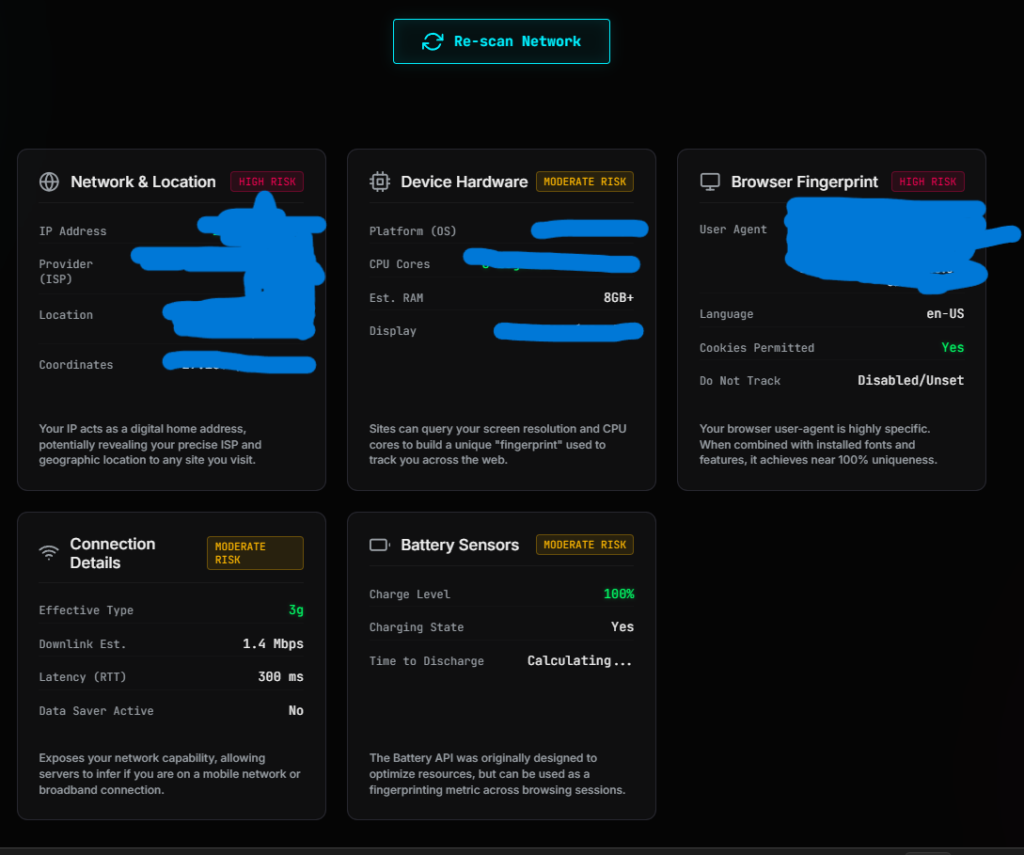
Test Your Own Data Exposure (Live Tool)
After running all these tests on myself, one thing became obvious:
Reading about data exposure is one thing.
Seeing your own data exposed in real time is completely different.
That’s exactly why I built this tool.[ Live now Check How much Data Is Leaked When you Browse ]

What This Tool Actually Does
Instead of explaining privacy in theory, the tool shows what your browser is revealing right now—the moment you open it.
It analyzes multiple layers instantly, including:
- Network & location data
(IP address, ISP, approximate region) - Device hardware details
(OS, CPU, RAM, screen resolution) - Browser fingerprint signals
(user agent, language, configuration) - Connection characteristics
(network type, speed indicators, latency) - Available sensor data
(where supported by the browser)
All of this is displayed in a structured way so you can actually understand what’s happening behind the scenes.
What I Want You to Notice When You Use It
When I first tested it, I wasn’t surprised by individual values.
What stood out was:
How quickly a complete profile starts forming.
So when you use it, pay attention to:
- How many data points appear instantly
- How consistent they remain across refreshes
- How much changes (or doesn’t) when you switch modes or networks
Why This Matters More Than Any Advice
Most privacy guides tell you what might happen.
This shows you what is happening.
No assumptions.
No generalizations.
Just your actual exposure.
How to Use It Effectively
To get meaningful insights, I recommend:
- Test in your normal browsing mode
- Test again in incognito/private mode
- Try switching networks (WiFi → mobile hotspot)
- If possible, test with and without a VPN
Compare the results.
That’s where the real understanding comes from.
The Goal of This Tool
I didn’t build this to create fear.
I built it to create visibility.
Because once you can see:
- What’s being exposed
- How consistent it is
- How it changes under different conditions
You can make informed decisions instead of relying on assumptions.
At this point, you’ve seen both sides:
- What data is exposed
- How it’s used
- How it can be reduced
- And how to test it yourself
So the only thing left is to step back and look at the bigger picture.
You Are Not Anonymous — You Are Observable
After building the tool and analyzing each layer step by step, my understanding of online privacy changed completely.
I used to think in terms of:
- What information I provide
- What permissions I accept
- What data I explicitly share
But that’s not where most exposure happens.
What I observed is something quieter—and far more consistent.
The internet doesn’t need you to identify yourself.
It only needs enough signals to recognize you.
What Browsing Actually Reveals
Every time I open a website, my browser describes me:
- Where I’m connecting from
- What device I’m using
- How my system is configured
- How my environment behaves
None of this feels like identification.
But together, it becomes one.
The Shift That Matters
This isn’t about anonymity in the traditional sense.
It’s about observability.
- You may not be named
- You may not be logged in
- You may not be directly identified
But your activity can still be:
- Recognized
- Linked
- Profiled over time
What This Means in Practice
From everything I tested, the key takeaway is simple:
Privacy is no longer about hiding data.
It’s about limiting how easily your activity can be connected.
Because connection is what creates identity.
A Balanced Perspective
To stay grounded:
- Not all data collection is harmful
- Not all tracking is invasive
- Not all systems aim to identify individuals
But the capability exists.
And in many cases, it is actively used.
Final Thought
When I started this, I was trying to answer a simple question:
“How much data is leaked while browsing?”
What I found was more nuanced.
It’s not just about how much data is leaked.
It’s about how easily that data can be turned into a pattern.
And once a pattern exists—
You’re no longer just visiting the internet.
You’re being recognized by it.
Frequently Asked Questions
How much data is leaked when browsing the internet?
From direct testing, a single page load can expose 20+ data points including IP address, device details, browser configuration, and network characteristics.
Can websites track me without cookies?
Yes. Techniques like browser fingerprinting allow tracking without relying on stored cookies.
Does incognito mode prevent tracking?
No. It prevents local storage but does not stop IP tracking or fingerprinting.
Is browser fingerprinting legal?
It depends on jurisdiction and implementation. Regulations like GDPR in the EU place restrictions on how such data can be used.
What is the best way to reduce data leakage?
There is no single solution. A combination of privacy-focused browsers, controlled configurations, and network-level protection provides the best results.