If you want to stop Facebook tracking your personal data, you might think that simply deleting the app is enough. But I have a hard truth for you: they are still watching. Even if you refused to join Facebook to protect your privacy, they likely have a file on you anyway.
This article is based on independent research conducted by Pixel Defense, combining documented Meta disclosures, academic studies, and real-world privacy testing. All claims are supported by verifiable sources linked below.
Do you think you’re invisible just because you logged out?
While Meta’s data harvesting is well-documented, the ‘Meta Trap’ often hides in the fine print of their ever-changing legal terms. To see exactly how these updates impact your current rights, you can use our AI Privacy Policy Analyzer. By pasting their latest policy into the auditor, you can instantly see if Meta has added new clauses regarding biometric data or off-platform tracking that weren’t there during your last review.
Prevent future damage by securing your identity layers
For years, we’ve been told that if a product is free, you are the product. But with Meta (the company that owns Facebook and Instagram), it’s actually much scarier than that. You aren’t just the product; you are the target.
Today, we are opening the case file on Facebook.
We aren’t just talking about the ads you see. We are talking about “Shadow Profiles“—hidden files Facebook keeps on people who never signed up and the 533 million phone numbers leaked to hackers. And we are talking about the invisible security cameras they have installed on millions of other websites you visit every day.
They know what you buy. They know where you go. And they know who your friends are—even if you never told them.
It sounds like a conspiracy theory, but it is a documented fact. And the worst part? Most of it is legal.
But here is the good news: You can fight back.
In this guide, I am going to show you exactly how their tracking machine works, and then I will give you the specific settings you need to change right now to cut their data pipeline.
Ready to go dark? Let’s begin.
1.Why You Must Stop Facebook Tracking (The Evidence)
If you are one of the millions of people who refused to join Facebook to protect your privacy, I have a hard truth for you.
They probably have a file on you anyway.
It sounds like a conspiracy theory, doesn’t it? The idea that a company you never joined has a secret dossier on your life sounds like something from a spy movie.
But this isn’t a theory. It is a documented reality called a “Shadow Profile.”
In 2018, when members of Congress asked Mark Zuckerberg about these profiles, he claimed he wasn’t “familiar” with the term. But privacy experts and security researchers have known about them for years.
Here is exactly how they trapped you without your permission.
The “Trojan Horse” Contact List
You didn’t give Facebook your phone number. Your friend did.
When your friend signed up for Facebook or Messenger, the app likely asked them to “Find Friends” by uploading their contact list.
In that split second, Facebook sucked up every name, phone number, and email address in your friend’s phone.
If your number was in that list, Facebook created a hidden file for you. They use this data to map out who you know, where you live, and who you are likely to be—all without you ever clicking “Agree” on a Terms of Service.
The Invisible CCTV (The Meta Pixel)
It gets worse. You are likely being watched right now, even if you are nowhere near Facebook.com.
Facebook gives a piece of code called the Meta Pixel to millions of other websites (news sites, online stores, etc.) to help them run ads.
But this pixel acts like a two-way mirror.
Research has shown that this tracking technology is present on over 30% of popular websites. Another study found that Facebook can track roughly 40% of the total time users spend browsing the web.
This means that even if you are “ghosting” Facebook, their invisible cameras are following you from room to room across the internet.
Meta doesn’t just watch your timeline; they read the ‘digital envelope’ of your private chats. See our analysis of the WhatsApp Metadata Leak.
2.The Hall of Shame: Why This Isn’t a Conspiracy Theory
I know how this sounds.
When people talk about “secret profiles” and “mass surveillance,” it usually sounds like the plot of a spy movie or a fringe conspiracy theory.
You might be thinking, “Rock, aren’t you exaggerating? Isn’t this just how the internet works?”
I want to be very clear: We are not dealing with theories here. We are dealing with documented history.
We don’t need to guess if Facebook will misuse your data, because they have already been caught doing it. Repeatedly.
Here are three verified exhibits from the “Hall of Shame” that prove exactly why you shouldn’t trust them with your digital life.
Exhibit A: The Cambridge Analytica Scandal (2018)
This was the moment the world woke up. A political consulting firm harvested the private data of 87 million Facebook users without their consent.
How they did it: They didn’t hack the system. They simply used a “personality quiz” app called This Is Your Digital Life.
When one person took the quiz, the app scraped the data of all their friends too. This data was then weaponized to build “psychographic profiles” to manipulate voter behavior in major elections.
Facebook scans your activity to target ads. If you think switching to a ‘private’ messenger solves this, think again. Read my investigation: Is Telegram Safe? The Truth About Cloud Chats.”
Exhibit B: The 533 Million User Leak (2021)
If you think your phone number is safe with Facebook, think again.
In 2021, a massive database containing the personal info—including full names, locations, and phone numbers—of 533 million users from 106 countries was leaked online for free.
Hackers have used this data to launch massive waves of “smishing” (SMS phishing) attacks. If you’ve been getting more spam texts lately, this is likely why.
- Source: The Guardian – Facebook says breach that hit 533m is old news
- Source: The Record – Phone numbers for 533 million Facebook users leaked
Exhibit C: The “Onavo VPN” Betrayal
This is perhaps the most cynical move in their history.
Facebook promoted a “security” app called Onavo Protect, promising to keep users safe while they browsed the web.
The Reality: It wasn’t protecting users; it was spying on them.
Facebook used the VPN to track which competitor apps (like WhatsApp and Snapchat) people were using, so they could figure out who to buy or crush. They marketed a surveillance tool as a privacy tool. Apple eventually forced them to remove it for violating data collection rules.
3. The Mechanism: Why It Is So Hard to Stop Facebook Tracking
You might think that if you delete the app, you are safe. But if you really want to stop Facebook tracking you, you need to understand the invisible tools they use to follow you across the web.
They rely on two main weapons: The “Meta Pixel” and predictive AI.
The Invisible Eye (The Meta Pixel)
The biggest obstacle when you try to stop Facebook tracking is a tiny piece of code called the “Meta Pixel.”
Facebook gives this code to millions of other websites (like news sites, online stores, and blogs) to help them run ads. But this pixel acts like a two-way mirror.
- How it works: When you visit a shoe store website that has the Pixel installed, it reports your visit back to Meta immediately.
- The Scope: Research shows this tracker is on over 30% of popular websites.
This means Facebook builds a profile of your shopping habits even if you are logged out. To truly stop Facebook tracking your activity, you cannot just change settings on Facebook; you have to block these trackers on the other sites you visit too.
The Microphone Myth (And The Scarier Reality)
A common question I get at Pixel Defense is: “Does Facebook listen to my microphone?”
Many people believe the only way they could see such accurate ads is if the app is listening. They think the way to stop Facebook tracking is to tape over their mic.
- The Reality: Security researchers have found no evidence that Facebook records your audio to target ads.
- The Truth: Their AI is actually smarter than a microphone.
They don’t need to listen to you. Because they track your location, your credit card usage, and your friends’ habits, they can mathematically predict what you will buy before you even say it out loud.
If you want to stop Facebook tracking effectively, you have to cut off the data, not just the audio.
Facebook isn’t the only giant watching you. Microsoft is doing the exact same thing on your desktop. Read my latest guide on how to disable Copilot completely to stop Windows spyware.
4.Why Facebook Tracking Is Harder to Escape in 2025 Than Ever
Most advice focuses on blocking cookies or using privacy browsers, but in 2025, that is fighting the last war. Meta has shifted its infrastructure to bypass user-side controls entirely. Here is why “opting out” is now largely an illusion:
- The Rise of AI Inference: You can block Facebook from seeing exactly what you buy, but you cannot stop them from predicting it. Meta’s AI models no longer need perfect data; they use “probabilistic matching.” If you act 90% like a known expectant parent (based on typing speed, time of day, and location), the AI treats you as one. You are no longer tracked just by your cookies, but by your behavioral patterns, which are impossible to erase.
- Server-Side Matching (CAPI): Apple’s “Ask App Not to Track” only affects the app on your phone. It does not stop the websites you visit from using Facebook’s Conversions API (CAPI). This allows companies to send your data (email, purchase history) directly from their server to Facebook’s server, completely bypassing your browser and your privacy settings.
- Offline Data Brokers: The “offline-to-online” loop is now seamless. Data brokers purchase records of your physical world actions—credit card swipes, warranty registrations, loyalty card usage—and upload them to Meta. If you buy a product in a physical store with a credit card, that transaction can still trigger an ad on your Instagram feed hours later, with zero digital cookies involved.
5. The Solution: How to Stop Facebook Tracking (Step-by-Step)
Now that you know the truth, it is time to fight back.
You don’t need to delete your account to protect yourself. You just need to cut the data pipeline. Here is the updated method to find the hidden “Off-Meta” setting in 2025.
Step 1: Nuke Off-Meta Data to Stop Facebook Tracking
Meta recently moved this setting into a new menu called “Accounts Center” to make it harder to find. Here is the secret path to reach it:
- Open the Facebook app and tap the Menu (three lines).
- Go to Settings & Privacy > Settings.
- Crucial Step: Do not scroll down. Tap the box at the very top called “Meta Accounts Center”.
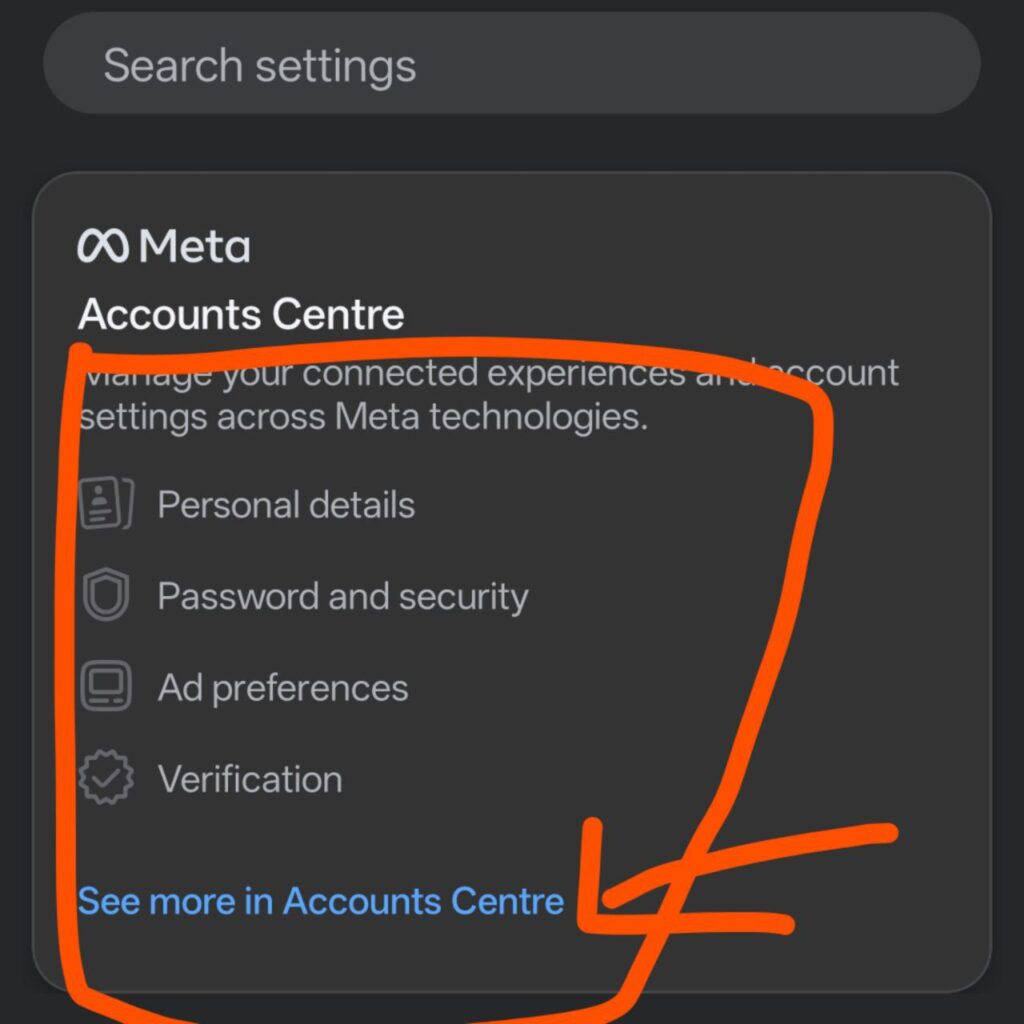
- Tap “Your information and permissions”.
- Tap “Your activity off Meta technologies”.
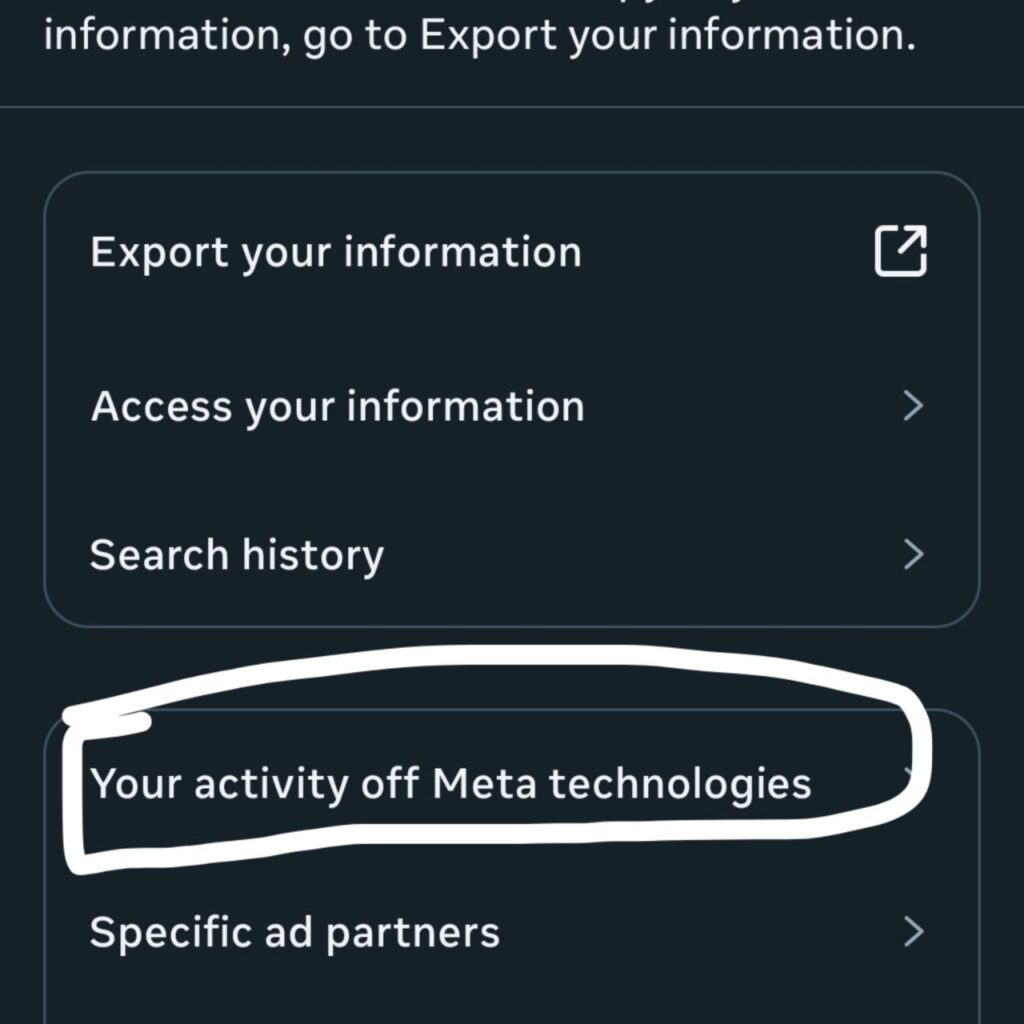
- The Fix:
- First, tap “Clear previous activity” to wipe the data they have already collected.
- Second, tap “Manage future activity” and select “Disconnect future activity” to stop them from linking your future browsing to your account.
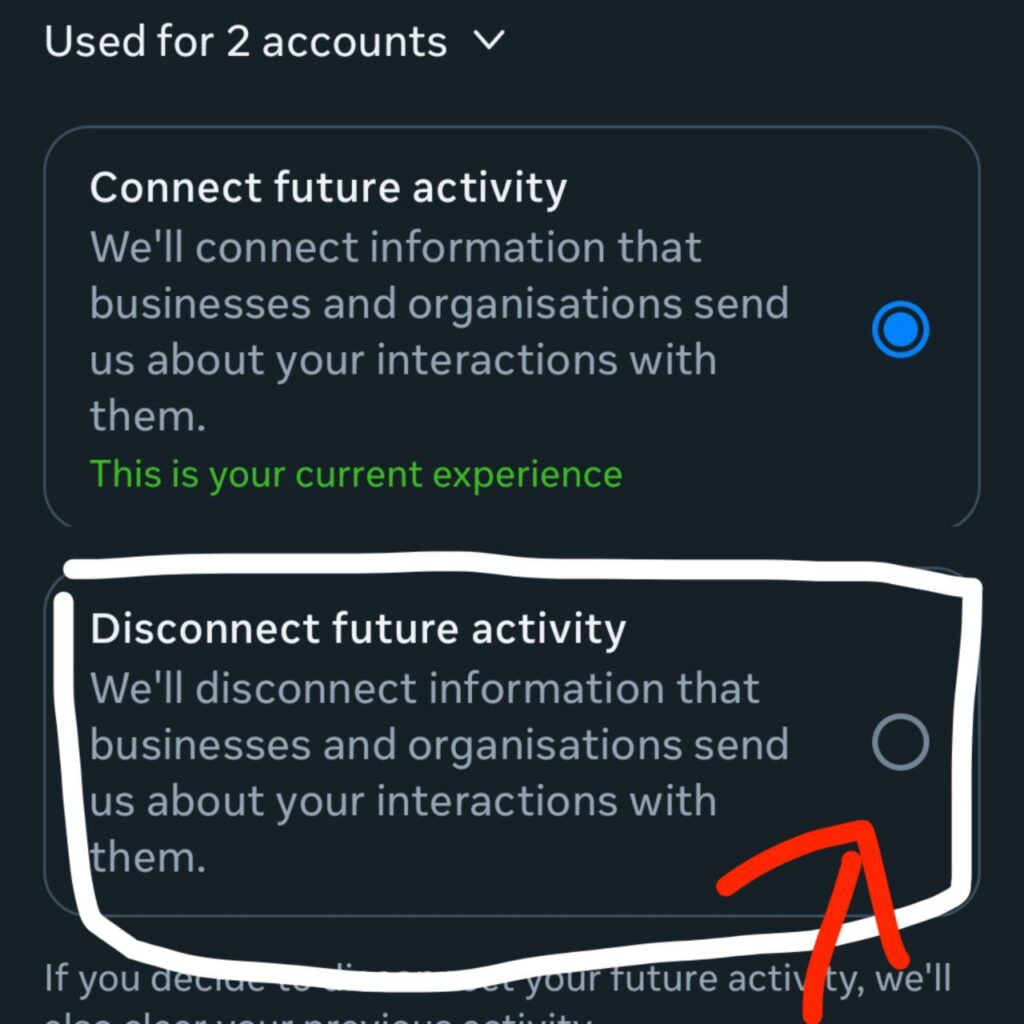
Step 2: Reset Your Device ID to Stop Facebook Tracking
Your phone has a built-in ID that advertisers use to follow you. Resetting this is a quick way to confuse their algorithms.
- For iPhone Users: Go to Settings > Privacy & Security > Tracking. Make sure “Allow Apps to Request to Track” is turned OFF.
- For Android Users: Go to Settings > Privacy > Ads. Tap “Delete advertising ID” or “Reset advertising ID” to start fresh.
Step 3: Browser Tools That prevent Meta data collection
Changing settings inside Facebook isn’t enough because the “Meta Pixel” lives on other websites. To truly stop the tracking when you are shopping or reading news, you need a shield.
I recommend two free tools:
- uBlock Origin: This is a browser extension that blocks the invisible scripts that load the Meta Pixel.
- Brave Browser: If you want an easy solution, switch to the Brave browser. It blocks cross-site trackers by default, making it much harder for Big Tech to build a profile on you.
Conclusion: You Are Now in Control
The goal isn’t to be invisible—that’s almost impossible. The goal is to make it hard and expensive for them to spy on you.
By following these steps, you have successfully clogged their data pipeline. You have taken action to stop Facebook tracking your daily life, and that is a massive win for your digital freedom.
However, deleting the Facebook app is only step one. If you are running iOS 18, the operating system itself is still logging your behavior. You need to read our guide on how to stop tracking on iPhone 17 Pro Max to truly lock down your device
Now that you’ve stopped Meta from building a profile on you, you need to tackle the bigger threat. Read my full guide on how to delete your Google Advertising ID to stop your Android phone from tracking you too.



Pingback: Delete Google Advertising ID: The "Trap" & How to Fix It - Pixel Defense
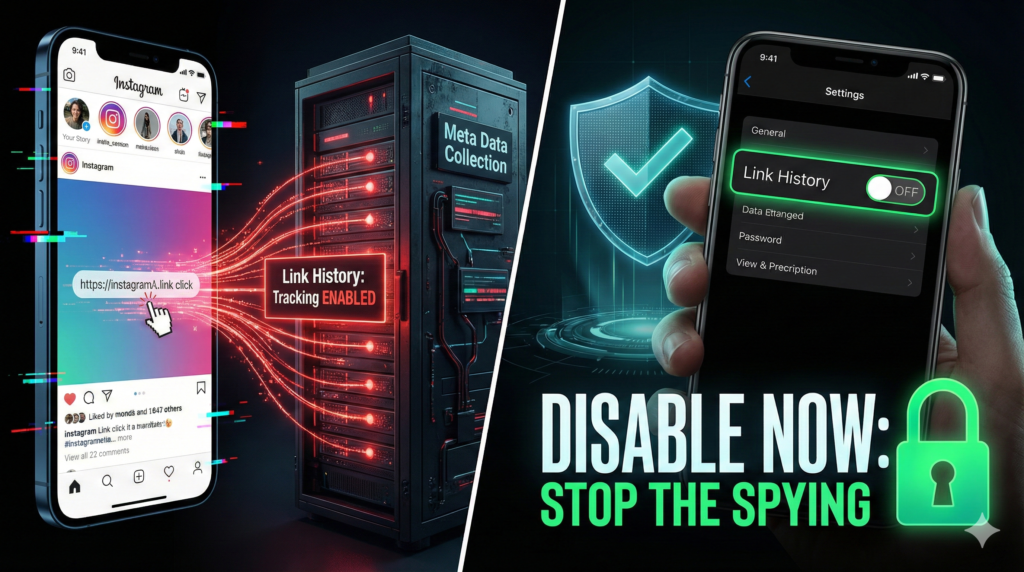
Pingback: How to Disable Link History on Instagram & Facebook
Pingback: WhatsApp Metadata Leak: Why Encryption Won't Save You (2025) - Pixel Defence
Pingback: Meta Shadow Profile Opt Out: Delete Your Ghost Data (2025)