You searched for a pair of running shoes once. Maybe you didn’t even buy them. But now, everywhere you go online — news sites, weather apps, YouTube, Instagram — those same shoes are staring back at you.
This isn’t a coincidence. It’s not magic. It’s a multi-billion dollar surveillance machine, and you’re the product.
I’m Rock, founder of Pixel Defence, and in this post I’m going to break down exactly how this happens — and more importantly, what you can do to stop it.
Why Ads Follow You Everywhere After One Search
The moment you search for a product or land on a product page, something happens in the background that most people never see.
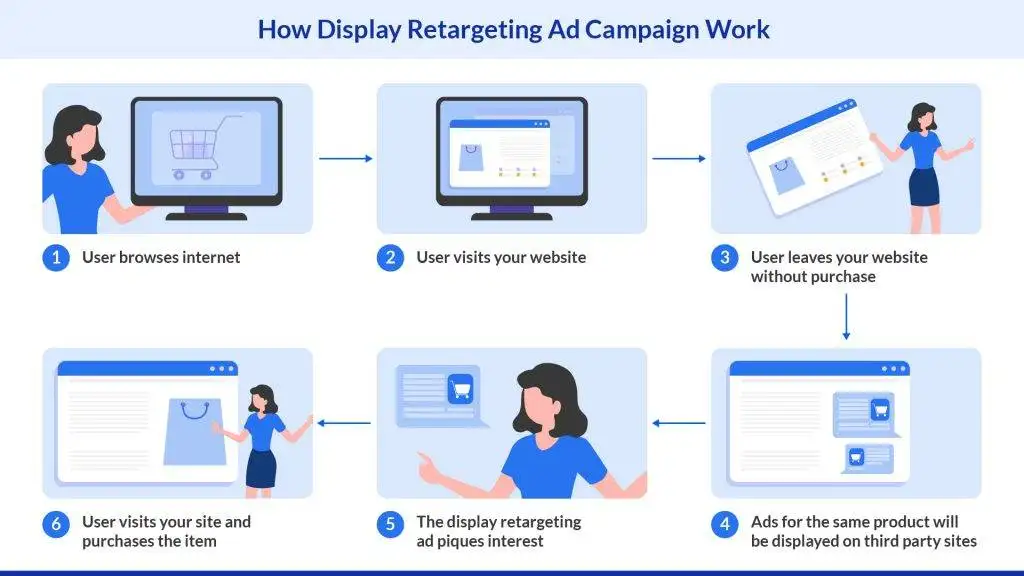
The website fires a tracking pixel or drops a third-party cookie into your browser. That cookie is tied to your unique ad-network ID — think Google Ads, Meta Pixel, Criteo, or Amazon Ads. It’s like a digital name tag being pinned to your browser without your permission.
Later, when you visit a completely different website — a recipe blog, a news site, a sports forum — that site is likely running ads served by the same network. The network recognises your ID and instantly serves you the same product category ad you saw days ago.
This is called retargeting, and it’s extremely effective. Retargeted display ads have an average click-through rate of 0.7–1.2% (2024–2026), compared to just 0.07% for standard display ads. That’s up to 17x more effective. And around 76% of consumers are more likely to convert after seeing a retargeted ad. The ad industry knows exactly what it’s doing.
How Ads Track You Across Websites and Apps
There isn’t just one tracking method — there are several, layered on top of each other. Here’s how each one works:
Cookies A cookie is a small text file stored in your browser. A first-party cookie is set by the website you’re actually visiting. A third-party cookie is set by an external domain — like googleads.g.doubleclick.net — embedded invisibly in the page via iframes or scripts.
These third-party cookies are what allow ad networks to build profiles of you across dozens or hundreds of sites.
Tracking Pixels A tracking pixel is a tiny, invisible 1×1 image embedded in a page, email, or ad. When it loads, it sends data back to the tracker’s server — your IP address, browser type, the page URL, and timestamps.
Meta Pixel, Google Analytics pixels, and Criteo pixels all work this way. You never see them. They never ask permission.
Device and Browser Fingerprinting This one is the most alarming. Even if you clear your cookies, fingerprinting can still identify you. Scripts silently collect dozens of attributes from your device — your OS, browser version, screen size, installed fonts, timezone, language, GPU type, and even WebRTC behaviour.
These are combined and hashed into a pseudo-unique ID that follows you even across browsers and devices.
Together, these three methods create a tracking net that’s nearly impossible to escape — unless you know what to do. See Our Tool how much data are you currently leaking on this browser.
How Websites Track You Without You Knowing
Most people assume they only get tracked on shopping sites. The truth is far more uncomfortable.
According to Kaspersky’s 2023–2024 tracking-services report, Google’s tracking services dominate third-party tracking globally across virtually every category of website. Many ecommerce sites alone carry 5 to 15+ third-party trackers — each one silently watching.
These trackers aren’t obvious. They hide inside scripts with innocent-sounding names — analytics.js, fbq.js, gtm.js.
These are loaded from external domains the moment a page opens, and they begin collecting data immediately: the page URLs you visit, your referrer (what site sent you there), your click paths, form-field interactions, how far you scroll, and how long you spend on each section.
You didn’t sign up for this. You didn’t agree to be monitored this thoroughly. But it’s happening on nearly every site you visit.
How Ad Networks Share Your Data Across Platforms
Here’s where it gets truly uncomfortable — it’s not just one company watching you. Multiple networks share and synchronise your data to build a single, unified profile of your behaviour.
Google Ads / Google Display & Video 360 logs your activity under your Google ID — or your cookie and fingerprint if you’re not signed in. This allows them to serve you coordinated ads across Google Search, YouTube, Gmail, and millions of sites in their display network.
Meta Ads + Meta Pixel records events like page views, add-to-cart actions, and purchases. It builds a conversion-mapping profile and retargets you across Facebook, Instagram, and thousands of third-party apps through their Audience Network.
Privacy researchers and organisations like the EFF have argued for years that these cross-platform ID graphs represent a serious and ongoing privacy risk — even after Meta introduced “client-side hashing” to obscure some data.
The result? One search. Multiple companies. A coordinated campaign of ads following you everywhere.
Why Facebook Is Suddenly Asking You to Make a Choice About Ads
If you’ve recently opened Facebook and been hit with a popup asking you to make a decision about ads — you’re not alone, and you’re right to be suspicious of it.
This started happening across the EU and UK as a direct result of data protection regulations like GDPR and the Digital Markets Act forcing Meta to offer users a genuine choice. In theory, you can now say no to personalised ads. In practice, the way Meta has designed these prompts makes it deliberately confusing to do so.
Here’s the reality: if you tap “Accept,” you’re consenting to Meta using your off-platform browsing behaviour, your app activity, and your interaction data to build a targeting profile. That profile feeds every ad you see on Facebook, Instagram, and across the Meta Audience Network.
If you tap “Decline” or opt for the paid no-ads tier (where available), the tracking doesn’t disappear entirely — it just changes form. Meta still collects certain data for what it calls “security and integrity” purposes.
The key thing to understand is that this popup is not a neutral question. It is a consent interface designed by one of the world’s largest advertising companies. The choice architecture — the wording, the button placement, the framing — is engineered to nudge you toward accepting.
👉 I’ve written a full breakdown of exactly what each choice means, what Meta still tracks if you decline, and how to actually limit Facebook tracking in Why Facebook Is Suddenly Asking About Ads (And What Happens If You Choose Wrong).
Why Snapchat Is Full of Ads Now
Snapchat built its reputation on feeling personal and unpolished — ephemeral messages between friends, no algorithmic feed, no pressure. That era is effectively over.
Snapchat has aggressively expanded its ad inventory over the past two years, inserting ads between Stories, inside Spotlight (its short-video feed), and even in chat-adjacent spaces. The reason is straightforward: Snapchat has been under sustained financial pressure and ad revenue is its primary path to profitability.
What makes it feel so targeted is that Snapchat runs a sophisticated interest and behavioural targeting system behind the scenes. It tracks the content you engage with, your location data (if permitted), your age and demographic profile, and signals from advertiser partners through its own version of a pixel — the Snap Pixel. The ads you see aren’t random. They’re built from a profile Snapchat has been quietly assembling.
There’s also the “does Snapchat listen to me?” question — which I address directly in the dedicated post, because the answer involves microphone permissions and what the data actually shows.
👉 For a full explanation of why Snapchat’s ad volume has surged, why you specifically are seeing certain ads, and how to reduce ad personalisation on the platform, read Why Snapchat Is Full of Ads Now (And Why You’re Seeing So Many).
Why You’re Still Getting Ads on YouTube Premium
This one genuinely frustrates people — and rightfully so. You paid for YouTube Premium specifically to escape ads. So why are you still seeing them?
The answer involves an important distinction that YouTube has never been particularly transparent about.
YouTube Premium removes pre-roll and mid-roll video ads — the interruptive kind that play before or during a video. What it does not remove is sponsored content baked directly into the video itself. When a creator says “this video is sponsored by [brand]” and spends 60 seconds reading a promotional script, that is not a YouTube ad. It is content the creator has been paid to include, and Premium has no mechanism to detect or remove it.
There are also edge cases and bugs. Some users on Premium have reported seeing actual ad units — particularly on embedded videos, on third-party apps, or when watching through a Smart TV app that hasn’t properly authenticated the Premium status. These are reported to Google as bugs, but they are not always resolved quickly.
The broader pattern — YouTube Premium, Amazon Prime Video ads, Spotify ads on paid tiers — reflects an industry-wide shift toward layered monetisation on platforms people are already paying for.
👉 I break down exactly what YouTube Premium does and doesn’t cover, the types of ads still shown, and how to report genuine ad bugs in Why You’re Still Seeing Ads on YouTube Premium (Even After Paying).
Why Pinterest Feels Like It’s Nothing But Ads Now
Pinterest was once a clean, visual discovery tool. If it now feels like a shopping catalogue with a few organic pins scattered in between — that’s not your imagination. Pinterest’s ad density has increased significantly, and the algorithm changes driving this are deliberate.
Here is what changed: Pinterest shifted its core ranking model to heavily prioritise promoted pins and shopping ads in the home feed and search results. Organic content — the boards and pins from creators and regular users — has seen a significant reach reduction as a result. This mirrors what happened to Facebook’s organic reach years ago when it pivoted to pay-to-play distribution.
The targeting behind Pinterest ads is also more sophisticated than most users realise. Pinterest tracks your search queries, the boards you save to, the pins you linger on, and data from its advertising partners to build an interest profile. If you’ve ever wondered why the promoted pins feel eerily on-brand with what you’ve been searching for, this is why.
The platform’s monetisation pressure increased sharply in 2025–2026 as it pushed further into the social commerce space, trying to compete directly with TikTok Shop and Instagram Shopping.
👉 For a full timeline of what changed, why organic reach dropped, and practical steps to see fewer ads on Pinterest, read Why Pinterest Feels Like Only Ads Now (What Changed in 2026).
Why Amazon Prime Is Showing You Ads Even Though You Pay
Amazon Prime Video’s decision to introduce ads into its streaming service — for users who are already paying subscribers — was one of the most controversial monetisation moves in recent memory.
Here’s what actually happened: In early 2024, Amazon quietly reclassified the standard Prime Video tier as an ad-supported tier by default. Existing subscribers were not grandfathered in without ads. If you wanted to go back to the ad-free experience you signed up for, you had to pay an additional monthly fee on top of your existing Prime subscription.
This is not a bug. It is not an error. It is a deliberate restructuring of what Prime Video includes, dressed up in language about “continuing to invest in content.”
The ads themselves are targeted — Amazon has an enormous advantage here because it knows your purchase history, your search behaviour on Amazon.com, your browsing patterns, and your demographic data. The Prime Video ad inventory is monetised using this data, making it one of the most valuable advertising environments that exists.
More broadly, this is part of an accelerating pattern. Streaming services that built their audiences on ad-free propositions — Netflix, Disney+, Amazon — have all introduced ad tiers. The “you pay, so no ads” compact is dissolving across the industry.
👉 I’ve covered exactly what Amazon changed, how the different Prime tiers now differ, and whether there is any way to remove ads in Why Amazon Prime Now Shows Ads (Even If You Pay).
How to Stop Pop-Up Ads on Your Android Phone
Pop-up ads appearing on your Android phone — outside of a browser, while you’re using other apps, or even on your home screen — are a different and more aggressive problem than standard web tracking.
This isn’t normal ad behaviour. When ads are appearing at the system level on your phone, one of three things is usually happening:
You have an app with adware built in. Some free apps, particularly utilities, flashlight apps, wallpaper apps, and third-party keyboard apps, are monetised by serving ads outside their own interface. These are technically allowed under certain app store rules, but they are deeply invasive.
You’ve enabled notification-based ads without realising it. Some websites and apps ask permission to send you “notifications” — and then use that channel to push promotional content that looks like system alerts. This is increasingly common and deliberately deceptive.
A malicious app is running in the background. Less common, but genuinely possible, particularly if you’ve installed apps from outside the Google Play Store.
The fix involves checking your notification permissions, auditing your recently installed apps, and running a security scan. Using a tool like uBlock Origin in your mobile browser (available via Firefox for Android) and reviewing app permissions regularly are your first lines of defence.
👉 For a complete step-by-step fix — including exactly how to find the offending app, disable notification ads, remove adware, and protect yourself going forward — read How to Stop Pop-Up Ads on Android (Step-by-Step Fix That Actually Works).
How to Stop Ads from Following You Everywhere
The good news is that you can push back. It takes a few steps, but the results are significant.
Browser Settings
- Chrome / Edge: Block third-party cookies, enable “Clear cookies and site data when you close all windows,” and turn on Do Not Track.
- Firefox: Switch to Strict tracking protection and block cookies from unvisited sites.
- Safari: Enable “Prevent cross-site tracking” — it’s one of the better built-in protections available.
Tools I Recommend at Pixel Defence
- uBlock Origin — Open-source, lightweight, and the single best tool for blocking trackers and ads. Install this first.
- Privacy Badger — Backed by the EFF, it learns to block invisible trackers as you browse.
- Brave Browser — Built-in shields that block fingerprinting and third-party cookies by default.
- Firefox — Far better privacy defaults than Chrome out of the box.
On Mobile
- Android: Go to Settings → Google → Ads → Opt out of Ads Personalization, then Reset your advertising ID.
- iOS: Go to Settings → Privacy & Security → Tracking → Turn off “Allow Apps to Request to Track.” Also reset your Advertising Identifier.
Use a privacy-respecting VPN to mask your IP address and make fingerprinting significantly harder.
None of these alone is a silver bullet. But together, they dramatically reduce your exposure.
Why You Keep Seeing the Same Ads Again and Again
You’ve probably noticed it — not just the same product category, but the exact same ad, following you for days or even weeks after a single visit to a website.
This is retargeting working exactly as designed. Once a tracking pixel drops a cookie tied to your browsing session, the advertiser creates a custom audience segment — “everyone who viewed product X in the last 30 days” — and pushes that segment across every ad platform they use simultaneously.
The ad creative is dynamic too. Dynamic retargeting shows you the exact product image you viewed, with the exact price, pulling directly from the advertiser’s product feed. It feels personal because it is — engineered to feel personal.
👉 I’ve written an entire deep-dive on exactly why retargeting works the way it does and how to stop it — read Why you Keep Seeing the Same Ads Again and Again for the full breakdown.
Why Instagram and YouTube Show Personalized Content
Retargeted ads are just one half of the story. The content you see on Instagram and YouTube — the Reels, the Shorts, the recommended videos — is shaped by an entirely separate but equally powerful system.
These platforms build behavioural profiles from how long you pause on a video, how fast you scroll, what you re-watch, and what you share. They use this to predict what you’ll engage with next — maximising your time on their platform, not your well-being.
👉 I break this down completely in Why Instagram and YouTube Show Exactly What You Think — including how their algorithms work in real time and how to reset your recommendations.
Final Thoughts: You’re Being Tracked More Than You Think
Most people know, vaguely, that ads are targeted. But very few people understand the full scale of it — the pixels, the cookies, the fingerprinting, the cross-platform ID graphs, and the dynamic creative systems all working in concert.
You’re not being marketed to. You’re being profiled.
The tools exist to fight back. Start with uBlock Origin today. Adjust your browser settings this week. Reset your mobile ad IDs. Every layer of protection you add is a layer of data they don’t get.
Want to see exactly how much tracking is happening on your browser right now? Head to our tools section at Pixel Defence and run a tracker audit on your current setup. The results will surprise you.



Pingback: Why You Keep Seeing the Same Ads Again and Again (Retargeting Explained)