You remember when Snapchat felt different. No algorithmic feed. No relentless scroll. Just quick snaps between friends that disappeared after viewing. It felt personal in a way that Facebook and Instagram never quite managed.
That era is effectively over.
Open Snapchat now and you’ll find ads between Stories, ads inside Spotlight, ads appearing directly inside your Chat inbox, and sponsored content engineered to look like messages from friends. If it feels like the app has been taken over, that’s because — from a monetisation standpoint — it largely has.
I’m Rock, founder of Pixel Defence, and I’m going to explain exactly why this happened, how Snapchat is targeting you specifically, whether the platform is actually listening to your conversations, and what you can do to take back some control.
Why You Keep Getting Ads on Snapchat
The short answer is money. The longer answer is survival.
Snap Inc. reported 474 million daily active users in Q4 2025, while advertising revenue reached $1.48 billion — but the numbers behind that headline tell a more uncomfortable story. The company deliberately reduced user acquisition marketing to focus on extracting more revenue from existing users in developed markets. In plain terms: Snapchat stopped trying to grow and started trying to squeeze.
Active advertisers increased 28% year-over-year — meaning more brands than ever are paying to reach you on the platform. More advertisers means more ad inventory being filled, which means more ads appearing in your feed.
The platform has also been aggressively building out new ad formats to increase that inventory. Snapchat rolled out Sponsored Snaps globally — a format that places brand messages directly inside your Chat inbox, making them look almost indistinguishable from a message from a real person. They also built a suite of AI-powered ad products that make advertising on Snapchat smarter, simpler, and more intuitive for advertisers.
The result for users is more ads in more places, using more sophisticated targeting than ever before.
There is also a structural financial pressure driving this. Snapchat+ subscriptions crossed 15 million paying users, generating close to $700 million annually — which sounds significant, but it means the vast majority of Snapchat’s hundreds of millions of users are on the free tier, which means they are the product being sold to advertisers.
Spotlight accounted for significant impression volume growth, with the number of US Snapchatters posting to Spotlight increasing 47% year-over-year. More content in Spotlight means more slots to insert ads between that content. Every feature Snapchat grows becomes a new advertising surface.
Why YOU Specifically See Certain Ads
This is where it stops being about Snapchat’s business model and starts being about your data.
The ads you see on Snapchat are not random. They are the result of a targeting system that builds a detailed profile of who you are, what you’re interested in, and what you’re likely to buy — and then matches that profile to advertiser campaigns bidding to reach someone exactly like you.
Here is what Snapchat is using to build that profile:
Your on-platform behaviour
Every Snap you send, every Story you watch, every Spotlight video you linger on, every filter you use — all of it is recorded and fed into your interest profile. The algorithm knows what content you engage with and uses that to infer what ads are relevant to you.
Your demographic data
Your age, gender, location, and device type are all signals that advertisers can target directly. Snapchat’s advanced segmentation allows advertisers to get extremely granular — for example, targeting females aged 18-24, in a specific city, interested in beauty, who have visited a particular website in the past 30 days.
Your off-platform behaviour via the Snap Pixel
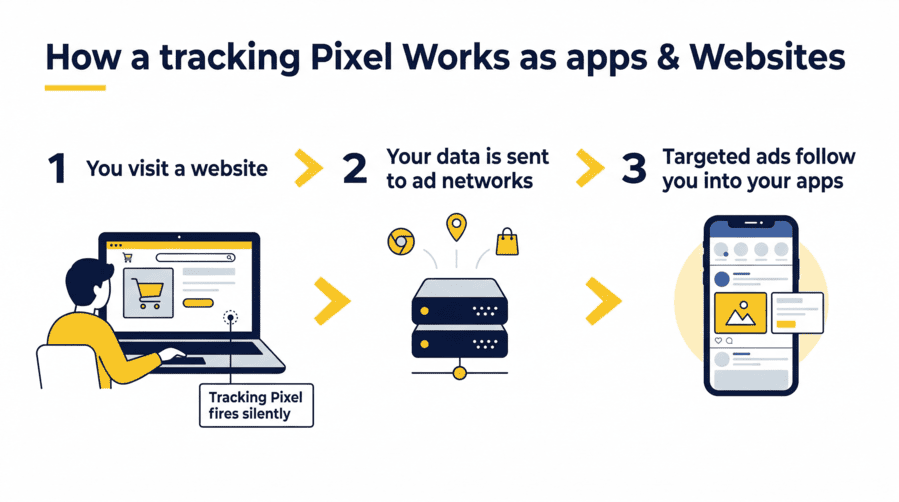
This is the one most people don’t know about. The Snap Pixel is a piece of JavaScript code that advertisers embed on their websites. When someone visits a website but doesn’t make a purchase, the Snap Pixel enables the advertiser to retarget those users with relevant ads on Snapchat, reminding them of what they were interested in. So the shoes you looked at on a retailer’s website can follow you directly into your Snapchat feed.
Lookalike Audiences
Even if you’ve never visited an advertiser’s website, Snapchat can find users who behave similarly to an advertiser’s existing customers, widening reach to people likely to care about their offer. This means you can be targeted based on what people similar to you do — not just what you do yourself.
AI-powered Smart Targeting
Snapchat’s Smart Targeting uses machine learning to identify and target additional high-value users based on targeting inputs, delivering an average 8.8% increase in conversions for adopted ad sets. The system is getting better at finding you — and people like you — all the time.
The combination of these signals creates a targeting profile that is far more detailed than most Snapchat users realise. You’re not seeing random ads. You’re seeing ads that have been precision-matched to a data model of who you are.
Does Snapchat Listen to You for Ads?
This is the question I get asked most often about Snapchat, and I want to give you an honest answer rather than a sensational one.
The short answer is: there is no verified technical evidence that Snapchat actively listens to your private conversations to serve ads.
Snapchat’s own privacy documentation is clear on this point. Snaps and Chats are private and delete by default, including Voice and Video Chats — meaning Snapchat does not scan their content to personalise your experience, make recommendations, or show you ads.
So why does it so often feel like Snapchat — or any app — can read your mind?
The answer is that the behavioural profiling system is sophisticated enough that it doesn’t need to listen. Here’s what’s actually happening:
Your Snapchat interest profile, your location history, your social graph (who you snap and how often), your search behaviour on other platforms, and the Snap Pixel data from websites you visit all combine to build a picture of you that is remarkably accurate.
When you talk about something out loud and then see an ad for it, it’s almost certainly because you had already signalled that interest digitally — through a search, a click, a pause on related content — and the algorithm caught it before your conscious mind registered the connection.
There is one important nuance worth knowing. Snapchat’s privacy policy confirms it collects device information including information from device sensors that measure motion and microphones, including whether you have headphones connected.
This is for functional purposes — the app needs microphone access to let you record Snaps and voice messages. But the permission exists, and broad permissions create the potential for misuse even when the company’s stated policy prohibits it.
My recommendation at Pixel Defence is always to check your app permissions and only grant microphone access when actively recording. Not because I can prove Snapchat is listening — I can’t — but because limiting unnecessary permissions is basic digital hygiene regardless.
How to Reduce Ad Personalisation on Snapchat
You cannot remove ads from Snapchat without paying for Snapchat+, and even then the experience is only partially de-cluttered. But you can significantly reduce how targeted those ads are. Here’s how:
Inside the Snapchat App
- Go to Settings → Privacy Controls → Ad Preferences
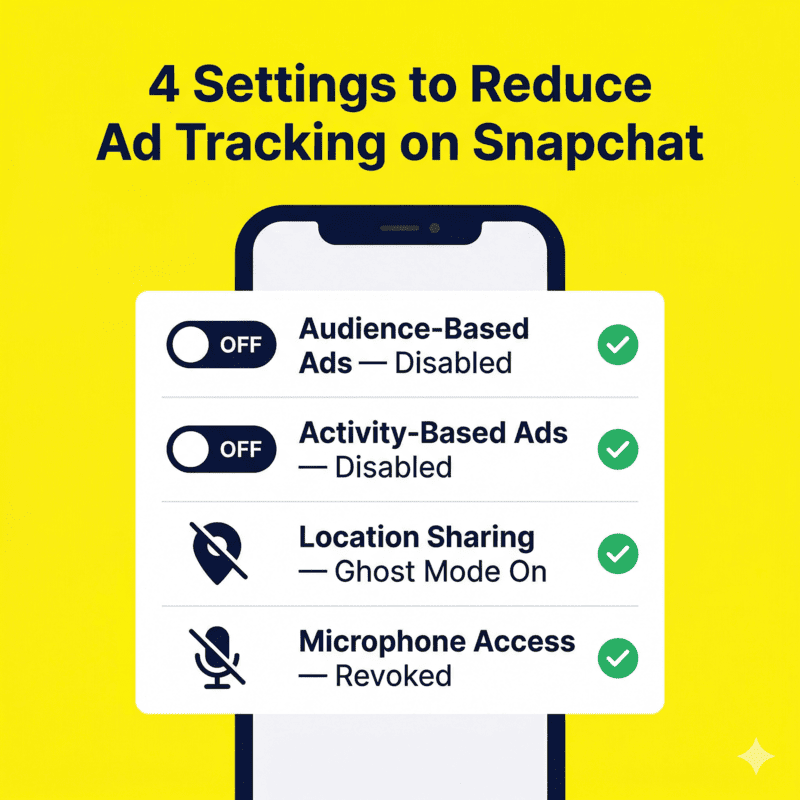
- Turn off “Audience-Based Ads” — this stops Snapchat from using data from third-party advertisers (like the Snap Pixel) to target you
- Turn off “Activity-Based Ads” — this stops Snapchat from using your on-platform behaviour to personalise ad targeting
- Under “Lifestyle & Interests,” review and delete the interest categories Snapchat has assigned you — these directly inform which ad campaigns you’re matched to
Device-Level Controls
- iOS: Go to Settings → Privacy & Security → Tracking and turn off tracking for Snapchat. Also go to Settings → Snapchat → Microphone and set it to “Ask” or “Never” if you don’t use voice features
- Android: Go to Settings → Apps → Snapchat → Permissions and review what you’ve granted. Revoke microphone access if you don’t use it. Also go to Settings → Google → Ads → Reset Advertising ID to disrupt the device-level targeting ID Snapchat uses
Browser-Level Protection
Install uBlock Origin or Privacy Badger in your desktop browser to block the Snap Pixel on external websites. This directly cuts off one of the key data pipelines feeding Snapchat’s targeting system — your off-platform browsing behaviour.
Limit Location Sharing
Go to Settings → See My Location and enable Ghost Mode. Your location is a powerful targeting signal. Removing it from Snapchat’s data pool reduces how precisely advertisers can target you geographically.
How This Connects to the Bigger Picture
Snapchat’s ad surge is not happening in isolation. It is part of a wider pattern across every major platform — the quiet shift from user-first design to advertiser-first monetisation.
The Snap Pixel works exactly like the Meta Pixel and Google’s tracking tags. The behavioural targeting system mirrors what Instagram and YouTube run. The “Sponsored Snaps” appearing in your inbox like messages from friends is just a new variation of the same strategy: make ads feel like content so you engage with them before you realise what they are.
Every platform is competing for the same advertising budgets, and the more precisely they can target you, the more they can charge. Your data is the product that funds the competition.
👉 For the complete breakdown of how tracking works across every platform and app you use — not just Snapchat — read our pillar post Why Ads Follow You Everywhere (And How to Stop It). It covers every tracking mechanism being used on you and exactly how to shut each one down.
Frequently Asked Questions About Snapchat Ads
Why do I keep getting ads on Snapchat?
Snapchat has dramatically expanded its ad inventory and now runs ads in Stories, Spotlight, and directly inside your Chat inbox. The more surfaces the platform adds, the more ads you see — and the system is specifically designed to target you based on your behaviour and data profile.
Why does Snapchat have ads now when it didn’t used to?
Snapchat has always had ads, but the volume and placement have increased significantly as the company pivoted toward extracting more revenue from existing users rather than growing its user base. More advertisers joined the platform — up 28% year-over-year — and more ad formats were created to accommodate them.
Is Snapchat listening to my conversations to show me ads?
There is no verified technical evidence that Snapchat listens to your private conversations. Snapchat’s own documentation states it does not scan Chats or Snaps to personalise ads. What feels like mind-reading is actually precise behavioural targeting built from your usage patterns, location, and off-platform data.
What is a Sponsored Snap and why is it in my inbox?
A Sponsored Snap is a paid ad format that appears inside your Chat Feed, designed to look like a message from a brand. Snapchat rolled this out globally in 2025 as a premium ad placement. It is not a real message — it is an advertisement that uses the familiar visual language of the inbox to feel more personal.
Can I pay to remove ads from Snapchat?
Snapchat+ (the paid subscription) offers some reduction in advertising, but it does not completely remove all ads from the platform. At Pixel Defence, the more effective approach is adjusting your ad preferences and using device-level controls to reduce the targeting data Snapchat can use — which makes the ads you do see significantly less relevant and personalised.
How do I stop Snapchat from tracking me across other websites?
Snapchat tracks your off-platform behaviour via the Snap Pixel, embedded on many external websites. To block this, install uBlock Origin in your browser and enable strict cookie blocking. This prevents the Snap Pixel from firing and sending your browsing data back to Snapchat’s ad targeting system.
Why are Snapchat ads so accurate and specific?
Because Snapchat combines your on-platform behaviour, your demographic profile, your location, your device advertising ID, and data from the Snap Pixel on external websites to build a detailed interest profile. AI-powered Smart Targeting then matches your profile to advertiser campaigns with increasing precision over time.
Final Thoughts on Snapchat Ads
Snapchat built its identity on feeling private, personal, and ephemeral. The irony is that the platform running on top of that identity is now one of the more sophisticated advertising and data collection systems available to marketers.
The ads are not random. The targeting is not accidental. And the Sponsored Snaps appearing in your inbox like messages from friends are the clearest signal yet of where the platform’s priorities actually lie.
Understanding the system is the first step. Adjusting your Ad Preferences, revoking unnecessary permissions, blocking the Snap Pixel in your browser, and resetting your device advertising ID are the practical steps that follow.
At Pixel Defence, we believe your data belongs to you — not to the platforms monetising it without your full understanding. Start with the settings. Then build outward from there.



Pingback: Why Ads Follow You Everywhere (And How to Stop Them in 2026)