You opened Facebook and something unusual happened. Instead of your feed loading normally, a popup appeared demanding you make a decision about ads. It looks official. It feels urgent. And the options are worded in a way that makes it genuinely hard to know what you’re agreeing to.
You’re not imagining the confusion. That popup is designed to be confusing.
I’m Rock, founder of Pixel Defence, and in this post I’m going to tell you exactly what this prompt is, what each choice actually means for your privacy, whether Facebook is tracking you regardless of what you pick, and what real steps you can take to limit it.
Why Is Facebook Asking About Ads in the First Place?
The prompt you’re seeing — usually labelled something like “Make a choice about what you see in your ads” or “Control how you see ads“ — is Meta’s legally required consent layer. It is not a feature update. It is not Facebook trying to be helpful. It is a direct result of EU privacy and competition law forcing Meta to give you a documented, binding choice about how your data is used.
Specifically, it exists because of three pieces of legislation that have fundamentally changed how big tech platforms can operate in Europe:
- GDPR (General Data Protection Regulation) — requires platforms to obtain genuine, informed consent before processing your personal data for advertising
- DSA (Digital Services Act) — holds large platforms accountable for algorithmic transparency and ad targeting practices
- DMA (Digital Markets Act) — designates Meta as a “gatekeeper” platform and forces it to offer transparent ad-choice mechanisms rather than quietly assuming your consent
Under these rules, Meta cannot bury your tracking consent in a terms-of-service document you never read. It has to put the choice in front of your face — which is exactly what this popup does.
Meta has already been fined approximately €200 million over unfair ad-tracking practices tied to DMA violations. This new “choice” layer is partly a consequence of those regulatory actions.
If you’re seeing this outside the EU, it’s because Meta has been rolling out similar consent logic globally — either proactively, or because your country’s data protection laws have pushed similar requirements.
What Happens If You Accept vs. Reject
This is the part that matters most, and it’s where Meta’s wording becomes deliberately slippery. The popup typically presents three paths, though the exact labels vary by region and language.
Here is what each option actually means in plain terms:
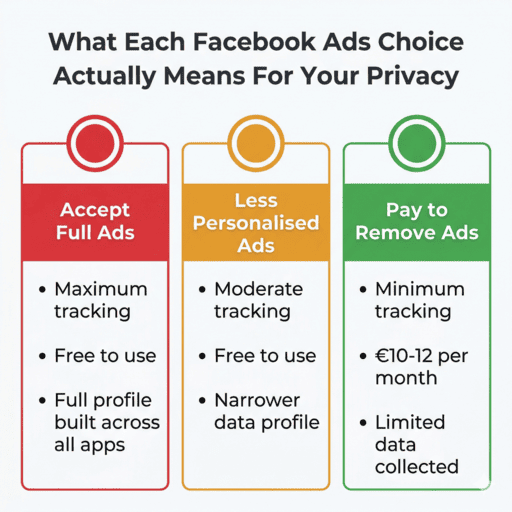
Option 1: Accept Full Personalised Ads You are giving Meta explicit consent to combine your activity across Facebook, Instagram, WhatsApp, and thousands of partner websites and apps into a single rich targeting profile. Every product you’ve viewed, every article you’ve clicked, every search you’ve made on external sites that carry a Meta Pixel — all of it gets stitched together and used to target you with precision.
You will see highly relevant, eerily specific ads. The trade-off is that your data is being processed at the maximum level Meta is capable of.
Option 2: Less-Personalised / Limited-Data Ads Meta still shows you ads — this option does not remove ads. What changes is the richness of the data behind them. Meta uses fewer cross-app signals and less granular profiling. Instead of targeting you based on the specific product you viewed on a third-party website last Tuesday, it targets you based on broader interest categories.
The ads feel less personal. The tracking is still happening — just with a narrower dataset.
Option 3: Pay for Ad-Free (or Lighter-Ads) Subscription In some regions, Meta offers a paid subscription tier — typically around €10–€12 per month — in exchange for removing or significantly reducing personalised ads. If you pay, Meta says it will stop using your behavioural data for targeted advertising, or heavily reduce how it does so.
This is what regulators call a “pay-or-consent” model. Your privacy becomes a product you can purchase. The existence of this option does not mean the free version is truly free — it means your data is the price of the free version, now stated explicitly.
The critical detail most people miss: If you keep dismissing the popup without choosing, Meta may eventually default to consent or restrict certain features on your account, depending on how local law has been implemented. Ignoring it is not a neutral act.
Is Facebook Tracking You Anyway?
Yes. And Meta’s own documentation confirms this.
Choosing the “less personalised” option or paying for the subscription tier does not make you invisible to Meta. What changes is the intensity and scope of the tracking — not its existence.
Here’s how to think about it:
Under full consent, Meta connects your Facebook activity, Instagram activity, WhatsApp signals, and data from partner sites and apps into one unified profile. Every signal is stitched together.
Under limited data or the paid tier, Meta narrows the set of signals it can use for personalisation. It still collects your on-platform activity — what you like, comment on, share, and interact with — plus basic profile information like your age, location, and device. It keeps that data. It just doesn’t combine it as aggressively with off-platform sources.
The honest summary is this: the “choice” popup shifts you from maximum tracking to moderate tracking. It does not offer zero tracking as an option. As long as you are logged into Facebook and using the platform, some level of data collection is happening.
This is not a conspiracy theory. It is how Meta’s own help pages describe the system.
How to Actually Limit Facebook Tracking (Real Steps)
The popup is only one lever. Your total tracking exposure on Meta is shaped by a combination of in-app settings, device-level controls, and external tools. Here’s what I recommend at Pixel Defence, broken into layers.
Inside Facebook and Meta Settings
- Choose the least-tracking option in the popup. Pick “less-personalised ads” at minimum. If the paid tier is available in your region and affordable, it is the most effective in-platform option.
- Turn off “Ads based on activity from partners.” Go to Settings → Ads → Ads based on activity information from partners and switch it off. This prevents Meta from using your off-site browsing data — the websites you visit that carry Meta Pixel — for targeting.
- Clean up your ad profile. Navigate to Settings → Ads → Ad Preferences and manually remove or narrow the interest categories Meta has assigned you. You can also block specific advertisers from targeting you.
- Review your Accounts Center. Go to Accounts Center and check which accounts are linked — Facebook, Instagram, WhatsApp, and others. Where possible, disable cross-app targeting to break the profile-stitching between platforms.
Device-Level Controls
- iOS users: Enable App Tracking Transparency and when Facebook requests permission to track you across other apps, deny it. This is one of the most effective single steps available on Apple devices.
- Android users: Use Google’s privacy controls to opt out of ad personalisation and reset your advertising ID regularly. Go to Settings → Google → Ads.
- In your browser: Use Firefox with Enhanced Tracking Protection or Brave to block Meta Pixel and third-party Facebook cookies on external websites. This limits how much off-platform data reaches Meta in the first place.
- Log out when you’re not using Facebook. While logged out, Meta cannot tie ad exposure to your specific account — though anonymised signals may still be collected.
Advanced Steps for Serious Privacy
- Use mbasic.facebook.com — a stripped-down version of Facebook’s interface that bypasses many of the heavier tracking SDKs built into the standard site and app.
- Keep accounts segmented. Avoid logging into Facebook on the same browser or device you use for banking, work accounts, or other sensitive services. The cross-domain profile Meta can build shrinks significantly when you segment your digital life.
- Revisit your settings every few months. Meta re-prompts and updates consent options after new regulatory rulings. What you set today may be quietly changed or overridden. Make it a habit to check Settings → Privacy → Ads and your Accounts Center regularly.
How This Connects to the Bigger Picture of Ad Tracking
The Facebook ads choice popup feels like an isolated event — a single company, a single decision. But it’s actually one visible piece of a much larger system.
Meta’s tracking infrastructure extends far beyond Facebook itself. The Meta Pixel sits on millions of websites you visit every day. Your activity on those sites feeds back into Meta’s ad systems — or it did, until you took steps to block it. The “choice” popup only governs what Meta does with data it collects on its own platforms. The off-platform tracking is a separate battle entirely.
👉 For the complete breakdown of how ad networks track you across every website and app you use — not just Meta’s ecosystem — read our post Why Ads Follow You Everywhere (And How to Stop It). It covers cookies, tracking pixels, browser fingerprinting, and the exact steps to shut each one down.
Frequently Asked Questions About Facebook’s Ads Choice Popup
Why is Facebook suddenly asking me about ads in 2025/2026?
EU privacy laws — specifically the GDPR, the Digital Services Act, and the Digital Markets Act — legally require Meta to get your explicit consent before using your data for targeted ads. Meta has already been fined approximately €200 million for non-compliance. This popup is the direct result of that regulatory pressure.
Is the Facebook ads choice popup a scam or a virus?
No — it is a legitimate prompt from Meta, not a phishing attempt or malware. That said, it is designed by an advertising company to nudge you toward the most data-permissive option, so treat it with scepticism and read each choice carefully before tapping.
What happens if I just close the popup and ignore it?
Ignoring it is not a neutral act. Depending on your region, Meta may eventually restrict features on your account or default you to full consent as though you had accepted. Always make an active choice rather than leaving it unresolved.
Is paying for the ad-free Facebook subscription worth it for privacy?
It is the most effective in-platform option for reducing targeted ads, but even the paid tier doesn’t make you fully invisible. Meta still collects some data for what it calls “security and integrity” purposes, so it reduces personalised ads significantly but isn’t a complete privacy solution.
Does this popup appear on Instagram too?
Yes. Facebook and Instagram share the same Meta ad infrastructure, so the consent prompt applies across both platforms. Changes made in Accounts Center affect your entire Meta profile, including Instagram.
Final Thoughts on the Facebook Ads Choice Popup
Here’s what I want you to walk away with.
This popup is not Facebook doing you a favour. It is Facebook being legally compelled to show you a choice it would prefer you never had to make. The design of the prompt — the wording, the button order, the framing — is engineered by one of the most sophisticated persuasion machines in history, and it is pointed at getting you to click “Accept.”
Now you know what each option actually does. Now you know that even the “reject” path isn’t truly opt-out. And now you have the actual steps to tighten your privacy beyond what the popup alone offers.
Make the choice with open eyes. Then go into the settings and make the rest of the choices they didn’t put in the popup.
At Pixel Defence, that’s what we’re here to help you do.



Pingback: Why Ads Follow You Everywhere (And How to Stop Them in 2026)