Every photo you take contains two layers of information: the image you can see, and a hidden layer of data you almost certainly never think about. That second layer — metadata — can silently broadcast your home address, daily routine, device identity, and more to anyone who knows where to look.
Photo metadata is hidden information embedded inside image files—commonly including GPS location, timestamps, device details, camera settings, and editing history. Most smartphones add this data automatically when you take a picture.
This isn’t theoretical. Metadata embedded in photos has been used to locate activists, expose journalists’ sources, enable doxxing, and reveal the home addresses of people selling second-hand goods online. Understanding what your photos contain — and how to control it — is a practical privacy skill, not a paranoid one.
Table of Contents
What Is Photo Metadata?
Metadata is structured data embedded within a file that describes the file itself. In the context of digital photographs, metadata is automatically written by your camera or smartphone at the moment of capture, and it travels invisibly inside the image file wherever that file goes.
There are three primary metadata standards you’ll encounter in photos:
- EXIF (Exchangeable Image File Format): The most common standard, used by virtually all digital cameras and smartphones. EXIF stores technical capture data: GPS coordinates, timestamps, device model, shutter speed, focal length, and more.
- IPTC (International Press Telecommunications Council): Originally designed for news photography, IPTC fields store editorial information such as caption, copyright, author name, and keywords. These fields are often populated manually by photographers and photo editors.
- XMP (Extensible Metadata Platform): An Adobe-developed standard that extends IPTC and EXIF, commonly written by editing software like Lightroom or Photoshop. XMP can record editing history, software version, and creator identity fields.
In everyday use, the distinction between these standards matters less than the combined effect: a single JPEG from your phone can contain dozens of discrete data fields, most of them written without any user action or awareness.
Does iPhone Have a Privacy Screen? Know the answer and alternative.
What a Photo Can Actually Reveal About You
GPS Coordinates
This is the highest-impact metadata field in terms of privacy. Modern smartphones record precise GPS coordinates at capture time — latitude, longitude, and often altitude — accurate to within a few metres. These coordinates are embedded in the EXIF GPSLatitude, GPSLongitude, and GPSAltitude fields.
When you photograph something at home and share that image without stripping GPS data, the recipient (or anyone who obtains the file) can extract those coordinates and map them directly to your address. The same applies to images taken at sensitive locations: a source’s office, a medical facility, a domestic shelter. Scrub GPS metadata locally using Metadata Scrubber
Date and Time Stamps
EXIF captures the precise date and time of capture, often accurate to the second. The DateTimeOriginal field reflects when the shutter fired; DateTimeDigitized records when it was processed. These timestamps use the device’s internal clock and, on GPS-enabled devices, are frequently synchronised to atomic time via satellite.
Individually, a timestamp seems harmless. Aggregated across multiple shared photos, timestamps construct a detailed map of your schedule — when you wake up, when you leave for work, when you return home. For anyone attempting to surveil or harass a target, this is operationally useful information.
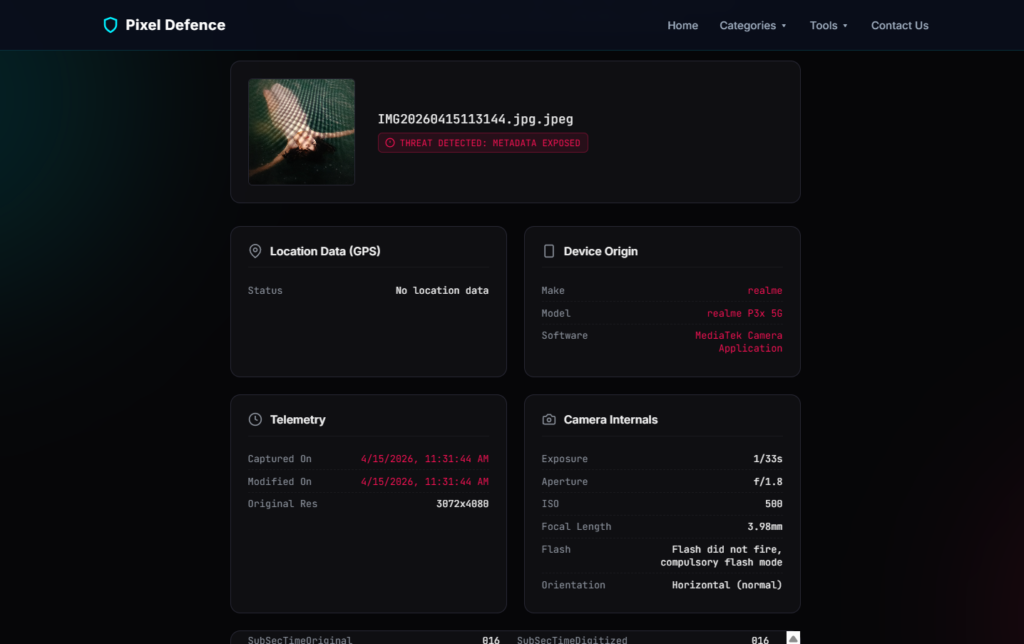
Device Make and Model
The Make and Model EXIF fields record the manufacturer and exact model of the capturing device. Software records the firmware version. For smartphones, this frequently resolves to something like Apple / iPhone 15 Pro or samsung / SM-S928B.
This matters in several contexts. Corporate environments may prohibit personal devices; a leaked photo taken on a personal iPhone rather than an issued device can create compliance problems. More critically, device model data combined with GPS and timestamps can be used to fingerprint a specific individual’s device across multiple image sources.
Editing Software and Author Fields
EXIF and XMP can both record the software used to edit an image (ProcessingSoftware, CreatorTool), and in some workflows, the name of the person who edited it. Adobe Lightroom, for instance, writes the registered user’s name into the XMP creator field by default. This can inadvertently attach a real name to an image intended to be anonymous.
IPTC’s By-line and Contact fields serve a similar function. Photographers who set these fields for professional work may forget they’re present when sharing images in non-professional contexts.

Why Hidden Metadata Is a Real Privacy Risk
These aren’t edge-case concerns. Consider the following scenarios:
Online marketplace sellers
A seller photographs a second-hand item on their kitchen counter, uploads the image to a marketplace listing, and the GPS coordinates embedded in that photo resolve to their home address — visible to every prospective buyer, and every person browsing the listing.
Journalists and source protection
A reporter photographs documents provided by a confidential source. If those images are shared or published without metadata removal, the GPS data can indicate exactly where the meeting took place — potentially identifying or endangering the source.
Social media users and routine exposure
Regular photo sharing across a period of weeks builds a timestamped, geolocated log of a person’s life. Consistent posting of morning photos with consistent GPS coordinates effectively broadcasts where someone sleeps. Consistent lunchtime photos at a specific location identifies a workplace.
Employees and workplace data
A photo taken on a company device and shared externally can disclose device serial information, software versions, and GPS coordinates of internal facilities. In sensitive industries — defence, healthcare, legal — this constitutes a data disclosure risk with potentially serious consequences.
Why Many Online EXIF Removers Create a New Privacy Problem
The obvious response to metadata risk is to use a tool to strip it. A search for “remove EXIF data” returns dozens of web-based services, many of them appearing simple and trustworthy.
However, there’s a structural privacy consideration with any tool that operates via server-side processing: to remove metadata from your image, you must first upload that image to a third party’s server.
What happens to that image once uploaded depends entirely on the provider’s data handling practices — which vary considerably and are not always clearly disclosed. Files may be processed in memory and immediately discarded.
They may be temporarily cached. In some cases, provider terms of service permit the use of uploaded content for service improvement. Server logs may record upload events.
None of this is unique to EXIF removers — it applies to any cloud-based file processing service. But it creates a specific problem: the very images most likely to warrant metadata removal (photos containing sensitive GPS data, images connected to confidential matters, photos of private spaces) are the ones least appropriate to hand to an unknown third-party processor.
For many use cases — stripping GPS from a photo of a piece of furniture you’re selling — the risk is low. For journalists, activists, legal professionals, or anyone handling sensitive material, server-side processing represents a risk worth taking seriously.
| Method | Removes Metadata | Upload Required | Quality Loss | Privacy Risk |
|---|---|---|---|---|
| Screenshot | Partial | No | Yes | Low |
| Cloud EXIF Remover | Yes | Yes | No | Medium |
| Browser-Based Scrubber | Yes | No | No | Low |
Why Browser-Based Metadata Removal Is Safer
The alternative is client-side processing: metadata removal that runs entirely within your browser, using your own device’s computing resources, without transmitting the file anywhere.
In a client-side model, the image file never leaves your machine. The tool reads the file locally, rewrites or strips the relevant metadata fields in-browser, and offers you the cleaned file for download — all without a server ever seeing the original.
This is the approach taken by Pixel Defence’s Metadata Scrubber, which processes files entirely in your browser, so your original images never leave your device. For anyone handling images where the content itself is sensitive — not just the metadata — this distinction is significant.
When compressing images you can also strip all metadata in the same step using our Image Compressor.
Browser-based processing also removes dependency on third-party infrastructure, meaning there’s no upload queue, no server-side logging, and no terms of service governing what can be done with your files after the fact.
Does Screenshotting a Photo Remove Its Metadata?
This is a common workaround, and the answer is: partially, with caveats.
When you take a screenshot of an image, the resulting file is a new capture — it doesn’t inherit the original photo’s EXIF fields like GPS coordinates or device model from the source image. In that limited sense, screenshotting does strip the original metadata.
However:
- New metadata is created. The screenshot carries its own EXIF data, including the timestamp of the screenshot and the device used to take it.
- Image quality degrades. Screenshots introduce compression artefacts and reduce resolution, which may matter depending on the use case.
- It’s not reliable for all fields. Depending on the operating system and the application used to view the image, some metadata may persist or be rewritten in unexpected ways.
- It’s an indirect method. Using a purpose-built metadata removal tool is faster, more reliable, and produces a full-resolution output.
Screenshotting is a rough workaround, not a privacy control.
Does Social Media Automatically Remove Metadata?
Some platforms do strip metadata from uploaded images as part of their processing pipeline — Facebook, Instagram, and Twitter/X have all implemented metadata removal to varying degrees over the years.
But there are significant qualifications:
- Behaviour varies by platform and upload method. Some platforms strip metadata from images uploaded via mobile apps but preserve it for web uploads, or vice versa.
- Platform policies change. A platform that strips metadata today may change its processing pipeline without announcement.
- The platform itself receives the original file. Even if the publicly accessible version of an image has had metadata removed, the platform has already processed the original — and their data retention and usage policies govern what happens to it.
- Not all platforms remove metadata. Smaller platforms, forums, and file-sharing services frequently preserve metadata intact.
Relying on a platform to handle metadata removal is not a privacy strategy. It’s an assumption that may or may not hold depending on factors outside your control.
Frequently Asked Questions
Can metadata reveal my home address?
Yes, if the photo was taken at your home with GPS enabled and the GPS EXIF fields haven’t been stripped. The coordinates recorded will correspond to wherever the photo was taken.
Anyone with access to the file can extract those coordinates and identify the location — no specialist knowledge required; free tools like ExifTool or online EXIF viewers will display the data instantly.
Can deleted EXIF data be recovered?
Once metadata has been properly stripped from a file, it cannot be recovered from that file — the data simply isn’t there.
However, if the original file (with metadata intact) has been backed up to cloud storage, shared with another party, or cached somewhere before removal, those copies retain the original metadata.
Stripping metadata from a local copy doesn’t retroactively strip it from copies that already exist elsewhere.
Does WhatsApp remove metadata?
WhatsApp compresses images sent via its platform, and this compression process does strip most EXIF metadata from the delivered version.
However, files sent as documents rather than images may preserve metadata intact.
As with any platform-based stripping, this is a processing side effect rather than a privacy guarantee, and should not be relied upon for sensitive material.
Does AirDrop preserve metadata?
Yes. AirDrop is a direct device-to-device transfer protocol — it doesn’t process or modify files in transit.
A photo transferred via AirDrop arrives at the recipient’s device with all metadata intact, exactly as it was on the sending device.
If you need to share a photo without metadata via AirDrop, strip the metadata before initiating the transfer.
Do screenshots remove GPS data?
Screenshots do not carry forward the GPS coordinates from the original image being screenshotted. The screenshot is a new capture of what’s displayed on screen, and GPS coordinates aren’t visible content — they’re not part of what gets captured.
However, as noted above, screenshots create their own metadata and degrade image quality. They’re not a substitute for proper metadata removal.
Conclusion
Photo metadata is invisible by design, which is precisely what makes it a privacy risk. GPS coordinates, timestamps, device identifiers, and author fields are written automatically, travel inside files silently, and are readable by anyone with basic tools.
The practical risks are real and varied: location exposure for marketplace sellers, source identification risks for journalists, routine profiling for regular social media users. Understanding what your photos contain is the first step; removing sensitive metadata before sharing images is the second.
You can strip EXIF data from any image using our free image toolkit before sharing it.
Before uploading any photo to a public platform, marketplace listing, or external communication, it’s worth taking sixty seconds to check what’s embedded in the file.
For images where privacy matters, Pixel Defence’s Metadata Scrubber provides a straightforward way to strip that data without sending your original files to a third-party server — everything runs locally in your browser, so the images never leave your device.
The data hidden in your photos doesn’t have to stay hidden from you.