You navigate to the signup page on X (formerly Twitter), click the small text that says “Use email instead,” and enter your email address. You enter the 6-digit confirmation code, pick a handle, and land on your brand-new timeline. You think you beat the system.
Thirty minutes later, you click “Follow” on a breaking news account, and your screen instantly locks up: “We’ve detected unusual activity on your account. To unlock it, please verify your phone number.”
There is no “Skip” option. There is no email alternative. You cannot post, you cannot reply, and you cannot view your feed. Your new account is completely paralyzed until you surrender the exact piece of personal data you wanted to keep private: your personal mobile number.
I’m Rock, the founder of Pixel Defence. I run this site to investigate Big Tech data harvesting and help everyday people reclaim their digital sovereignty.
I’m not here to tell you to delete your social media accounts or quit the internet. Millions of people use X every single day to follow financial markets, read breaking news, and keep up with tech communities.
You should be able to read and participate on X without handing over your personal phone number. In this investigation, I am pulling back the curtain on why X constantly ambushes new accounts with phone demands, why free virtual numbers fail, and how to create twitter account without phone number verification that stays active permanently.
Table of Contents
What Is Happening: The Arkose Labs Bot Trap
If you read generic tech tutorials on creating an X account without a phone number, they all give the same lazy advice: “Just click Use Email Instead during registration!”
That advice is years out of date.
While X’s signup form still lets you type in an email address, their automated bot-defense system treats unverified email accounts with extreme hostility.
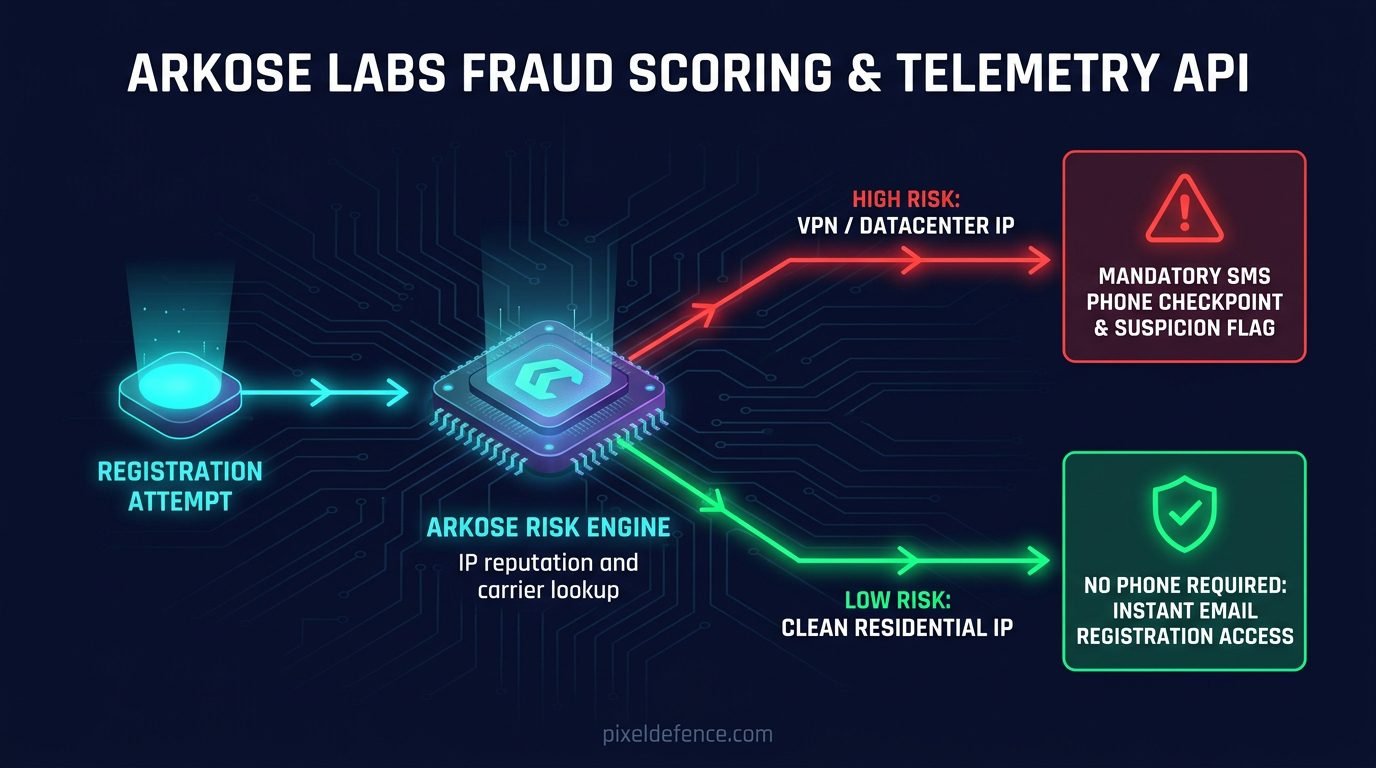
The moment you register without a phone number, X’s automated risk engine places your profile into an aggressive observation sandbox managed by Arkose Labs, their third-party anti-bot provider.
During your first 48 hours, automated machine-learning models score every single interaction you perform:
- Are you connecting from a commercial VPN datacenter IP address?
- Did you follow more than three accounts within your first fifteen minutes?
- Did you post a tweet containing an external web link?
- Does your browser have a clean history or an aggressive tracking-protection setup?
If your account trips even a single suspicion flag, X immediately drops an emergency roadblock.
They freeze your account under the guise of “suspicious automated behavior” and demand an SMS phone verification code. If you don’t have a cellular phone number ready, your account is permanently locked.
How X's Anti-Bot Pipeline Forces Phone Checkpoints:
-----------------------------------------------------------------
[User registers using email on desktop]
       │
       ▼
[Arkose Labs Heuristic Engine calculates Risk Score]
       │
       ├─► HIGH RISK: Commercial VPN / Fast follows / Missing cookies
       │         │
       │         ▼
       │   [Immediate Account Freeze: "Unusual Activity Detected"]
       │         │
       │         ▼
       │   [Mandatory SMS Cellular Verification Required]
       │
       └─► LOW RISK: Clean residential IP / Slow browsing / Human cadence
                 │
                 ▼
           [Account passes sandbox smoothly without phone prompt]
Why It Matters: Why X Desperately Wants Your Mobile Number
Why is X so aggressive about demanding a mobile phone number? Why isn’t a confirmed, secure email address enough to verify an account?
It has very little to do with stopping spam bots. It has everything to do with corporate monetization, advertising graphs, and training artificial intelligence models.
According to research from the Electronic Frontier Foundation (EFF), your mobile phone number is the single most valuable identity anchor in existence:
- Cross-Platform Identity Linking: Commercial data brokers (like LiveRamp and Acxiom) use your mobile number to bridge your anonymous X browsing history with your real-world purchases, voter registrations, and credit scores.
- Contact Book Doxxing: Even if your X handle is completely pseudonymous and contains zero personal information, attaching your phone number allows X’s algorithms to scan the address books of everyone who has ever saved your contact. If a coworker or family member uploads their contacts, X will immediately suggest your “secret” account to their feed.
- Training Grok AI: Under X’s current terms of service, your public posts, interactions, and profile data are automatically ingested to train xAI’s Grok models by default. Your phone number permanently anchors your human identity to those AI training weights.
When you give X your mobile phone number, you destroy any possibility of digital compartmentalization. Your online thoughts, follows, and interactions are welded directly to your real-world identity.
The Virtual Number Trap: Why Google Voice and TextNow Fail
When users get hit with X’s sudden SMS verification roadblock, their first instinct is to download a free virtual phone number app like Google Voice, TextNow, or an online temporary SMS inbox.
In 2026, this almost never works. In fact, it often leads to an instant, permanent account ban.
X does not blindly dispatch an SMS text message. When you submit a phone number into X’s verification box, their backend servers execute a real-time query against telecom carrier databases using carrier lookup APIs like Twilio Lookup or Telesign.
These carrier lookup services run an instant query called a Home Location Register (HLR) check against telecom databases. Within milliseconds, X receives a complete technical breakdown of your number:
- Line Type: Mobile (Cellular SIM), Landline, or VoIP (Voice over IP).
- Carrier Name: Major wireless carriers (Verizon, AT&T, T-Mobile) vs. virtual providers (Google Voice, Bandwidth.com, Pinger).
- Prepaid / Virtual Status: Flags whether the line is tied to a physical SIM card or a virtual cloud server.
How X Detects and Rejects Virtual Phone Numbers:
-----------------------------------------------------------------
[User enters Google Voice / TextNow number]
       │
       ▼
[X Verification Engine runs real-time Twilio/Telesign Carrier API query]
       │
       ├─► Line Type detected as "VoIP" / "Virtual"
       │         │
       │         ▼
       │   [Error: "Please enter a valid phone number / Unsupported carrier"]
       │   [Account permanently flagged for suspicious bot behavior]
       │
       └─► Line Type detected as "Mobile" (Valid Cellular SIM)
                 │
                 ▼
           [SMS Verification code dispatched successfully]
When you enter a Google Voice or TextNow number, X detects the VoIP tag instantly.
The screen displays a frustrating error: “Please enter a valid phone number” or “This carrier is not supported.”
Even worse, if you try entering multiple virtual numbers in a row, X’s automated fraud filters flag your account for “evasion attempts,” turning a temporary checkpoint into an irreversible permanent suspension.
How to Create a Twitter Account Without a Phone Number: 4 Proven Steps
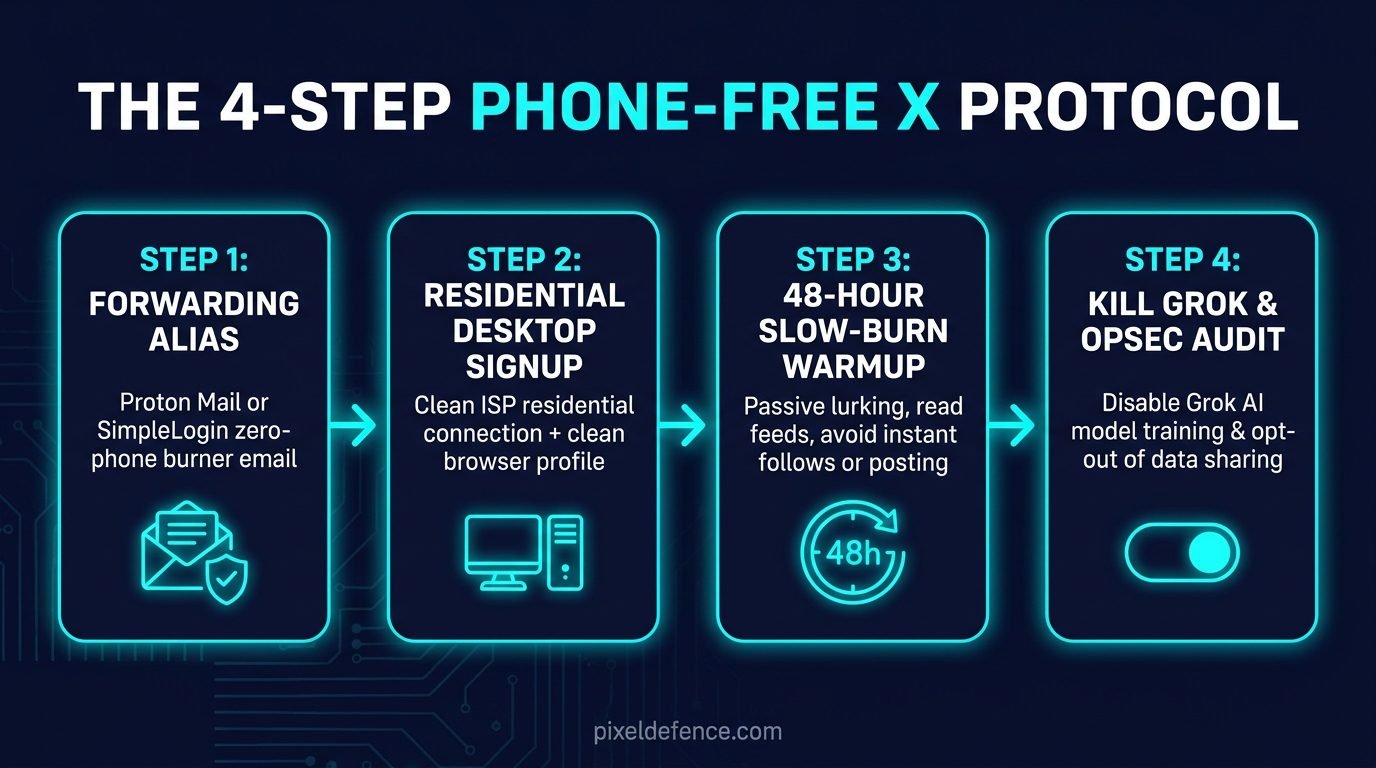
Follow this tested protocol to register an X account with zero phone number, navigate Arkose Labs fraud scoring, and keep your profile completely private.
Step 1: Use an Encrypted Email Forwarding Alias
Never register on X using a disposable “10-minute” email service. As I proved in my investigation on how to create a burner email for social media, disposable email domains are cataloged on global spam blacklists and trigger an instant phone number checkpoint during signup.
Instead, create a dedicated email forwarding alias using SimpleLogin, DuckDuckGo Email Protection, or Proton Pass:
- Generate a unique, platform-specific alias (e.g.,
x.shield412@simplelogin.com). - Point the forwarding route to your primary secure inbox.
- Use this alias in the X registration form.
This ensures you can receive verification codes and password reset links forever, while X never learns your true personal email address.
Step 2: Register on Desktop via a Residential IP (Avoid Commercial VPNs During Signup)
The number one mistake that triggers an instant phone verification prompt is using a commercial VPN during registration.
X maintains an extensive, real-time blacklist of commercial datacenter IP addresses (NordVPN, ExpressVPN, Surfshark, Mullvad). The second an account creation request originates from a known datacenter IP with zero linked phone number, Arkose Labs assigns it a maximum risk score, requiring an immediate phone number.
Here is the correct method:
- Open a clean private browsing window on your desktop browser.
- Connect through your standard home residential internet connection or a mobile hotspot.
- Click “Create account” and select “Use email instead.”
- Enter your birthday (ensure you choose an age over 21 to avoid automated age-gating locks).
- Enter the verification code sent to your email alias.
- Complete the Arkose puzzle slowly and deliberately to mimic natural human mouse movement.
Step 3: Survive the 48-Hour “Slow-Burn” Warmup Period
Once your account is created, your profile is in an automated probationary sandbox. If you behave like a bot, X will freeze your account and demand an SMS number.
Follow the Slow-Burn Rule for the first 48 hours:
- Do not follow more than 3 accounts on Day 1.
- Do not post any tweets containing external web links.
- Do not send direct messages (DMs) to strangers.
- Do not rapidly like or retweet dozens of posts in a single sitting.
- Do not change your IP address or switch between multiple networks.
Spend a few minutes browsing your feed, search for a hobby topic, and log out naturally. By establishing a slow, human interaction pattern, your account clears the Arkose sandbox without triggering a phone challenge.
Step 4: Lock Down Grok AI Training and Privacy Settings
Once your account clears the initial 48-hour probationary window, you must immediately disable X’s aggressive data-harvesting channels:
- Click More in the left sidebar and select Settings and privacy.
- Navigate to Privacy and safety → Data sharing and personalization.
- Locate Grok and uncheck the box labeled: “Allow your posts as well as your interactions, inputs, and results with Grok to be used for training and fine-tuning.”
- Go to Discoverability and contacts:
- Turn off “Let people who have your email address find you on X.”
- Turn off “Let people who have your phone number find you on X.”
- Go to Audience and tagging and check “Protect your posts” if you want to keep your tweets private to approved followers only.
If you want to audit X’s full legal policy to see what other device telemetry they log behind your back, test their terms in our free Pixel Defence Privacy Policy Analyzer.
Mobile App vs. Mobile Web: Why You Should Ditch the Official App
If you want to protect your privacy, do not install the official X app on your smartphone.
The native X mobile app is a persistent telemetry gathering client. It requests broad operating system permissions:
- Precise GPS and coarse network location.
- Background Bluetooth scanning and nearby Wi-Fi network logging.
- Access to your device advertising identifier (IDFA on iOS, GAID on Android).
- Full contact address book synchronization.
When the X app is installed on your phone, it constantly communicates with advertising networks in the background, correlating your device hardware against your other accounts.
The Private Solution: Run X via a Mobile Browser Container
Instead of using the app, access X through a privacy-hardened mobile browser like Brave or Firefox with strict tracking protection turned on.
Navigate to x.com, log in with your email alias, and add the website to your phone’s home screen as a shortcut.
Running X inside a mobile browser sandbox gives you full access to tweets, bookmarks, and lists, while completely blocking X from accessing your phone’s hardware identifiers, sensor telemetry, and background location.
Before uploading any photos to X, make sure you strip hidden camera GPS tags and serial numbers first using our browser-based Pixel Defence EXIF Scrubber.
Action Checklist: 4 Rules to Keep X Phone-Free
- Rule 1: Never Use Virtual VoIP Numbers: If X ever flags your account for a phone number down the road, never input a Google Voice or TextNow number. If verification becomes strictly necessary, use a physical prepaid cellular burner SIM card.
- Rule 2: Opt Out of Grok AI Training Immediately: Check your data-sharing settings regularly to ensure X hasn’t re-enabled AI training permissions on your profile.
- Rule 3: Keep Discoverability Disabled: Ensure phone and email contact syncing remain toggled off so coworkers and acquaintances cannot find your account.
- Rule 4: Avoid Third-Party App Authorizations: Never use “Log in with Twitter” on random third-party websites or grant external apps access to your profile.
Frequently Asked Questions (FAQ)
Can I create a Twitter account without a phone number?
Yes. You can register on X using an email address by clicking “Use email instead” on desktop web. However, to prevent automated phone checkpoints within the first 48 hours, you must use a high-reputation email forwarding alias, avoid commercial VPNs during signup, and maintain a slow human browsing pace.
Why does Twitter keep asking for my phone number?
X asks for a phone number when its automated Arkose Labs anti-bot engine detects suspicious behavior. Common triggers include connecting from a commercial VPN datacenter IP, following multiple accounts too quickly, or having an unverified email address.
Can I bypass Twitter phone verification with Google Voice?
No. X uses telecom carrier lookup APIs (like Twilio Lookup and Telesign) to detect line types in real time. Virtual VoIP numbers (Google Voice, TextNow, Skype) are flagged and rejected with an “unsupported carrier” error.
Does X use my tweets to train Grok AI?
Yes. By default, X automatically opts all users into having their public posts, replies, and search interactions used to train xAI’s Grok models. You can opt out in your Privacy and safety settings under Data sharing and personalization.