You create a brand new account on Instagram or X using a free 10-minute temporary email service. You feel completely protected, convinced you have outsmarted Silicon Valley’s pervasive tracking apparatus.
Twenty-four hours later, you open the app to log in and an aggressive red banner stops you cold: “Your account has been suspended. Enter your phone number to verify your identity.”
Just like that, your anonymous account is dead. The temporary inbox you used expired twenty minutes after you clicked the confirmation link, making verification impossible. Even worse, if you attempt to recover the account, the platform demands the exact piece of data you were trying to protect: your personal mobile number.
Using a burner email for social media seems like a simple privacy win, but millions of users fall into hidden traps that lead to instant account terminations.
I’m Rock, the founder of Pixel Defence. I run this site to investigate Big Tech data harvesting and help everyday people reclaim their digital sovereignty. When you try to protect your identity, you should never end up handing over even more personal data just to regain access.
In this investigation, I am pulling back the curtain on why free temporary emails fail, how data brokers use your email address as an unchangeable tracking anchor, and how to set up an unbreakable burner email for social media that will never get banned.
What Is Happening: The Disposable Email Trap
When people decide to browse social media anonymously, their first instinct is to search Google for “free burner email” or “temp mail generator.”
They land on disposable email websites like 10MinuteMail, Guerrilla Mail, or Temp-Mail, copy a randomized address, paste it into the social media registration form, and confirm the initial link. It feels effortless, fast, and completely anonymous.
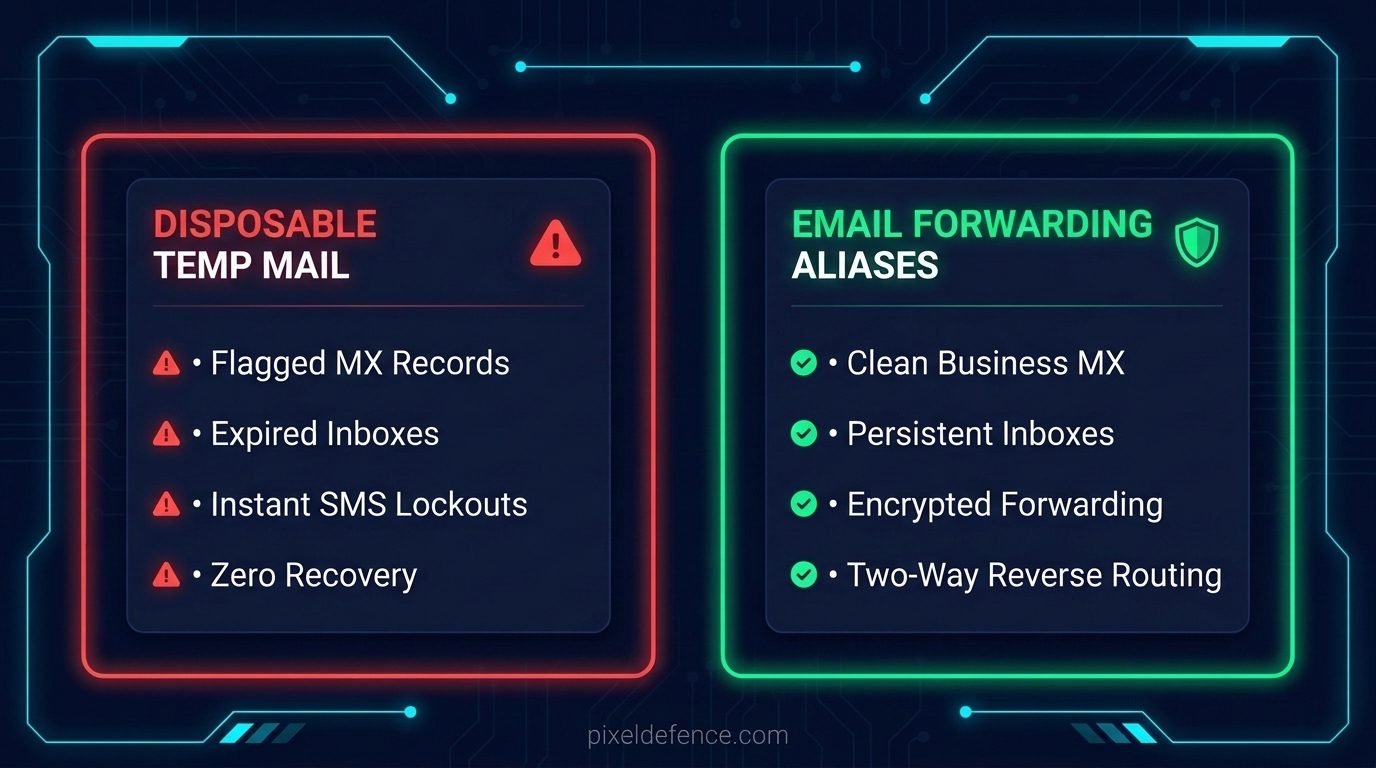
What those free generator sites never tell you is that social media algorithms are actively monitoring for those exact domains.
The moment you type a known disposable domain into a registration field, you trigger an automated fraud flag. Big Tech security systems do not treat you like a privacy-conscious citizen trying to avoid tracking. They categorize your connection alongside malicious automated spam bots, credential stuffers, and ban-evasion rings.
Within hours—often the minute your new account performs any standard action like searching for a profile, following a creator, or liking a post—the platform freezes your profile.
The platform then demands that you confirm a security code dispatched to the registration email. Because that temporary inbox vanished into thin air the second you closed your browser tab, your account is permanently lost.
How Social Media Platforms Kill Temp-Mail Accounts:
-----------------------------------------------------------------
[User enters temp-mail address]
       │
       ▼
[Social Platform runs automated MX check against Spamhaus Blacklist]
       │
       ├─► MATCH FOUND: Domain flagged as disposable / bot network
       │         │
       │         ▼
       │   [Result 1: Instant registration rejection]
       │   [Result 2: Account allowed, but instantly flagged for bot challenge]
       │         │
       │         ▼
       │   [Mandatory SMS Phone Number Verification Triggered]
       │
       └─► CLEAN MX RECORD: High-reputation business server detected
                 │
                 ▼
           [Account approved cleanly without phone checkpoint]
Why It Matters: Your Email Is a Universal Tracking Beacon
Why are social media platforms so determined to force a stable, verified email address from you during registration?
It has very little to do with protecting your account security. It has everything to do with corporate surveillance, cross-site profiling, and the multi-billion-dollar commercial data broker pipeline.
According to research from the Electronic Frontier Foundation (EFF), modern online tracking relies heavily on cross-context behavioral matching. To companies like Meta, ByteDance, Google, and commercial data brokers like LiveRamp and Acxiom, your primary email address is your universal digital passport.
Think about where your primary email address is currently stored:
- It is tied to your primary bank accounts, credit cards, and utility records.
- It is stored in your Amazon order history, ride-sharing accounts, and food delivery apps.
- It sits inside the digital address books of hundreds of friends, colleagues, and family members.
- It is registered across dozens of retail loyalty programs and newsletters.
When you hand that same primary email address to a social network, you hand them the master key to your offline life.
Data brokers convert your email address into a standardized cryptographic string called a SHA-256 hash. Even when websites claim they “never share your raw email with advertisers,” they routinely transmit this hashed string to third-party ad networks.
The advertising network cross-references that hash against billions of aggregated commercial records. Instantly, your supposedly pseudonymous social media browsing habits are linked to your real-world purchases, your physical neighborhood, and your household income.
Even if you never type your real name into your profile, your email address has already exposed your entire offline identity to the platform’s advertising servers.
The Dangerous Myth: Gmail Plus-Addressing
Before exploring the real solution, we must dismantle a persistent myth that self-proclaimed privacy influencers regularly spread across social forums.
You have likely seen people advise: “You don’t need a new email! Just add a plus sign to your existing Gmail. If your email is john@gmail.com, sign up using john+instagram@gmail.com.”
Google supports this feature, and incoming verification messages will land directly in your primary inbox. But from a surveillance defense standpoint, this technique provides zero protection.
Any novice software developer can write a single line of code that detects the + character and strips everything between the plus sign and the @ symbol:
// How ad trackers strip plus-addressing instantly:
const cleanEmail = rawEmail.replace(/\+.*@/, '@');
Every major tracking script, advertising database, and commercial data broker runs this exact sanitization process automatically before storing records.
When you use plus-addressing on a social media account, you are handing over your raw, unmasked root email address. You achieve zero anonymity, zero identity separation, and zero defense against cross-platform profiling.
How They Detect You: The MX Record Blacklist
To understand why disposable temporary emails get your accounts banned, you have to examine how mail servers interact at a network infrastructure level.
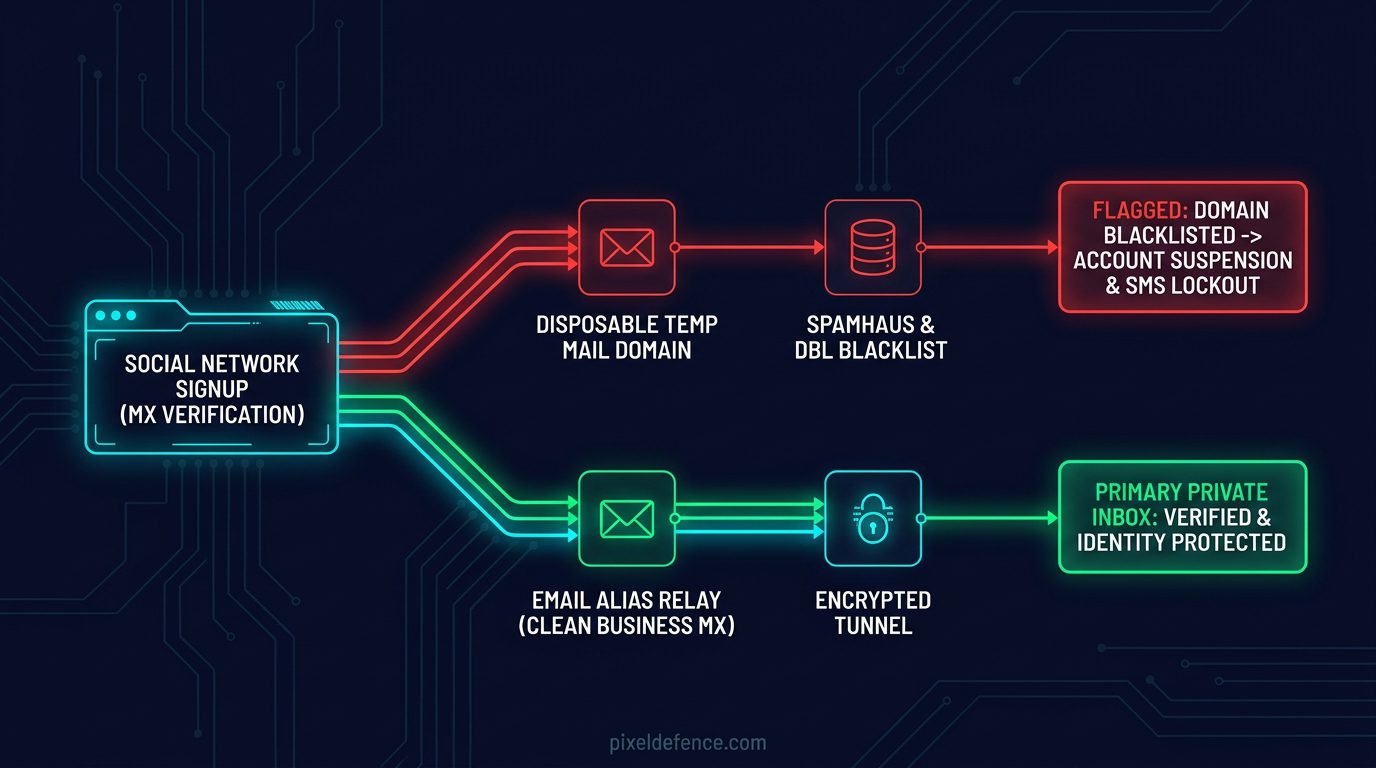
When you submit an email address on a registration form, the platform’s backend servers perform an automated DNS query to look up the domain’s Mail Exchange (MX) records.
Social networks subscribe to real-time email hygiene and disposable domain blocklists operated by internet security authorities like Spamhaus. These registries catalog hundreds of thousands of known temporary and throwaway email domains.
When you enter an address from a free temp-mail site, your address points to an IP subnet and mail server that has processed millions of spam blasts, automated bot signups, and phishing payloads.
The social platform detects this low-reputation infrastructure instantly. If they do not reject the registration form immediately, they flag your newly created account for automated monitoring.
The moment your account takes any normal action—such as following three accounts in a single minute—the platform triggers a verification checkpoint. You are locked out permanently because the disposable mailbox is already gone.
The Proven Fix: High-Reputation Email Forwarding Aliases
How do you create a burner email for social media that guarantees anonymity without triggering automated platform suspensions?
The answer is Email Forwarding Aliases.
Unlike disposable temporary inboxes that self-destruct after sixty minutes, an email alias is a persistent, permanent address hosted on a high-reputation, RFC-compliant mail server.
Incoming messages sent to your alias are encrypted and forwarded seamlessly to your real personal inbox. The sender—in this case, the social media company—only ever sees the alias.
The social network has zero technical visibility into your true recipient address, your underlying email provider, or your real identity.
Secure Email Aliasing Architecture:
-----------------------------------------------------------------
[Social Network: Instagram / X / TikTok]
       │
       ▼ (Sends confirmation code to alias: insta.priv78@simplelogin.com)
[High-Reputation Alias Relay: SimpleLogin / DuckDuckGo]
       │  - Strips sender tracking pixels (web beacons)
       │  - Encrypts payload with PGP
       ▼
[Your Secure Personal Inbox: Proton Mail / Tuta / Private Domain]
       │
       ▼ (Optional Two-Way Reply)
[Reverse Alias System re-masks your real address on outgoing reply]
Furthermore, because modern alias services support reverse routing, you can reply directly to verification emails or customer support tickets from your normal email client.
The alias relay intercepts your outgoing message, removes your personal email headers, and delivers the response back to the platform under the alias identity.
If a social platform ever experiences a security breach, or begins selling your contact information to marketing partners, you can simply disable that single alias inside your dashboard. Your real email address remains completely safe and untouched.
The Top 3 Email Alias Services for Social Media
I put the leading email masking providers through rigorous testing across multiple social media registrations. These three services consistently bypass automated fraud filters while maintaining strict zero-knowledge standards.
1. SimpleLogin (The Most Secure Choice)
- Website: simplelogin.io
- Parent Company: Proton AG (Operated under strict Swiss privacy regulations).
- Pricing: Free tier includes 10 active aliases; Premium provides unlimited aliases for $30/year.
- Why it works: SimpleLogin operates clean, enterprise-grade mail infrastructure with full SPF, DKIM, and DMARC authentication records. Social media registration forms process them as legitimate business domains rather than disposable bot networks. Furthermore, SimpleLogin supports PGP encryption, allowing incoming emails to be encrypted before they ever reach your destination server.
2. DuckDuckGo Email Protection (The Best Free Solution)
- Website: duckduckgo.com/email
- Infrastructure: DuckDuckGo Privacy Relay.
- Pricing: 100% Free.
- Domain: Clean
@duck.comaddresses. - Why it works: In addition to concealing your real address, DuckDuckGo automatically strips embedded tracking pixels and marketing web beacons from forwarded emails. When a social network dispatches a login notification, they cannot record your IP address or detect the exact second you open the email.
3. Proton Pass (The Most Convenient Browser Integration)
- Website: proton.me/pass
- Integration: Built natively into Proton’s open-source browser extension and mobile app.
- Pricing: Generous free tier with built-in email masking.
- Why it works: Whenever your cursor enters an email registration box on any website, Proton Pass displays an inline button offering to generate a randomized alias on the spot. It creates the alias, links it to your inbox, and saves your login credentials in an encrypted vault simultaneously.
How to Set Up an Isolated Social Media Alias (Step by Step)
Here is the exact setup procedure I follow whenever I configure an isolated testing account for an investigation:
Step 1: Establish Your Primary Forwarding Route
Register for an account on SimpleLogin or activate DuckDuckGo Email Protection. Connect your personal, secure email address as the verified forwarding destination.
Step 2: Generate a Dedicated Alias for Each Service
Never generate a single “burner” alias and reuse it across multiple platforms. Reusing aliases destroys your compartmentalization.
Generate a separate, distinct alias for every individual social network:
- For your private Instagram account:
insta.shield749@simplelogin.com - For your anonymous Reddit profile:
reddit.priv812@duck.com - For your isolated X profile:
x.intel993@simplelogin.com
Label each alias clearly inside your dashboard with the service name and registration date.
Step 3: Complete Account Registration
Enter your dedicated alias into the social platform’s signup form.
When the platform sends its 6-digit confirmation code, the message will route through the relay and appear in your personal inbox within seconds. Copy the verification code, paste it into the registration form, and complete your setup.
Step 4: Verify Your Security Recovery Channel
Before performing any further activity on the platform, verify your recovery pipeline.
Log out of your newly registered account, select “Forgot Password,” and confirm that the password reset link delivers properly through your alias relay into your personal inbox. Once verified, you know your account is fully protected against unexpected lockouts.
Before signing up, you should also inspect the platform’s terms. You can run any social network’s legal documentation through our free Pixel Defence Privacy Policy Analyzer to identify hidden data collection clauses before you register.
Action Checklist: 4 Rules to Keep Your Account Safe
To maintain an anonymous social media presence that never gets caught in automated platform sweeps, implement these four defensive rules today:
- Rule 1: Enforce Strict One-to-One Isolation: Never share an alias between two services. If you register both Facebook and Instagram using the same alias, Meta will merge your profiles across their advertising database.
- Rule 2: Avoid Shared Free Suffixes for High-Value Accounts: If you plan on maintaining an account long-term, connect a custom domain (purchased anonymously with privacy protection) to SimpleLogin. This ensures you own your mail routing infrastructure even if a shared domain suffix is restricted.
- Rule 3: Disable Marketing and Social Digests: After verifying your account, open your alias settings and mute non-essential marketing emails. This keeps your personal inbox clean while preserving critical security and password reset alerts.
- Rule 4: Scrub All Media Before Uploading: An anonymous email address shields your registration identity, but uploading uncleaned photos will leak your home GPS coordinates, camera serial numbers, and device timestamps. Before posting any image, strip its metadata with the Pixel Defence EXIF Scrubber.
Frequently Asked Questions (FAQ)
Can social media platforms see my real email address through an alias?
No. The social media platform only interacts with the public alias address and the MX records of the relay provider. The platform’s mail servers never establish a direct connection to your personal inbox provider.
Will Instagram or X ban my account for using an email forwarding alias?
No. Established forwarding services like SimpleLogin, DuckDuckGo, and Proton Pass operate fully authenticated, RFC-compliant mail servers with valid SPF, DKIM, and DMARC records. To social media automated filters, these addresses appear as standard, legitimate email accounts.
What should I do if an email alias service shuts down?
If you use a provider’s shared domain, you must update your email address across your accounts before the service terminates operations. If you attach your own custom domain to the alias provider, you simply update your DNS MX records to point to a new provider with zero impact on your accounts.
Does Gmail plus-addressing provide any privacy protection?
No. Plus-addressing (yourname+tag@gmail.com) provides zero privacy against social media platforms or data brokers. Automated tracking scripts remove the plus-tag using basic pattern matching, exposing your true root email address immediately.