You need advice on a toxic workplace situation, a deeply personal health question, or a family crisis that you cannot share with anyone you know offline. You turn to Reddit because it is the only place on the modern web where real people have answered the exact problem you are facing.
Then your cursor freezes over the “Post” button. You hesitate because your Reddit username is the same handle you used on a gaming forum ten years ago, or you realize someone who knows you could easily recognize your story.
You shouldn’t have to delete your account or abandon a community just to protect your personal privacy. My goal isn’t to make a grand anti-tech gesture or demand that everyone quit the internet. Millions of us rely on social platforms every single day.
My mission at Pixel Defence is simple: I want to help you use the platforms you need while keeping your personal life strictly to yourself.
In this guide, I am going to show you exactly how to post on reddit anonymously, how to stop Google from indexing your private discussions, and how to create an untraceable throwaway account that keeps your real-world identity completely safe.
Table of Contents
What Is Happening: Reddit Isn’t a Private Forum Anymore
A decade ago, Reddit felt like an anonymous corner of the web. You picked a silly username, never gave an email address, and browsed niche subreddits in relative obscurity.
That era of Reddit is officially over.
Over the past two years, Reddit transformed into a publicly traded media company. They signed massive commercial data-licensing agreements with tech giants like Google and OpenAI, turning user discussions into primary training datasets for artificial intelligence models.
Because of Google’s strategic search partnership with Reddit, Reddit threads now dominate the top of Google Search results.
Every question you post, every comment you leave, and every candid detail you share about your life is scraped, cataloged, and indexed by search engine spiders within minutes.
Unless you actively change your account configuration, your Reddit history is not just sitting inside a subreddit; it is floating in public Google search results, waiting to be surfaced when an employer, coworker, or acquaintance searches for a specific phrase.
The Reddit Data Pipeline: How Your Posts Reach Google
-----------------------------------------------------------------
[User posts sensitive question in r/careerguidance]
       │
       ▼
[Reddit Real-Time Feed Ingestion]
       │
       ├─► Google Search Spiders (Crawled and indexed in under 5 minutes)
       │         │
       ▼         ▼
[Reddit AI Training API] ──► [Third-Party AI Models: Gemini / ChatGPT]
       │
       ▼
[Mosaic Profilers / OSINT Scraping Tools: RedditMetis / Pushshift]
Why It Matters: The Danger of “Mosaic Doxxing”
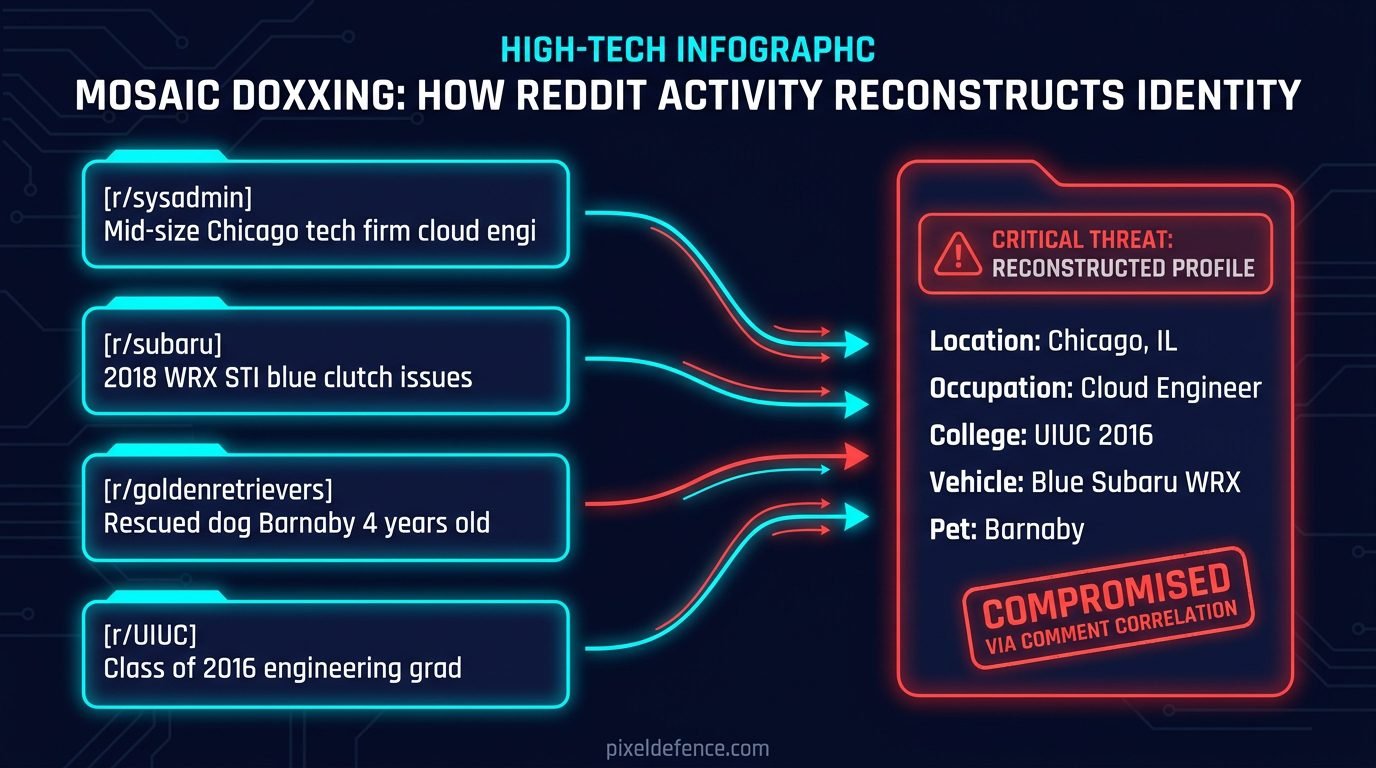
When people think about getting “doxed” online, they imagine a hacker breaking into their computer and leaking their driver’s license.
On Reddit, that almost never happens. According to security research from the Electronic Frontier Foundation (EFF), 99% of identity leaks happen through a quiet, self-inflicted process called mosaic doxxing.
Think of your Reddit account like a puzzle. In an individual post, you never say your real name. But over three or four years of active commenting, you scatter harmless puzzle pieces across dozens of communities:
- In
r/AskReddit, you mention that you are a 34-year-old high school biology teacher. - In
r/cars, you post a picture of your 2018 Honda Civic with a scrape on the bumper. - In
r/gardening, you mention that your tomatoes struggle in the heavy clay soil of eastern Ohio. - In
r/dogs, you post a picture of your rescue golden retriever and mention her name is Bella.
To a casual reader skimming one thread, those details are completely meaningless.
To an aggressive internet stalker, an angry Reddit user, or an automated data broker, those four pieces of data are more than enough.
Free open-source profiling tools like RedditMetis or ReSavr can ingest an entire user’s comment history in three seconds, automatically generating an interactive dossier showing your estimated age, location, occupation, and family status.
Before you know it, an anonymous comment you made about your workplace is traced directly back to your desk.
What Reddit Knows vs. What Moderators Know
Before we lock down your account, it is critical to separate internet myths from actual technical threats.
One of the most common questions I get asked is: “Can subreddit moderators see my IP address, my email, or my real location?”
The short answer is no. Subreddit moderators are unpaid community volunteers. They have zero access to your personal connection logs.
A moderator can only see what any regular user on the internet can see:
- Your public username.
- Your complete public submission and comment history.
- Your account age and karma score.
- The specific post or comment you submitted to their subreddit.
However, Reddit corporate administrators and their automated backend servers see everything:
- Your IP address and internet service provider (ISP).
- Your device hardware specifications and screen resolution.
- Your approximate geographic location down to the city level.
- Every subreddit you browse, even if you never click “Join” or leave a comment.
If you use Reddit’s official mobile app, their tracking capability expands dramatically to include your advertising ID, background telemetry, and cross-app tracking beacons.
How to Post on Reddit Anonymously: The 5-Step Defense Protocol
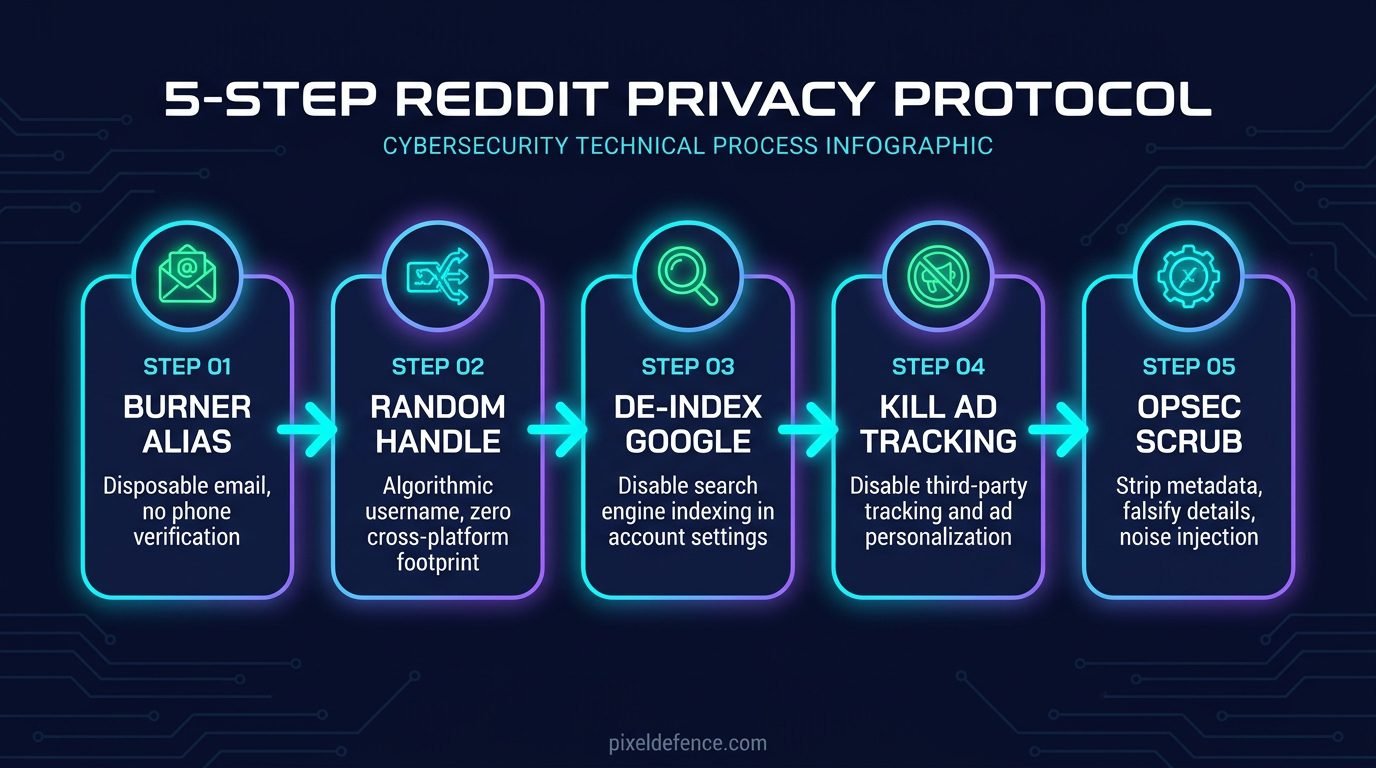
If you need to ask a sensitive question, discuss a medical issue, or share a workplace situation, do not post it from your primary account.
Follow this step-by-step blueprint to build an isolated, anonymous presence from scratch.
Step 1: Create an Isolated Burner Email (Or Skip Email Entirely)
When you register a new Reddit account on a desktop web browser, Reddit displays a box asking for your email address.
Most people do not realize that on the desktop web signup screen, entering an email is optional. You can leave the email field completely blank and click “Continue.” Reddit will prompt you to create a username and password without attaching an email.
However, there is a catch: if you sign up with zero email, you can never reset your password. If you ever forget your credentials or get logged out, the account is gone forever.
The safer, smarter approach is to use an isolated email forwarding alias. In our previous guide on how to create a burner email for social media, I showed how services like SimpleLogin and DuckDuckGo Email Protection allow you to receive password reset links without ever exposing your real address to Reddit.
Generate a unique alias (like reddit.safe914@duck.com), paste it into the signup box, and complete registration.
Step 2: Choose a Randomized, Non-Identifying Username
Never use a username that resembles any handle, gamertag, or email prefix you have ever used anywhere else on the web.
If your Instagram handle is mike_travels_99, do not name your Reddit account mike_travels_anon. Anyone who types that handle into a search engine will link both accounts in seconds.
The best defense is to let Reddit’s automatic username generator assign you a generic, randomized handle (such as Quiet-Carpenter-4812).
Randomized default handles blend into the background of Reddit’s comment sections. They provide zero linguistic clues about your gender, interests, or background.
Step 3: Shut Down Google Search Indexing Immediately
The moment you log into your new Reddit account, you must disable external search engine indexing. By default, Reddit leaves this setting turned on to feed Google’s search spiders.
Here is how to disable it:
- Click your profile avatar in the top right corner and select Settings.
- Navigate to the Safety & Privacy tab.
- Scroll down to the Advanced Privacy section.
- Locate the toggle labeled “Show up in search results” (Allow search engines like Google to link to your profile and posts).
- Toggle this setting to OFF.
Once disabled, Reddit adds a noindex tag to your profile page, preventing Google from indexing your individual user profile in search queries.
Step 4: Kill Ad Personalization and Location Tracking
While inside the Safety & Privacy settings menu, disable the data broker sharing channels that Reddit activates by default:
- Personalize ads based on your activity with our partners: Toggle OFF. (This prevents data brokers like LiveRamp from syncing your offline browsing with Reddit).
- Personalize ads based on your location: Toggle OFF.
- Personalize recommendations based on your general location: Toggle OFF.
- Content visibility: Toggle off “Show up in high-visibility feeds” if you want to keep your posts within the specific subreddit community rather than hitting Reddit’s global front page.
If you want to inspect Reddit’s full data harvesting policy and see what else they log behind your back, test their terms in our free Pixel Defence Privacy Policy Analyzer.
Step 5: Cleanse Your Post of Identifying Details
Before you submit your sensitive question or story, perform an operational security (OPSEC) scrub on the text itself:
- Fuzz the Numbers: If your real salary is \$76,500, write “roughly \$75k–\$80k.” If you have worked at your company for 4 years and 3 months, write “about 4 years.”
- Obscure Company Sizes: Instead of writing “I work at a boutique 14-person architecture firm in downtown Seattle,” write “I work at a small design firm in the Pacific Northwest.”
- Change Unimportant Details: If you are asking for advice about your brother, write that you are asking about a cousin. If your dog is a Dalmatian, call it a medium-sized mutt.
- Strip Photo Metadata: If you must upload a photo as evidence, never upload the raw camera file. Always strip your camera serial numbers and GPS coordinates first using our browser-based Pixel Defence EXIF Scrubber.
Mobile App vs. Browser: Why You Should Ditch the Official App
If your goal is true anonymity, do not install the official Reddit app on your smartphone.
The Reddit mobile application is a powerful telemetry gathering client. It requests access to your mobile advertising identifier (IDFA on iOS, GAID on Android), scans nearby Wi-Fi network names, and runs background diagnostic beacons.
When you use the mobile app, Reddit can easily associate two different accounts on the same phone through your shared hardware ID.
If you switch back and forth between your “anonymous” throwaway account and your personal account inside the official app, Reddit’s backend algorithms know both profiles belong to the same person.
The Private Alternative: Private Browser Containers
Instead of using the app, access Reddit using a privacy-hardened mobile browser like Brave or Firefox with strict tracking protection turned on.
Browsers run websites inside isolated memory sandboxes. They prevent Reddit from accessing your phone’s unique hardware IDs, contact lists, or background location.
Whenever you finish posting your sensitive question on your throwaway account, simply close the private browser tab. Your cookies, cached session data, and connection state are wiped clean automatically.
Action Checklist: 4 Rules for Painless Anonymous Posting
You don’t need a degree in cybersecurity to keep your personal life private. Whenever you need to ask a sensitive question on Reddit, stick to these four core rules:
- Rule 1: One Topic, One Throwaway Account: Never use the same throwaway account to ask about your marriage problems in January and your workplace drama in June. Create a single-use account for that specific question, get your answers, and never log into it again.
- Rule 2: Never Engage with Your Main Account: Do not upvote, comment on, or share your throwaway post using your primary personal account. Algorithms detect mutual interactions between separate profiles operating on the same IP subnet.
- Rule 3: Beware of Stylometry (How You Write): We all have unique typing quirks—frequent use of ellipses, specific slang words, or favorite emojis. When writing from a throwaway account, write plainly and avoid signature phrases that your friends or colleagues would instantly recognize.
- Rule 4: Mute Reply Notifications: Once your question has run its course, you don’t want ongoing email notifications dragging your attention back. Turn off email notifications in your settings so your throwaway account remains completely silent.
Frequently Asked Questions (FAQ)
Can Reddit see my IP address if I post without an account?
If you browse Reddit without an account, Reddit’s web servers still log your IP address, browser user-agent, and visited pages. To hide your IP address completely from Reddit’s servers, you must use a trusted VPN or the Tor browser.
Can someone find my identity from my Reddit username?
If you reuse a username that you have used on Discord, Steam, Twitter, or an old forum, yes. Anyone can paste your username into search engines to uncover your associated profiles. If you use a randomized username, they can only identify you through details in your posts.
Does deleting a Reddit comment remove it from Google Search?
When you delete a comment on Reddit, the text is removed from Reddit’s live servers, but cached versions may linger on Google Search for several days or weeks until Google re-crawls the thread. Third-party archiving services may also store copies of public comments.
Can I post anonymously on Reddit using a VPN?
Yes, but be cautious with brand new accounts. Reddit uses automated anti-spam systems that occasionally shadowban brand new accounts created over commercial VPN IP ranges. If you use a VPN, browse normally for a day before submitting sensitive posts.