Apple is trying to force you to buy a new phone, and they are using their latest marketing stunt to do it. They call it “Apple Intelligence,” but the rest of the world knows it simply as Siri AI.
I’m Rock, the founder of Pixel Defence, and I’ve spent the last few weeks auditing how this system handles your personal data. Before you upgrade your phone just to use these new features, you need to understand what is happening under the hood.
This guide is for anyone who wants to know the technical truth behind Apple’s new assistant. I will cover compatibility, setup, privacy features, device limitations, offline capabilities, and how to protect your data.
Before you hand over your personal life to Apple’s algorithms, you need to verify their terms. You can use our free Privacy Policy Analyzer tool to scan Apple’s terms of service and find the hidden data harvesting clauses they bury in the fine print.
Table of Contents
What Is Siri AI?
For years, the old Siri was nothing more than a glorified voice command parser. It followed pre-programmed scripts and frequently failed if you didn’t speak in a specific way.
The new siri ai is completely different because it is powered by generative artificial intelligence. It uses large language models to understand what you mean, not just what you say.
This means the assistant has access to your personal context, your emails, and what is currently displayed on your screen. It can follow conversation threads and perform actions across different apps.
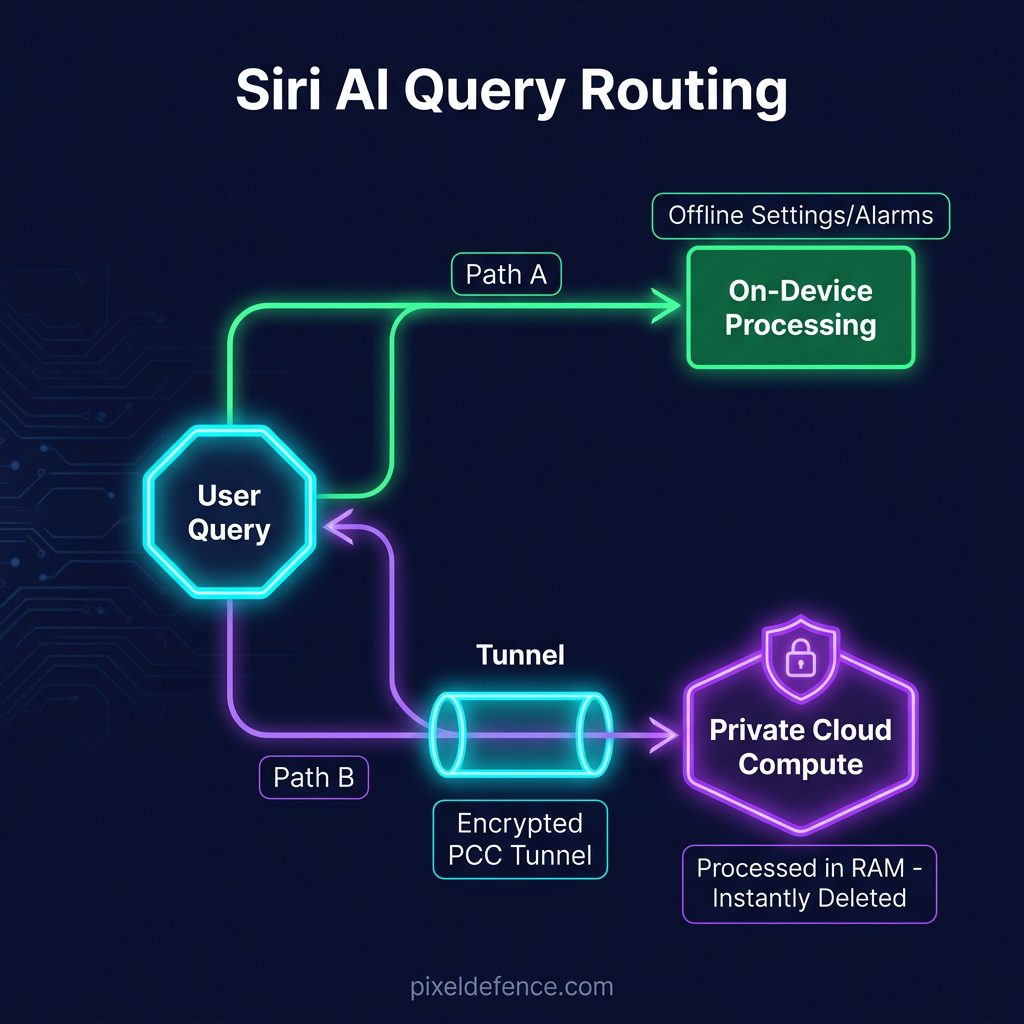
Apple is processing these requests in two ways: locally on your device or in the cloud. We need to examine exactly how this data routing affects your digital privacy.
Siri vs Apple Intelligence — What’s the Difference?
Many users confuse these two terms because Apple’s marketing department blends them together. However, they are two entirely different parts of the ecosystem.
Think of Apple Intelligence as the underlying brain engine. It is the suite of AI models, writing tools, and database structures that run in the background of iOS.
Now, think of Siri vs Apple Intelligence. Siri is simply the voice and text interface that lets you talk to that brain. Siri is the messenger, while Apple Intelligence is the engine.
Without Apple Intelligence, the assistant defaults to the old, basic voice-command parser. The shift to a modern siri ai requires the full brain engine to be active.
Does Siri Use any ai ?
If you are wondering whether the new assistant is powered by third-party tools, the short answer is no. Apple builds its core models in-house.
This means you do not have to worry about your voice recordings being sent to external databases by default. If you ask, “Does Siri use ChatGPT?”, the answer is that it does not rely on third-party chatbots for its core functions.
When Siri answers itself, it uses Apple’s own local or private cloud models. Your voice commands and personal text are processed within Apple’s own secure perimeter.
However, Apple does include optional prompts if a query requires external web search models. You must explicitly grant permission before any data is sent outside, and this feature can be disabled completely in your settings.
To check if Siri is powered by ai Or any other ai , you should know it runs on Apple’s proprietary on-device models. This keeps your personal data inside Apple’s ecosystem.
Which iPhones Support Siri AI?
This is where Apple’s marketing meets the harsh reality of planned obsolescence. The new siri ai compatible iphones list is deliberately restricted to recent, expensive hardware.
If you want to know if your device is on the siri ai supported devices list, check the compatibility table below, which I verified using Apple’s official iPhone comparison specifications:
If you own a standard iPhone 15 or an older model, you are completely locked out. Even if your phone is only a year old, Apple’s new assistant will not run on it.
This limitation is not just software. It is a deliberate hardware bottleneck that forces users to upgrade their siri ai iphone to a newer model.
Is Siri AI Available on Older iPhones?
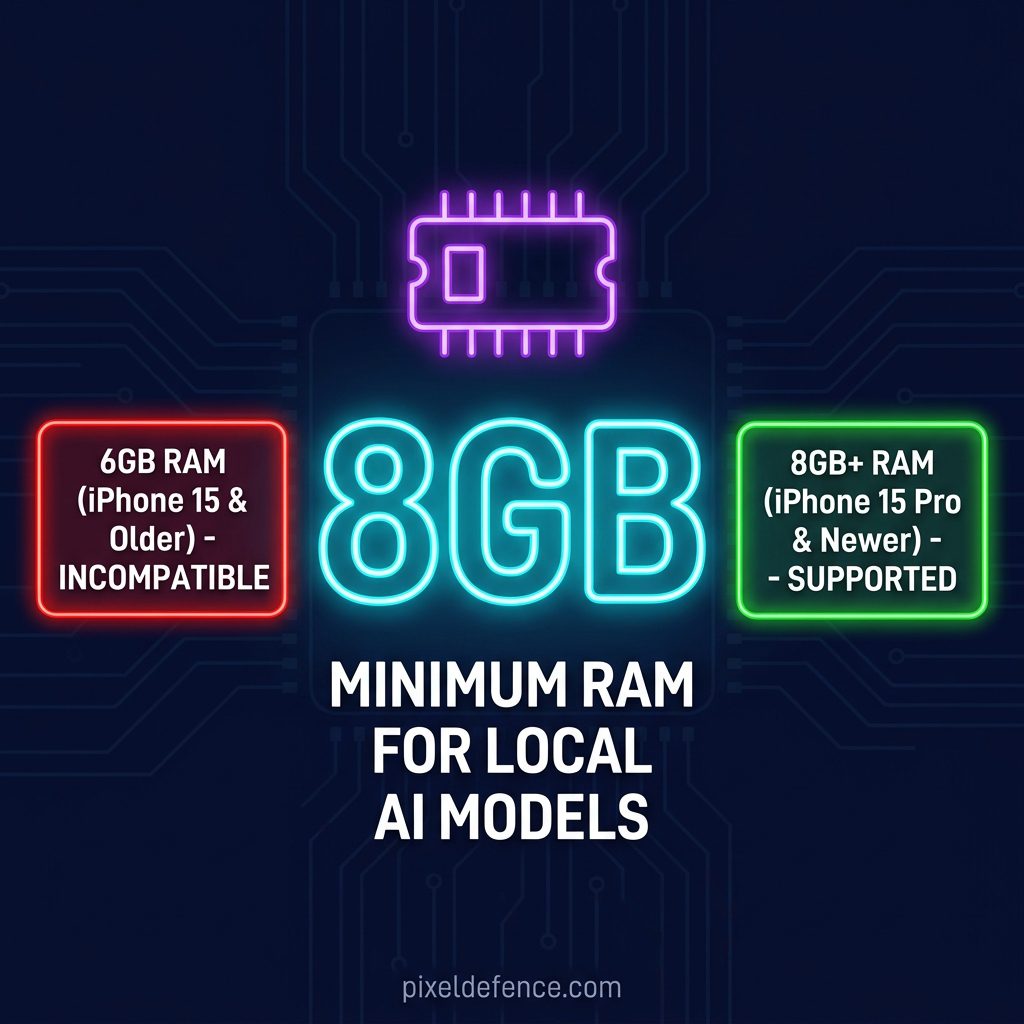
Why is Siri AI not available on older iPhones? The main hardware limit is the amount of random-access memory (RAM) inside the phone.
Think of RAM like the physical desk space in your office. The local AI models are like giant reference books. If your desk is too small, you cannot open the books and work at the same time.
Siri AI requires a minimum of 8GB of RAM to hold these models in memory. The standard iPhone 15 only has 6GB of RAM, meaning its “desk” is too small to load the model.
Apple’s Neural Engine—the chip that accelerates AI calculations—is also too slow on older devices. They designed these strict hardware limits to ensure you must buy their latest device.
If you are planning to upgrade your phone, you should also protect its screen from physical snoops. Check out my guide on choosing the best iPhone privacy screen to keep your screen secure from onlookers.
How to Enable & disable Siri AI
If you have a supported device, turning the feature on is relatively straightforward. However, knowing how to disable siri ai is just as important for your privacy.
Here is the step-by-step process of how to enable siri ai:
- Update your iOS to the latest version in your settings.
- Verify that your device is compatible (iPhone 15 Pro or newer).
- Open your Settings app and scroll down to Apple Intelligence & Siri.
- Select Join Apple Intelligence Waitlist (if applicable) and wait for activation.
- Toggle the Enable Apple Intelligence switch to turn the system on.
To turn the feature off completely, return to the same menu. Toggle the main switch to off, which disables the AI models and returns the assistant to the basic version.
Why Is Siri AI Not Available?
If you have updated your device and still cannot access the new features, several issues could be blocking it.
The most common reason why is siri ai not available is because you are using an unsupported phone. Check the compatibility table above to verify your device model.
If you are asking, “Why don’t I have Siri AI?”, it could also be a regional restriction. Apple has delayed these features in regions like the European Union due to strict digital privacy regulations.
Other troubleshooting steps include checking your language settings (it must be set to a supported English dialect initially). Also, ensure you have at least 4GB of free storage space to download the local models.
Is Siri AI Free?
Yes, Apple does not charge a subscription fee to use these basic intelligence features. It is included as a core part of the iOS operating system.
However, you must have a registered Apple account to activate the service and download the required local models.
The hidden cost of the service is the hardware itself. You are paying a premium for an 8GB RAM device just to run features that could technically be handled by cloud servers.
Apple uses this “free” software as a hook to lock you into their hardware ecosystem. Always read their terms using our Privacy Policy Analyzer before signing up.
What Can Siri AI Actually Do?
Apple has promised a wide range of new capabilities. The siri ai features are designed to make your daily tasks faster by understanding your personal context.
The assistant can now follow conversations even if you stumble over your words. It maintains context across multiple requests, allowing you to ask follow-up questions.
It powers new writing tools that can rewrite, proofread, and summarize text in any app. It also generates notification summaries and email summaries directly on your lock screen.
Furthermore, Siri can find photos using natural descriptions and perform actions inside apps. It can edit a photo and then send it to a friend via the Messages app.
Can Siri AI Browse the Web?
Yes, the assistant can access the web to answer real-time questions. However, the way it handles these web searches is a major privacy concern.
When you ask a question that requires external information, Siri searches the web using Safari’s search index. It pulls data from public web pages to compile an answer.
Unlike traditional search engines, it tries to summarize the web page content directly. This means you do not have to click through to individual websites.
However, this routing means your search queries are sent to external servers. If you value search privacy, you should limit how often you let Siri browse the web.
Does Siri AI Require Internet?
Many users want to know: does siri ai require internet to function? The answer depends entirely on the complexity of the task.
Simple commands can be processed locally on your device without sending any data online. Complex tasks require a connection to Apple’s servers.
If you are offline, Siri can still set alarms, play local music, and change settings. But if you ask a question about current events, it will fail without an active connection.
This split architecture means your phone is constantly deciding when to upload your data. Let’s look at the privacy implications of this system.
Is Siri AI Private?
Apple’s marketing machine claims that this system sets a new standard for privacy. In my siri ai privacy explained audit, I found a mix of good architecture and potential risks.
For local tasks, the data never leaves your device. According to Apple’s official intelligence privacy policy, this on-device processing is the gold standard because no third party can access your files.
For cloud tasks, Apple uses “Private Cloud Compute” (PCC). According to Apple’s PCC security guide, these are custom servers built with Apple Silicon that process your data in temporary memory (RAM) and immediately delete it.
Think of PCC like a secure, one-time shredder box. Your data goes in, gets processed, and is instantly shredded. The server doesn’t keep logs, and Apple engineers cannot access it.
However, you must trust that Apple’s code works exactly as they claim. While security researchers can audit the server images, ordinary users are left in the dark.
Does Siri AI Remember Conversations?
If you are worried about your device building a permanent archive of your thoughts, you need to understand how session memory works.
Siri maintains a short-term session memory. This allows you to ask a follow-up question without repeating the subject of the conversation.
However, this context is temporary. Once you close the Siri interface or start a new task, the active session memory is cleared.
Apple does not build a permanent, centralized database of your past conversations. Your local history is stored on your device and can be cleared in your Siri settings.
Frequently Asked Questions
Can Siri AI replace ChatGPT?
No, Siri is designed as a personal assistant to manage your device and apps, not as a standalone chatbot. It focuses on local device actions and privacy rather than creative writing or general knowledge generation.
Is Siri smarter than the old Siri?
Yes, it is significantly better at understanding natural speech patterns and personal context. It no longer fails if you stutter or change your mind mid-sentence.
Does Siri work without Apple Intelligence?
Yes, but it reverts to the legacy version. It will only support basic voice commands and will not have access to generative features or screen awareness.
Is Siri AI available worldwide?
No, Apple has restricted the launch to specific regions and languages. It is rolling out slowly to comply with local regulations and model training requirements.
Does Siri support multiple languages?
At launch, it primarily supports English. Apple is training the models to support additional languages, which will be released in future iOS updates.
Does Siri AI cost money?
No, the software features are free. The actual cost is the requirement to purchase a supported device (iPhone 15 Pro or newer) to run the models.
Conclusion
Siri AI is a powerful upgrade, but it comes with strings attached. You are forced to buy expensive new hardware due to RAM bottlenecks.
While Private Cloud Compute offers better security than traditional cloud servers, it is still cloud routing. You must decide if you trust Apple’s closed-source software.
Before you enable these features, I highly recommend checking Apple’s updated terms of service. Run their agreements through our Privacy Policy Analyzer to see exactly how your data is handled.
Stay informed, keep your device settings locked down, and never assume that marketing claims equal absolute privacy.