Creating AI art has never been more accessible, yet the friction to get started is at an all-time high. Almost every mainstream AI image generator now forces you to sign up, verify an email address, or link a social account before you can generate a single pixel. If you want to bypass this hassle and maintain your privacy, finding a reliable no login ai image generator is the best solution.
For this guide, I conducted a standardized test of 10 popular no-login AI image generators. I opened a clean private browser session, ran the exact same highly detailed prompt across all of them, and recorded the results. Here is the objective truth about which tools actually deliver high-quality images without requiring your email address.
If your goal is to transfer large files or media without creating an account, read my complete privacy investigation on the 7 best private file sharing sites without signup to see how P2P and zero-knowledge encryption protect your data.
Introduction
Why do so many AI image generators require an account?
Most AI image generator companies require user registration for three primary reasons: monetization, resource allocation, and tracking. By requiring an account, companies can easily upsell users to paid monthly subscriptions once free credits are exhausted. It also prevents automated bots from overloading their servers with generation requests. Finally, accounts allow companies to track generation history, map user preferences, and collect valuable email addresses for future marketing campaigns.
Why would someone want to avoid signing up?
Avoiding the sign-up process is primarily about reducing friction and protecting digital privacy. Every account you create is another database where your email address, IP address, and generation patterns are stored. In the event of a corporate data breach, your personal details can be exposed. Furthermore, many users simply want to test a tool’s capabilities for a quick task or brainstorming session without having their inbox flooded with marketing spam or newsletters.
How did you test these tools?
I tested every generator in a fresh private browser session to verify whether it allowed image generation without creating an account. I checked whether it required an email, imposed daily limits, added watermarks, and how quickly it generated images. The standardized test prompt used across all tools was:
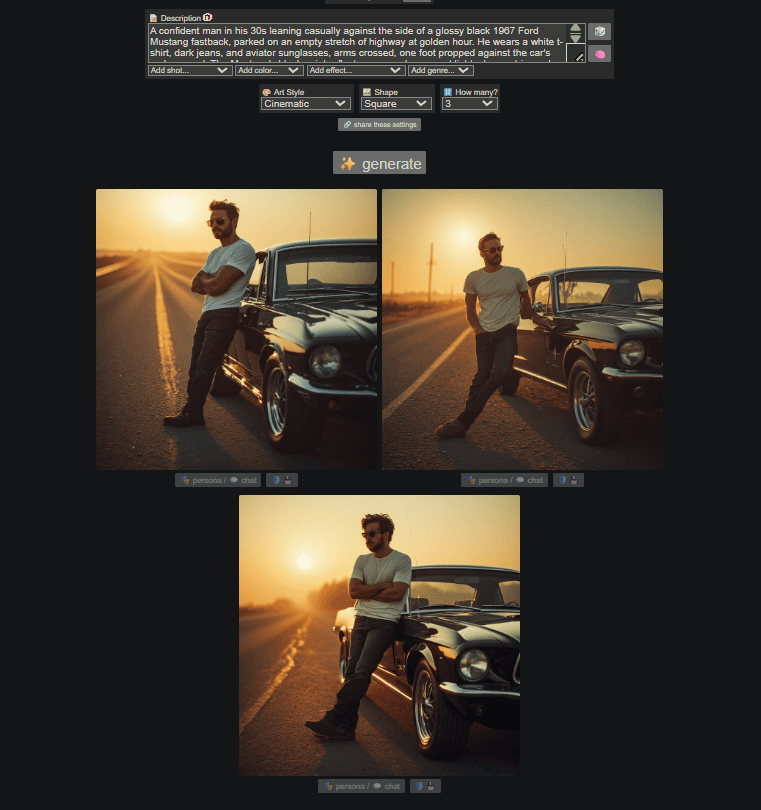
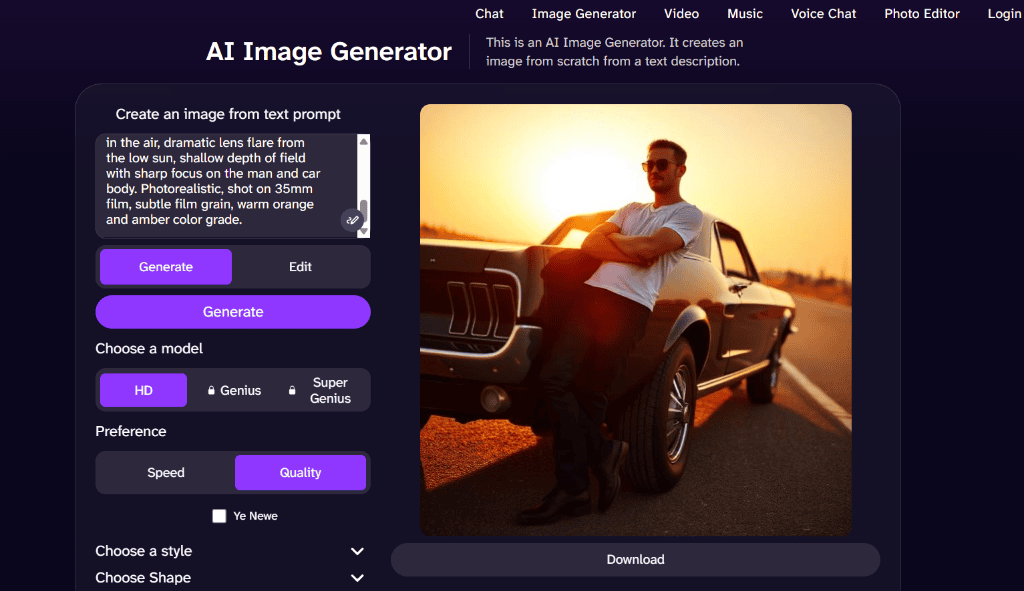
“A confident man in his 30s leaning casually against the side of a glossy black 1967 Ford Mustang fastback, parked on an empty stretch of highway at golden hour. He wears a white t-shirt, dark jeans, and aviator sunglasses, arms crossed, one foot propped against the car’s rocker panel. The Mustang’s black paint reflects warm amber sunset light, chrome trim and hubcaps gleaming, long hood stretching into the frame. Wide-angle cinematic shot, low camera angle, dust and warm haze in the air, dramatic lens flare from the low sun, shallow depth of field with sharp focus on the man and car body. Photorealistic, shot on 35mm film, subtle film grain, warm orange and amber color grade.”
Quick Comparison Table
| Tool | No Login | Free | Watermark | Daily Limit | Best For |
|---|---|---|---|---|---|
| Perchance AI | Yes | Yes | No | None | Anime & Speed |
| DeepAI | Yes | Yes | No | None (Ad-supported) | Basic Graphics |
| Raphael AI | Yes | Yes | No | None | Fast Generations |
| Flat AI | Yes | Yes | No | None | Photorealism & Privacy |
| Craiyon | Yes | Yes | Yes | None (Ad-supported) | Casual Experimentation |
| Hugging Face | Yes | Yes | No | None | High-Quality Models |
| Dezgo | Yes | Yes | No | Rate-limited | Custom Aspect Ratios |
| Img2Go | Yes | Yes | No | 10 credits/day | Multiple Variations |
| Fotor AI | Yes | Yes | No | Credit-limited | Creative Layouts |
| Dream AI | Yes | Yes | No | Limited style tiers | Stylized Artwork |
Which is the Best No Login AI Image Generator? Individual Reviews
1. Perchance AI
Best for: Anime art and fast generations.
Pros:
- Completely free with zero generation limits or daily caps.
- Very fast generation speeds, averaging under 20 seconds.
- No registration, login, or email verification is ever requested.
Cons:
- Interface looks outdated and is cluttered with options.
- Outputs are sometimes lower resolution compared to modern models.
- Image variations can occasionally display slight anatomical errors.
| Feature | Result |
|---|---|
| Login Required | ❌ |
| Email Required | ❌ |
| Watermark | ❌ |
| Model | Perchance Custom / SD derivative |
| Image Size | 512×512 (Square) |
| Speed | Under 20 seconds |
Privacy Notes:
Perchance AI operates on a client-side architecture for site settings, saving data locally in your browser’s local cache. Prompts and generation inputs are processed in-memory and not tied to any permanent profile. However, standard browser cookies are set to maintain site settings and preferences across visits.
Verdict:
Perchance AI is ideal for hobbyists who want rapid, unlimited creations without the constant nag screens to register an account.
2. DeepAI
Best for: Basic graphic creations and quick style edits.
Pros:
- Direct access to a wide range of predefined artistic styles.
- Simple, clean interface that loads instantly.
- Includes quick post-generation editing options.
Cons:
- Advanced models (Genius/Super Genius) are locked behind accounts.
- Free tier is heavily ad-supported, which degrades user experience.
- Photorealism struggle is noticeable compared to newer models.
| Feature | Result |
|---|---|
| Login Required | ❌ |
| Email Required | ❌ |
| Watermark | ❌ |
| Model | DeepAI Standard Model |
| Image Size | Square (approx. 512×512) |
| Speed | Under 30 seconds |
Privacy Notes:
DeepAI’s privacy policy indicates it sets persistent cookies on your device to support functionalities and manage advertisements. The site automatically logs general browser parameters and IP addresses in its server logs. Users must manage cookie consent panels to block third-party tracking.
Verdict:
DeepAI is a solid fallback option for simple design mockups, provided you do not mind closing multiple banner advertisements.
3. Raphael AI
Best for: Quick, clean photorealistic outputs.

Pros:
- Generates high-quality lighting and accurate subject details.
- Allows unlimited generations without credit limits.
- Simple, straightforward one-click interface.
Cons:
- The raphaelai.org domain is a third-party clone of the official raphael.app.
- Limited settings and aspect ratio adjustments.
- The backend model does not always capture minor details of longer prompts.
| Feature | Result |
|---|---|
| Login Required | ❌ |
| Email Required | ❌ |
| Watermark | ❌ |
| Model | Raphael Custom SD |
| Image Size | Square (1:1) |
| Speed | Under 30 seconds |
Privacy Notes:
Because the tested domain (raphaelai.org) is an unverified third-party clone, caution is advised. While the official developer platform (raphael.app) claims zero data retention, this cloned version utilizes standard web hosting cookies that may track sessions and device data.
Verdict:
Use Raphael AI when you need clean, watermark-free images quickly, but avoid entering sensitive prompts due to the clone domain status.
4. Flat AI
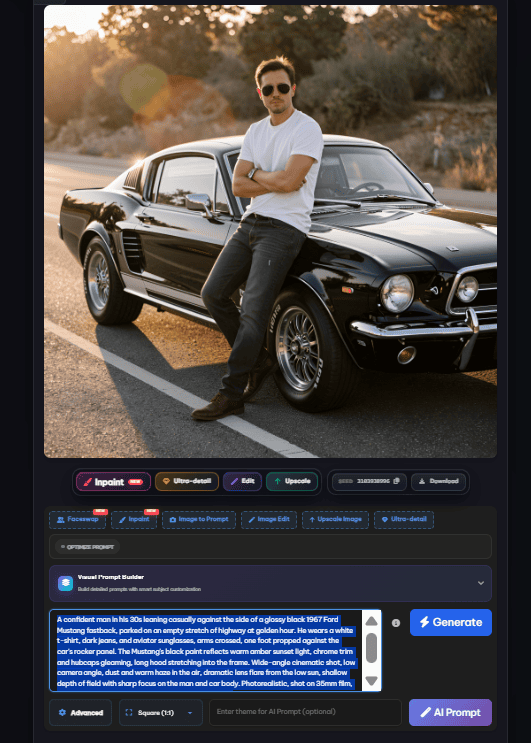
Best for: Highly detailed photorealism and privacy-conscious users.
Pros:
- Outstanding prompt adherence and photorealistic image details.
- Includes advanced features like inpainting and upscaling for guest sessions.
- Strong privacy claims backed by a clean interface.
Cons:
- The generation engine requires a modern browser to run smoothly.
- Interface can feel slightly overwhelming for complete beginners.
- Mixed safety trust reviews from independent web scanners.
| Feature | Result |
|---|---|
| Login Required | ❌ |
| Email Required | ❌ |
| Watermark | ❌ |
| Model | Flat AI SDXL |
| Image Size | Square (1:1) |
| Speed | Under 35 seconds |
Privacy Notes:
Flat AI stands out by claiming “No Tracking Cookies” and “Zero Data Retention.” Image histories and thumbnails are stored locally within your browser’s memory, meaning your prompt data never leaves your device permanently and can be wiped instantly by clearing browser data. This makes it an exceptionally safe no login ai image generator for quick, private runs.
Verdict:
Flat AI is a top choice for privacy-conscious creators seeking commercial-grade photorealism without signing up.
5. Craiyon
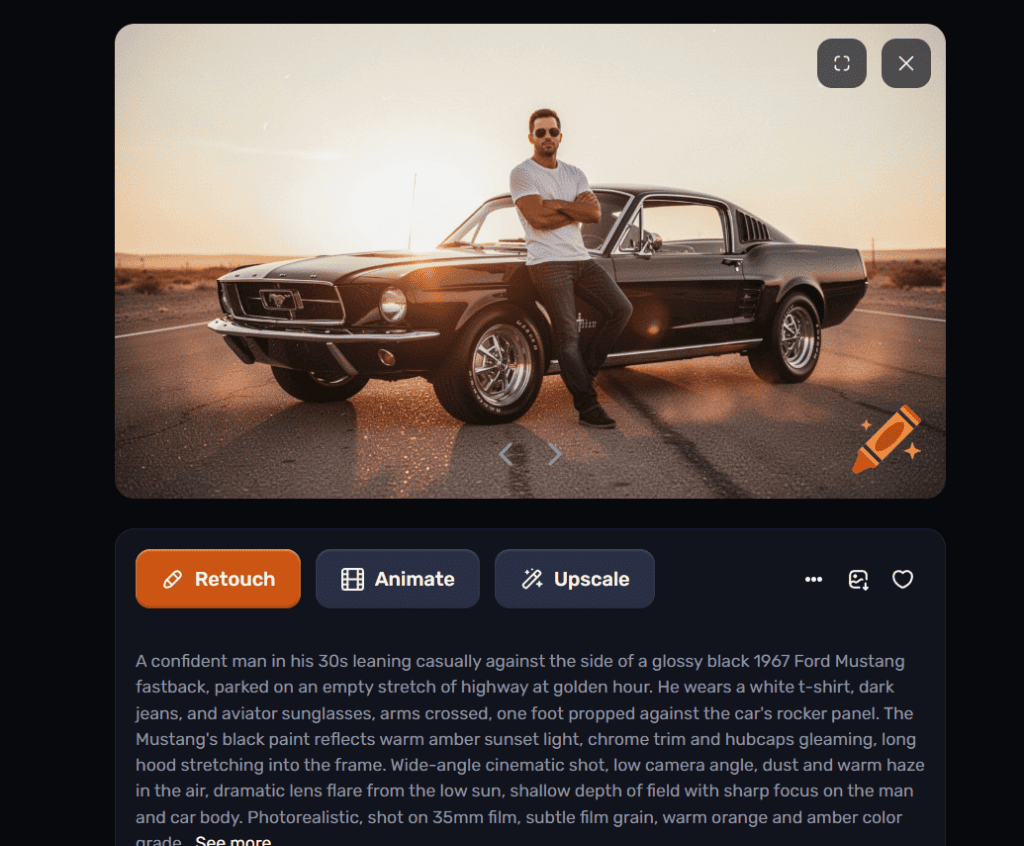
Best for: Casual experiments and brainstorming concepts.
Pros:
- Simple text interface requiring zero configuration.
- Provides easy Retouch and Animate options.
- Good color replication and golden hour lighting.
Cons:
- Forces a prominent orange crayon watermark in the bottom-right corner.
- Slow generation speed compared to newer models.
- Heavy advertising presence on the free generation interface.
| Feature | Result |
|---|---|
| Login Required | ❌ |
| Email Required | ❌ |
| Watermark | ✅ (Orange Crayon Logo) |
| Model | Craiyon v3 |
| Image Size | Square (1:1) |
| Speed | Under 45 seconds |
Privacy Notes:
Craiyon relies heavily on ad-serving networks. As a result, it sets numerous third-party tracking cookies to build user advertising profiles. Prompt keywords and basic device data are shared with advertising partners to optimize ad targeting.
Verdict:
Craiyon is fine for quick drafts, but the watermark and tracking cookies make it less ideal for professional or privacy-focused projects.
6. Hugging Face
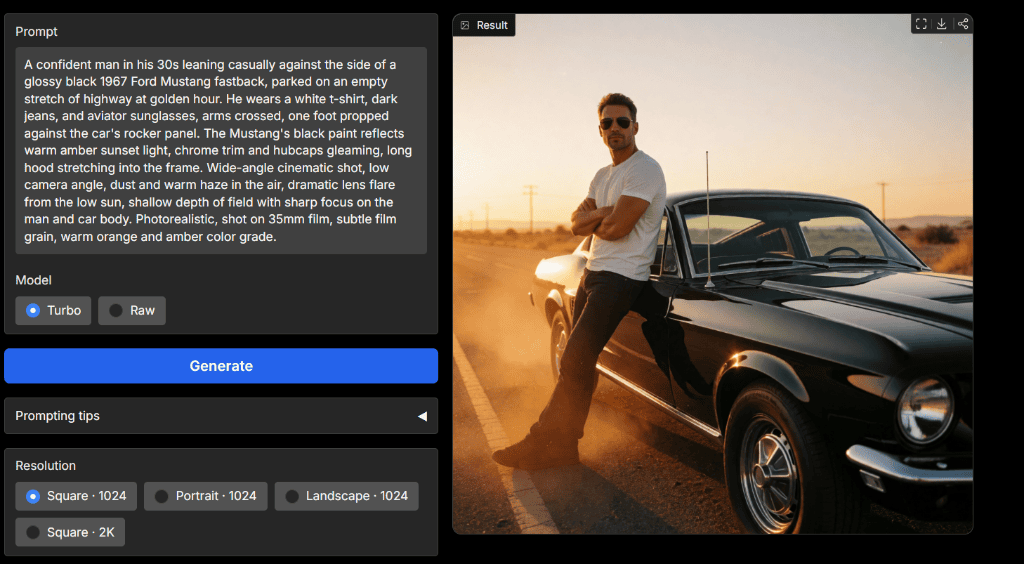
Best for: Advanced creators looking for state-of-the-art open models.
Pros:
- Incredible image quality with access to raw open weights.
- No watermarks or artificial resolution downgrades.
- Features multi-resolution support up to 2K.
Cons:
- Spaces are community-hosted, which can lead to server queues during high traffic.
- No long-term save feature for guest users.
- The layout is clean but lacks built-in editing or retouching features.
| Feature | Result |
|---|---|
| Login Required | ❌ |
| Email Required | ❌ |
| Watermark | ❌ |
| Model | Krea-2 / SDXL |
| Image Size | Square (1024×1024) |
| Speed | Under 25 seconds (Turbo) |
Privacy Notes:
Hugging Face Spaces are independent open-source apps. While Hugging Face uses basic cookies for session safety, prompt storage depends entirely on the Space code. Users can inspect the open-source code under the Space’s files tab to verify if the developer logs prompts. Using a clean Hugging Face space makes it an excellent, transparent no login ai image generator.
Verdict:
Hugging Face is the premier destination for high-quality, account-free image generation if you want to use state-of-the-art models.
7. Dezgo
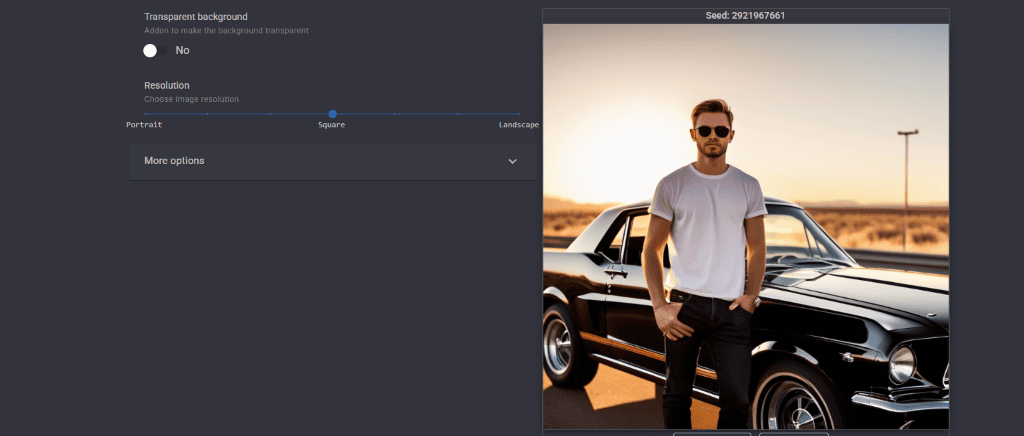
Best for: Custom aspect ratio generation without sign-up.
Pros:
- Easy aspect ratio slider from portrait to landscape.
- Generates clean images without visual artifacts.
- Quick, responsive controls.
Cons:
- Subject details can occasionally lack precision (e.g., car geometry).
- Generations are rate-limited during high-traffic periods.
- Advanced settings require a paid account or API key.
| Feature | Result |
|---|---|
| Login Required | ❌ |
| Email Required | ❌ |
| Watermark | ❌ |
| Model | Stable Diffusion XL (SDXL) |
| Image Size | Square (configurable) |
| Speed | Under 30 seconds |
Privacy Notes:
Dezgo sets standard preference cookies to remember user parameters. It integrates third-party advertising companies that place tracking cookies on your browser. Server logs automatically capture IP addresses and user agent details.
Verdict:
Dezgo is a highly capable tool for quick drafts when aspect ratio flexibility is your primary requirement.
8. Img2Go
Best for: Multi-variation generation in a single run.
Pros:
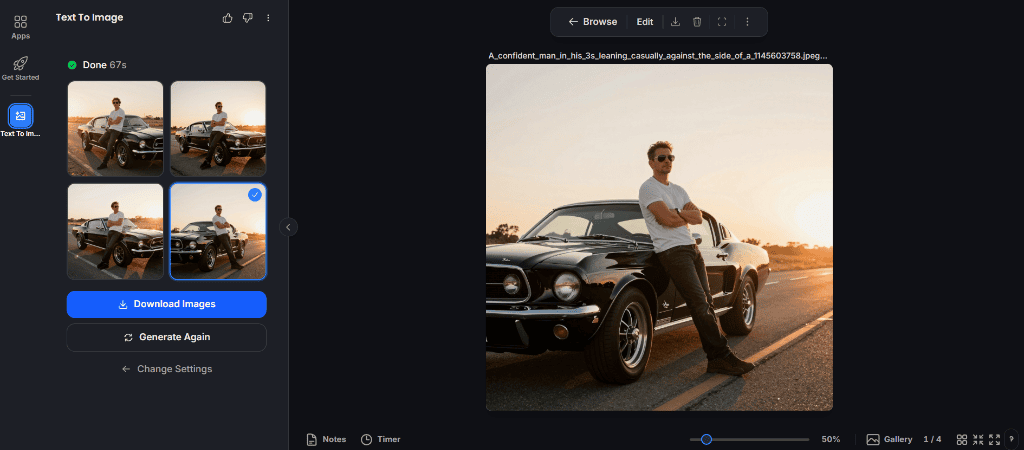
- Generates 4 distinct variations simultaneously.
- High photorealism and excellent prompt adherence.
- Clean, professional workspace interface.
Cons:
- Extremely slow generation times, averaging 67 seconds.
- Free tier is limited to 10 daily generation credits for guests.
- The layout has a learning curve due to advanced configuration panels.
| Feature | Result |
|---|---|
| Login Required | ❌ |
| Email Required | ❌ |
| Watermark | ❌ |
| Model | Stable Diffusion |
| Image Size | Square (1:1) |
| Speed | 67 seconds |
Privacy Notes:
Img2Go encrypts files in transit and at rest. The site automatically deletes all guest-generated files from its servers within 24 hours. The platform explicitly states it does not use your private images to train its AI models.
Verdict:
If you need multiple options and don’t mind waiting over a minute for the generation, Img2Go is a highly secure tool to choose.
9. Fotor AI
Best for: Creative layouts and portrait aspect ratios.
Pros:
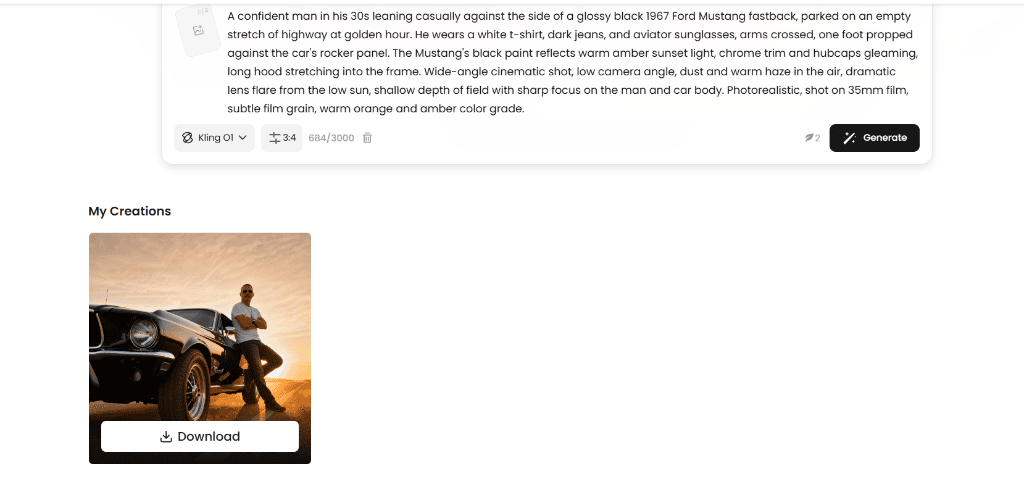
- Access to advanced models like Kling O1 in a free guest mode.
- Good rendering of lighting and composition.
- Convenient download controls on the preview page.
Cons:
- The free account-free tier has strict credit limitations.
- Prompts you to register for a premium account after a few runs.
- Image dimensions on the free tier are limited compared to paid plans.
| Feature | Result |
|---|---|
| Login Required | ❌ |
| Email Required | ❌ |
| Watermark | ❌ (None visible in preview) |
| Model | Kling O1 |
| Image Size | Portrait (3:4) |
| Speed | Under 40 seconds |
Privacy Notes:
Fotor utilizes persistent cookies and clear GIFs (web beacons) to track visitor movements and optimize ad targeting. It stores detailed records of site interactions. Clear cache and cookies regularly if you wish to wipe these trackers.
Verdict:
Fotor AI offers solid rendering quality, but its persistent nudges to register and heavy tracker use limit its long-term appeal for privacy users.
10. Dream AI
Best for: Stylized artwork and artistic drafts.
Pros:
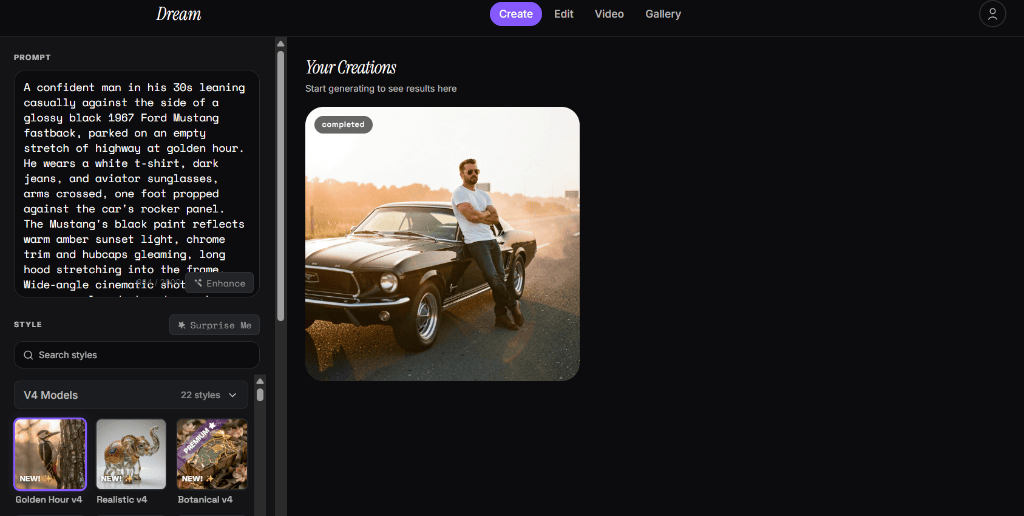
- Wide variety of pre-loaded art styles (Golden Hour, Realistic, etc.).
- Clean, visual dashboard with real-time status updates.
- Generates highly aesthetic images without registration.
Cons:
- Advanced templates and models require a paid subscription.
- Aspect ratios are locked for guest users.
- Text generation prompts can occasionally be cut off in the interface.
| Feature | Result |
|---|---|
| Login Required | ❌ |
| Email Required | ❌ |
| Watermark | ❌ |
| Model | Golden Hour v4 / Realistic v4 |
| Image Size | Square (1:1) |
| Speed | Under 30 seconds |
Privacy Notes:
Dream AI uses cookies to store user preferences and maintain sessions. Prompts and generated art are temporarily held in their cache, and public galleries may display creations if you do not opt out. The company also tracks device specifications for service optimization.
Verdict:
Dream AI is an excellent creative outlet for producing highly stylized art assets without account registration. It is a solid, styling-focused no login ai image generator.
Side-by-Side Comparison Gallery
To help you evaluate prompt adherence, here is how each tool rendered our standardized cinematic Mustang prompt:
| Tool | Generated Image |
|---|---|
| Perchance AI | |
| DeepAI | |
| Raphael AI | |
| Flat AI | |
| Craiyon | |
| Hugging Face | |
| Dezgo | |
| Img2Go | |
| Fotor AI | |
| Dream AI | |
Rankings
| Rank | Tool | Score | Best For |
|---|---|---|---|
| #1 | Hugging Face | 9.8 | Overall |
| #2 | Flat AI | 9.6 | Photorealism |
| #3 | Perchance AI | 9.5 | Anime |
| #4 | Raphael AI | 9.2 | Unlimited Use |
Best Picks by Category
- Best Overall: Hugging Face (Krea-2) – Provides professional resolutions, zero watermarks, and high speed.
- Fastest Generator: Perchance AI – Generates full batches in under 20 seconds.
- Best for Photorealistic Images: Flat AI – Exceptional lighting and car reflections.
- Best for Anime: Perchance AI – Offers custom character presets.
- Best for Logos: DeepAI – Standard models are optimized for flat icons.
- Best for Artwork: Dream AI – Excellent stylistic variations.
- Best Unlimited Option: Raphael AI – Clean, account-free runs.
- Best Privacy: Flat AI – Stores generation cache locally on your browser.
- Best Open Source: Hugging Face – Allows direct inspection of running Spaces.
- Best Mobile-Friendly: Dream AI – Highly responsive UI for smartphones.
FAQ
Can I generate AI images without creating an account?
Yes. Many independent platforms and community Hugging Face Spaces let you enter prompts and generate images directly from your browser without email validation or account creation.
Are no-login AI image generators really anonymous?
Not entirely. While they do not collect your name or email, most websites still capture your IP address, device fingerprints, and set cookies to track session behavior. True anonymity requires combining these tools with a private browser session and a VPN, as detailed on our Private AI Tools page.
Do these generators store my prompts?
Most platforms temporarily cache prompts to process the generation request. While privacy-centric tools like Flat AI clear logs immediately, other commercial tools may store prompts in server log history to train future model versions.
Which AI image generator has no watermark?
Among the tested tools, Perchance, Flat AI, Hugging Face, Raphael AI, Dezgo, and Dream AI generate clean images without any visible watermark on the free, guest tier.
Which one offers unlimited generations?
Perchance AI, Flat AI, and Raphael AI provide unlimited generations without forcing credits, timers, or daily limits during a guest browser session.
Can I use these images commercially?
It depends on the platform. Tools running on open-source weights (like Stable Diffusion on Hugging Face or Dezgo) generally allow commercial usage. However, ad-supported tools may restrict commercial usage on their free guest tiers. Always check the specific terms of use link on the generator website before using outputs commercially.
Conclusion
Generating AI images does not have to mean sacrificing your privacy or cluttering your email inbox. By using tools like Hugging Face, Flat AI, or Perchance, you can create outstanding artwork without setting up accounts. Keep in mind that login policies and credit caps can change overnight. I will keep this list updated as these tools evolve. To find more services that operate without harvesting your credentials, check out our guide to Private AI Tools.