A close friend or coworker texts you a link to a trending TikTok video. You tap the link, watch for five seconds, and an aggressive, unskippable modal completely covers your screen: “Log in to TikTok to continue watching.”
You try to swipe it away. You tap the screen. You hit the back button. Nothing works. The video is held hostage behind a registration wall demanding your email, phone number, and personal details.
Most people either give up in frustration or surrender to ByteDance by downloading the mobile app and creating an account. They assume there is no other way to watch the content they were sent.
I’m Rock, the founder of Pixel Defence. I run this site to investigate Big Tech data harvesting and provide everyday people with practical, uncompromising tools to defend their digital privacy.
I’m not here to tell you to ignore your friends or make a grand anti-social media gesture. Millions of great videos, recipes, news clips, and tutorials live on TikTok.
You should be able to view them without surrendering your identity to ByteDance’s tracking apparatus. In this investigation, I am answering the critical question: can you use tiktok without an account, exposing what ByteDance logs from guest visitors, and showing you four tested ways to watch videos completely friction-free.
Table of Contents
What Is Happening: The Coercive Web Gating Machine
If you visit TikTok’s homepage on a desktop web browser, the site appears to function like YouTube. You can browse the “For You” feed, watch short clips, and search for specific creators without entering credentials.
However, that open experience is an illusion designed to reel you in.
The moment you scroll past three or four videos, or attempt to view a creator’s second video, TikTok’s frontend code triggers an aggressive JavaScript gating routine.
A dark overlay freezes the media player, blurs the comment section, and spawns a persistent modal dialog: “Log in to TikTok. Sign up to like, comment, and follow.”
If you are browsing on a mobile smartphone browser, the coercion is even worse.
TikTok actively cripples the mobile web experience:
- Video resolution is downgraded to create buffering.
- The search bar is deliberately disabled or hidden.
- Tapping a creator’s profile redirects you to a full-screen landing page shouting: “Open in the TikTok App.”
- Comment threads are collapsed and blurred out entirely.
ByteDance doesn’t break the web version by accident. They engineer these artificial obstacles to force you into their native mobile application—where their data-collection capabilities expand by a factor of ten.
Why It Matters: What TikTok Tracks When You Have No Account
Many privacy-conscious users believe they are completely safe as long as they never create an account. They think: “If I don’t give them my name, email, or password, they have no idea who I am.”
In modern surveillance capitalism, that assumption is dangerously false.
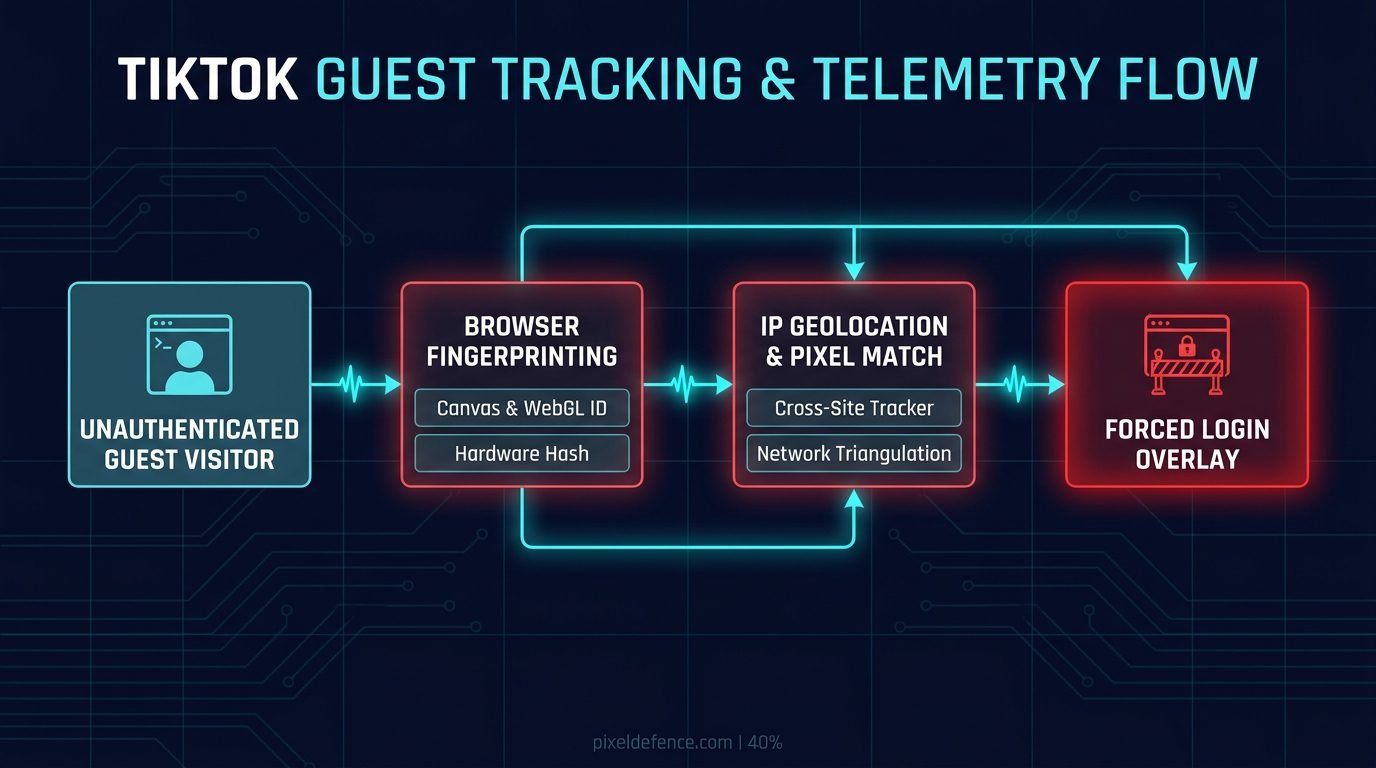
Even if you browse TikTok as an unauthenticated guest with zero account, ByteDance’s web servers and analytics scripts collect extensive telemetry on your device:
- Browser Canvas & WebGL Fingerprinting: When your browser loads a TikTok video, TikTok executes background JavaScript tests on your graphics hardware. They measure subtle differences in how your GPU renders fonts, 3D shapes, and color gradients, creating a unique hardware fingerprint that identifies your specific device across visits.
- IP Geolocation & ISP Tagging: Every HTTP request exposes your public IP address. ByteDance logs your geographic location down to your city, neighborhood, and internet service provider, linking your guest session to your physical household.
- The Web-Wide TikTok Pixel: Millions of third-party websites (online stores, news publishers, ticketing platforms) run the TikTok Pixel to track ad conversions. When you visit an online retailer that uses the TikTok Pixel, ByteDance links your offline shopping basket with the guest videos you watched earlier.
You may not have a username, but ByteDance maintains an active shadow profile on your browser hardware.
How TikTok Tracks Unauthenticated Guest Visitors:
-----------------------------------------------------------------
[Guest clicks TikTok video link in browser]
       │
       ▼
[TikTok Web Client executes background JavaScript profiling]
       │
       ├─► Canvas / WebGL Hardware Fingerprint (Unique device ID)
       │
       ├─► IP Address & Network ISP (Pinpoints physical city/home)
       │
       └─► Third-Party TikTok Pixel Match (Bridges commercial web history)
                 │
                 ▼
     [Aggressive Login Overlay Triggered after 3 videos to force identity reveal]
The Native App Trap: Why You Must Never Install It
If you want to protect your privacy, the single most important rule is: never install the official TikTok mobile app on your personal phone.
Multiple independent cybersecurity audits, including comprehensive analyses by Citizen Lab and the Electronic Frontier Foundation (EFF), have documented the staggering breadth of data the native TikTok application harvests compared to a sandboxed browser.
When the TikTok application sits on your smartphone, it requests access to:
- Unique Hardware Identifiers: Mobile advertising ID (IDFA on iOS, GAID on Android), device IMEI, and serial numbers.
- Keystroke Dynamics: The rhythm, speed, and cadence of your typing patterns inside the in-app browser.
- Clipboard Contents: Access to the text and links currently copied to your phone’s memory.
- Network Environment: The names (SSIDs) and hardware MAC addresses (BSSIDs) of every Wi-Fi network and Bluetooth device nearby.
- Background Telemetry: Accelerometer, gyroscope, and battery health data.
A mobile web browser strictly isolates websites inside a secure sandbox. Web pages cannot read your clipboard, cannot scan your local Wi-Fi networks, and cannot extract your phone’s hardware serial numbers.
By refusing to install the native app, you neutralize 90% of ByteDance’s surveillance vectors before they ever touch your operating system.
How to Use TikTok Without an Account: 4 Proven Ways
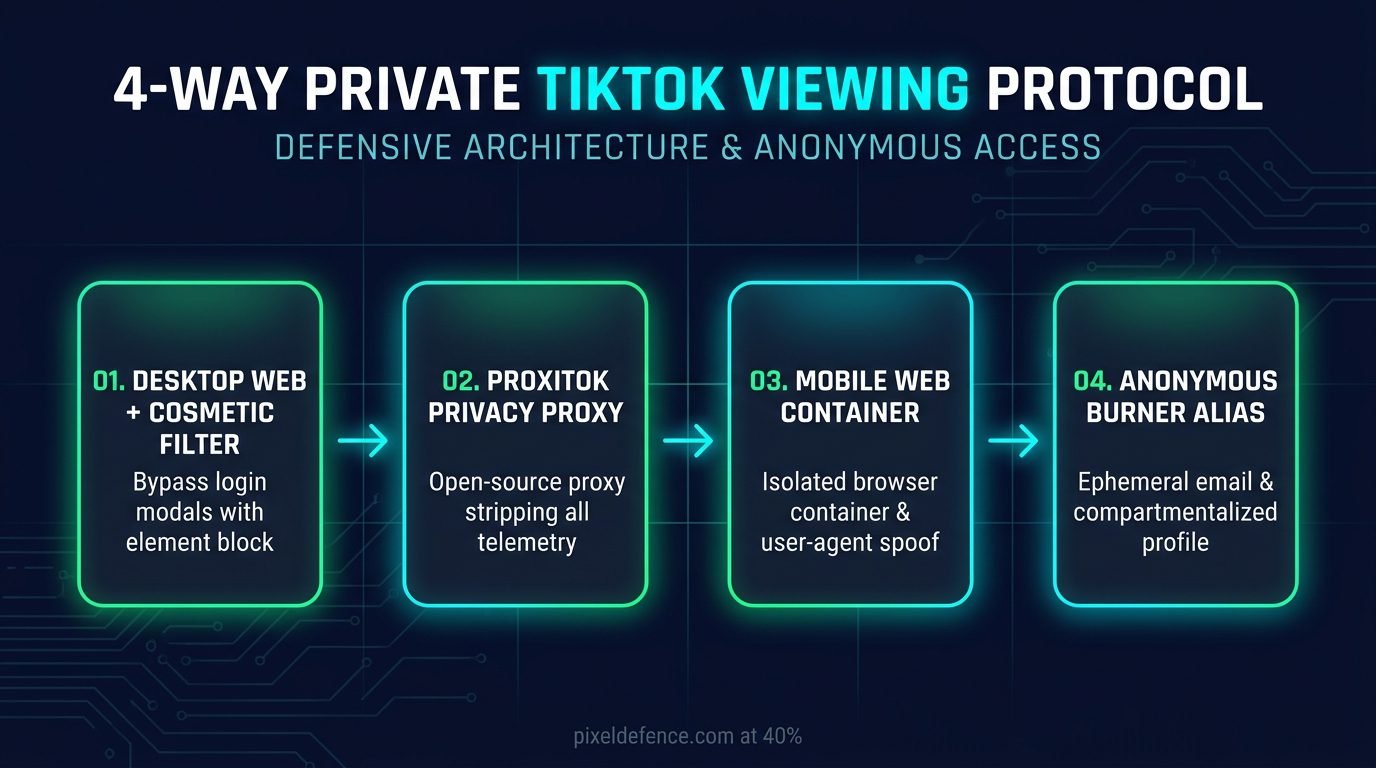
Here are the four tested methods to watch TikTok videos, view creator profiles, and bypass registration walls without sacrificing your personal information.
Method 1: The Desktop Web + Filter Blocker (The Best Overall Method)
If you browse TikTok on a desktop computer, you can kill the login barrier permanently using an open-source ad blocker like uBlock Origin:
- Open a privacy-hardened browser (like Brave or Firefox).
- Install the uBlock Origin browser extension.
- Open uBlock Origin settings, go to My Filters, and paste this custom cosmetic filter rule:
   tiktok.com##div[class*="DivLoginContainer"]
   tiktok.com##div[class*="DivModalContainer"]
tiktok.com##body:style(overflow: auto !important;)- Click Apply changes.
This simple rule blocks TikTok’s login overlay from ever appearing and forces your browser scrollbar to remain unlocked. You can scroll through hundreds of videos, search hashtags, and watch clips indefinitely without ever seeing a login prompt.
Method 2: Use an Open-Source Privacy Front-End (ProxiTok)
If you want complete zero-knowledge privacy where ByteDance never even sees your IP address, use an open-source front-end called ProxiTok.
ProxiTok operates like Invidious or Libreddit: it acts as a lightweight, privacy-respecting proxy between you and TikTok’s servers.
Here is how to use it:
- When someone sends you a TikTok link (e.g.,
https://www.tiktok.com/@username/video/123456789), copy the URL. - Replace
tiktok.comin the address bar with a public ProxiTok instance domain (such asproxitok.pabloferreiro.esor any verified community instance from GitHub). - The video loads in a clean, high-speed HTML5 player with zero tracking scripts, zero cookies, and zero login popups.
All video requests route through the proxy server. ByteDance only ever sees the IP address of the proxy, keeping your home network completely invisible.
Method 3: Mobile Web Containers (The Phone Workaround)
If you are on an iPhone or Android device and someone sends you a video link, do not tap it directly to open an in-app browser:
- Copy the TikTok link to your clipboard.
- Open a private browsing tab in Brave or Firefox Mobile.
- Paste the link into the address bar.
- If TikTok prompts you with an “Open in App” banner, tap the browser menu (three dots) and check “Desktop site.”
Switching your mobile browser user-agent to desktop mode instantly bypasses the mobile app redirect.
It restores the full video player, unlocks the search bar, and lets you play the clip cleanly without installing a single byte of ByteDance code on your phone.
Method 4: The Anonymous Burner Account (If You Must Comment)
What if you genuinely want to bookmark your favorite recipes, create playlists, or leave comments on a creator’s video?
In that scenario, you must follow our strict Minimal Viable Identity protocol:
- Never sign up using Google, Apple, or Facebook Single Sign-On (SSO). That merges your real-world identity into ByteDance’s advertising graph instantly.
- Never provide your personal phone number.
- Use an isolated email forwarding alias generated through SimpleLogin or DuckDuckGo Email Protection, as outlined in our guide on how to create a burner email for social media.
- Create a completely randomized username that shares zero connection with your real name or other social handles.
You get all the functional perks of a registered account while keeping your real identity completely isolated behind an encrypted email firewall.
If you want to review the full legal reality of what ByteDance shares with foreign servers and advertising networks, run their legal terms through our free Pixel Defence Privacy Policy Analyzer.
Action Checklist: 4 Rules for Zero-Data TikTok Browsing
- Rule 1: Never Tap “Open in App”: Treat the native TikTok mobile app as an untrusted client. Keep all viewing contained inside a private browser tab.
- Rule 2: Clear Site Cookies Regularly: If you browse TikTok web without an account, clear your browser cookies and site data once a week to reset your guest tracking identifier.
- Rule 3: Use ProxiTok for Direct Links: Whenever a friend sends you a video link, paste it into an open-source ProxiTok instance for zero-fingerprint viewing.
- Rule 4: Scrub All Media Before Uploading: If you ever decide to upload a video or picture to TikTok, remember that camera files contain embedded GPS coordinates and lens serial numbers. Strip all metadata first using our free browser-based Pixel Defence EXIF Scrubber.
Frequently Asked Questions (FAQ)
Can you use TikTok without an account?
Yes. You can watch videos, view user profiles, and search content on desktop or mobile web browsers without creating an account. However, you must use ad-blocking filters or desktop mode to bypass the login overlay that appears after viewing several clips.
Can TikTok see who I am if I don’t have an account?
TikTok cannot see your name or phone number directly, but they log your IP address, browser canvas fingerprint, and device specifications. If other websites you visit use the TikTok Pixel, ByteDance connects your guest browsing activity with your commercial web history.
What is the safest way to watch TikTok videos?
The safest method is using an open-source privacy front-end like ProxiTok. ProxiTok strips all tracking scripts, cookies, and fingerprinting telemetry, routing the video stream through an independent proxy so TikTok never logs your device IP.
Does the TikTok website track you as much as the app?
No. The TikTok mobile app has access to hardware serial numbers (IMEI/advertising IDs), keystroke rhythms, clipboard data, and local Wi-Fi networks. The website operates inside a restricted browser sandbox with zero access to your operating system sensors or files.