You don’t have to stop using ChatGPT to protect your privacy.
You just need to change what you put into it.
A lot of AI privacy advice online is weirdly unrealistic. It basically tells people to avoid AI entirely, never upload anything personal, and treat every chatbot like a security threat. That’s not how most people actually use these tools.
People use ChatGPT for work emails, resumes, brainstorming, legal questions, customer support, relationship advice, and sometimes things they probably wouldn’t even tell Google directly.
The real issue is that most users haven’t adjusted their habits yet. AI tools arrived faster than normal privacy instincts did.
That’s where prompt anonymization comes in.
Instead of avoiding AI altogether, you remove identifying details from your prompts while keeping enough context for the model to help you properly. In most cases, the answer you get is almost identical. The difference is that your real identity, workplace, or personal situation is no longer attached to the request.
If you haven’t already read our guide on dangerous AI oversharing habits, start there first:
Table of Contents
What Is Prompt Anonymization?
Prompt anonymization means removing or replacing personal, sensitive, or identifying information before sending prompts into ChatGPT or any other AI tool.
The easiest way to think about it is this:
You keep the problem, but detach the identity from it.
Most people assume AI needs highly specific details to produce useful answers. What surprises a lot of users is how little information these systems actually require.
For example, if you ask ChatGPT to help draft a difficult customer email, it usually doesn’t need:
- the customer’s real name,
- your company name,
- an invoice number,
- or your exact location.
It just needs context.
I’ve tested this repeatedly with anonymized prompts, and the output quality is usually almost identical. Once you notice that, it becomes difficult to justify casually pasting sensitive information into AI systems anymore.
Think of it like blurring faces before uploading a photo online. The image still works. The important context remains. But the identifying details are gone.
Why People Overshare With ChatGPT So Easily
The strange thing about ChatGPT is that it lowers your guard incredibly fast.
You open a chat window intending to ask one simple question, and ten minutes later you’re pasting in customer emails, internal Slack messages, details about a medical issue, or an argument with your landlord.
Not because you’re careless.
Because the interaction feels conversational instead of transactional.
I think that’s the part many privacy discussions miss. Humans naturally treat conversational systems differently from traditional software. Your brain stops thinking “I’m submitting data into a system” and starts thinking “I’m explaining a situation.”
That shift matters.
The irony is that many people are more cautious on social media than they are inside AI tools, even though they often share far more sensitive information with ChatGPT than they would publicly online.
And look, nobody reads AI privacy policies before clicking “I Agree.” Most people barely read app permissions on their phone. Expecting average users to deeply analyze data retention policies before using an AI tool just isn’t realistic.
The better solution is building habits that reduce exposure automatically.
The Prompt Anonymization Method (Step-by-Step)
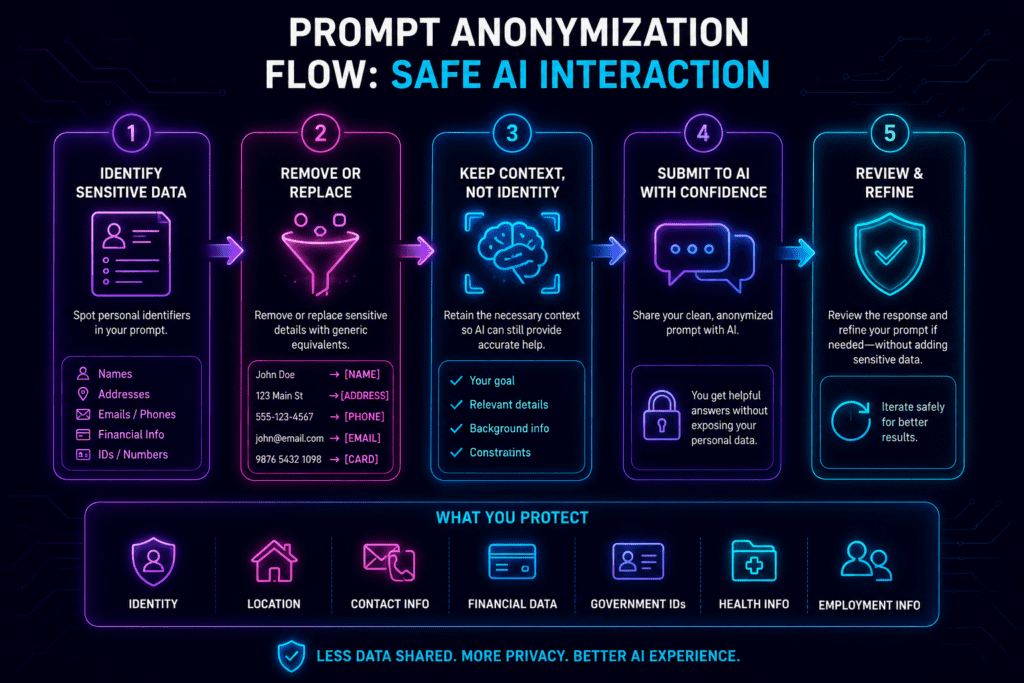
Step 1 — Remove Direct Identifiers
Start with the obvious stuff first.
Names, phone numbers, email addresses, account numbers, customer IDs, home addresses — remove all of it unless absolutely necessary.
For example, instead of writing:
“Write an email to my client John Smith at Acme Financial explaining why his account review was delayed.”
Write:
“Write an email to a financial client explaining why an account review was delayed.”The output will probably be nearly identical. ChatGPT doesn’t actually need to know who John Smith is to help you draft a professional email.
This sounds obvious in theory, but once you start paying attention, you realize how often people include identifying details that contribute nothing to the quality of the answer.
Step 2 — Replace Specific Details With Broader Categories
This is where anonymization becomes more subtle.
Sometimes information becomes identifying because of how specific it is when combined together.
For example:
“I work at a pediatric cancer clinic in Chicago.”
Even without your name attached, that sentence narrows things down considerably.
In most situations, you can broaden the context instead:
“I work in healthcare.”
Or:
“I work in a specialized medical environment.”
The model still understands the context well enough to help. You’ve just removed unnecessary specificity.
This matters especially for:
- niche industries,
- small companies,
- rare medical conditions,
- legal disputes,
- and internal business projects.
Most prompts don’t need your identity attached to them. They just need enough context to generate a useful response.
Step 3 — Use Placeholders Instead of Real Information
One of the easiest habits you can build is replacing names and identifying details with placeholders.
For example:
- [CLIENT]
- [COMPANY]
- [EMPLOYEE]
- [CITY]
- [DOCTOR]
Instead of:
“Rewrite this complaint response for Sarah from BrightStone Media.”
Use:
“Rewrite this complaint response for [CLIENT] from [COMPANY].”
What I like about placeholders is that they preserve structure. The AI still understands relationships between people and organizations, but none of the real-world identifiers remain attached to the conversation.
This is also much easier than trying to manually rewrite every prompt from scratch.
Step 3.5 — Use The “Character Method”
This is probably the most underrated privacy trick in everyday AI use.
Instead of making yourself the subject of the prompt, turn the situation into a hypothetical person, client, or friend.
For example, instead of writing:
“I’m having a dispute with my landlord about my security deposit.”
Write:
“A friend of mine is having a dispute with their landlord about a security deposit.”
Or even:
“What advice would you give someone dealing with a landlord deposit dispute?”
The answer quality is usually the same. But psychologically, the prompt becomes detached from your identity.
I’ve noticed this works especially well when people are emotional, stressed, or frustrated. Humans naturally overshare when talking about situations that feel personal. The Character Method creates just enough distance to stop that instinct from taking over.
It’s surprisingly effective for:
- legal questions,
- relationship problems,
- medical concerns,
- workplace conflicts,
- and financial stress.
ChatGPT is extremely good at understanding situations. It does not need your entire life story to do that.
Step 4 — Generalize Sensitive Situations
One of the easiest ways to accidentally expose personal information is through storytelling.
People naturally include extra details when explaining complicated situations. The problem is that many of those details are irrelevant to the actual task.
For example:
“My employee Sarah is under investigation for harassment after an incident last Friday.”
That contains:
- a name,
- a workplace relationship,
- a timeline,
- and a sensitive accusation.
The AI doesn’t need most of that.
A safer version would be:
“An employee is involved in a workplace conduct investigation.”
The important context is still there. The identifying information isn’t.
This becomes especially important in workplaces where employees casually paste internal situations into AI tools without thinking through the privacy implications first.
Step 5 — Pause Before You Hit Enter
Honestly, this step probably prevents more privacy mistakes than anything else in the article.
Just pause for five seconds before sending the prompt.
That’s it.
I’ve caught myself removing unnecessary details constantly just by slowing down briefly and rereading what I was about to submit.
Ask yourself:
- Does the AI actually need this name?
- Does this location matter?
- Am I oversharing because I’m frustrated?
- Would I be comfortable if this prompt was accidentally exposed somewhere later?
Most of the time, you’ll realize at least one detail can be removed without affecting the quality of the answer at all.
Real Before-and-After Prompt Examples
Resume Editing
Unsafe Prompt
“Improve my resume for a cybersecurity manager role at DeltaCore Technologies in Dallas.”
Safer Prompt
“Improve my resume for a cybersecurity management role at a mid-sized technology company.”
The second version still contains everything the AI needs to help effectively. The company and city weren’t improving the output in any meaningful way.
Medical Questions
Unsafe Prompt
“My daughter Emily has severe anxiety and takes Lexapro. What should I do before her school trip?”
Safer Prompt
“How can parents prepare children with anxiety for school travel situations?”
This is one of the best examples of how anonymization preserves usefulness while dramatically reducing exposure.
Customer Support
Unsafe Prompt
“Help me respond to customer Michael Turner who complained about invoice #44182.”
Safer Prompt
“Help me respond professionally to a customer dispute regarding an invoice issue.”
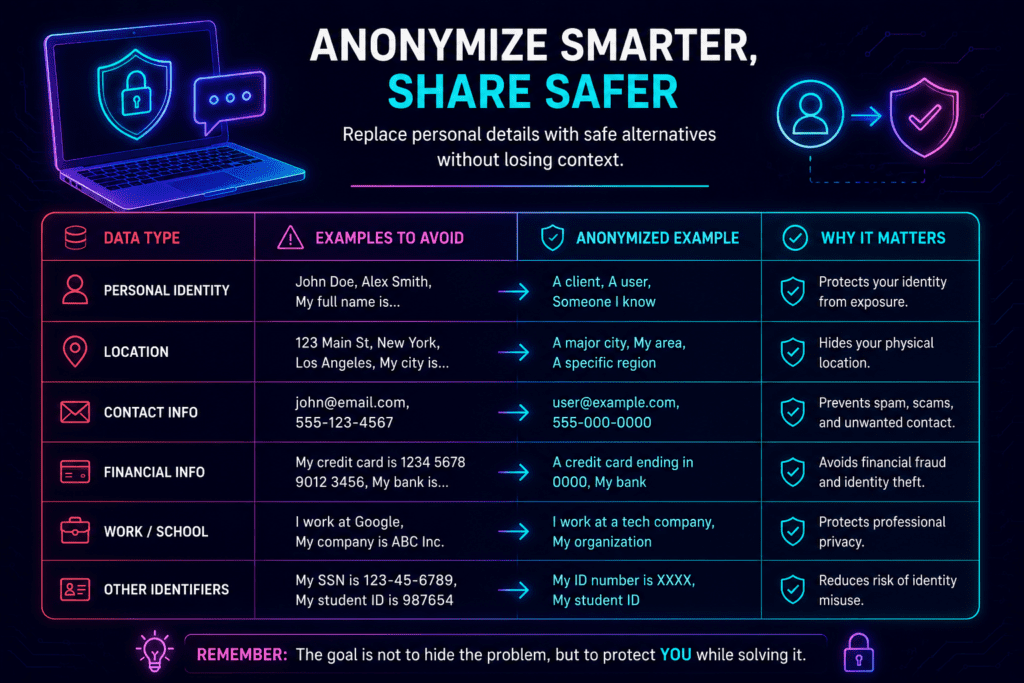
Again, the structure of the problem matters far more than the identifying details.
Copy-Paste Prompt Templates For Private ChatGPT Use
One thing I realized pretty quickly is that privacy habits become easier when you stop improvising every prompt.
Templates help because they force you to think in categories instead of identities.
Work Email Template
“Write a professional email from [ROLE] to [RECIPIENT ROLE] regarding [SITUATION TYPE] at a [INDUSTRY TYPE] company.”
Example:
“Write a professional email from a project manager to a client regarding a delayed deadline at a software company.”
Medical Question Template
“What should someone with [CONDITION TYPE] know before [ACTIVITY TYPE]?”
Example:
“What should someone with anxiety know before international travel?”
Resume Editing Template
“Improve this resume for someone applying to a [JOB TYPE] role in the [INDUSTRY TYPE] industry.”
Legal or Dispute Template
“What advice would you give someone dealing with [GENERAL LEGAL ISSUE]?”
Example:
“What advice would you give someone dealing with a landlord deposit dispute?”
Does Prompt Anonymization Actually Work?
In most everyday use cases, yes.
Large language models mainly care about:
- intent,
- structure,
- relationships between ideas,
- and enough context to understand the task.
They usually do not require exact identities.
That’s why anonymized prompts often generate answers that are almost indistinguishable from fully detailed ones.
Of course, this doesn’t mean you should start uploading confidential contracts and assume placeholders magically solve everything. Prompt anonymization reduces unnecessary exposure — it doesn’t eliminate all risk.
But it does solve the biggest problem, which is that most people share far more information than they actually need to.
Related: If you use AI platforms regularly, you should also read our complete guide on how to opt out of AI training across all major platforms.
How To Set Up a More Private ChatGPT Environment
Prompt anonymization is the first layer of protection.
Your setup is the second.
If you use AI tools regularly, it’s worth separating that activity from the rest of your browsing life a little bit.
Not because you’re trying to disappear online, but because separation reduces accidental exposure.
Use a Dedicated Browser or Browser Profile
One thing privacy-conscious users do well is compartmentalization.
Instead of mixing AI usage with everything else in your browser, create a separate browser profile specifically for AI tools.
Firefox and Brave both work well for this.
Firefox Containers are especially useful because they isolate cookies and sessions into separate environments. You can literally keep your AI tools separated from personal browsing, shopping accounts, work logins, and social media activity.
That kind of separation sounds excessive until you realize how interconnected modern tracking systems actually are.
Create a Separate Email for AI Accounts
If you test AI tools frequently, using a dedicated email address is honestly one of the simplest upgrades you can make.
It creates distance between:
- your personal identity,
- marketing systems,
- AI accounts,
- and cross-platform tracking.
Even using an alias is better than connecting every AI platform directly to your primary inbox.
Check Your Chat History and Training Settings
Most people never check these settings at all.
That’s understandable, but it’s still a mistake.
If you’re using AI regularly, spend five minutes reviewing:
- chat history,
- training permissions,
- temporary chat settings,
- and data retention controls.
If you haven’t already, read:
Does Chatgpt Save Conversations
Because honestly, most users have no idea what settings they enabled months ago when they first created their account.
Avoid Uploading Raw Files When Possible
This is one habit that dramatically lowers risk immediately.
Instead of uploading:
- contracts,
- medical reports,
- PDFs,
- customer documents,
- or internal business files,
…extract only the relevant section manually.
Most of the time, the model only needs a small portion of the content anyway.
Use Privacy Extensions Carefully
Useful browser tools may include:
- uBlock Origin,
- Privacy Badger,
- Cookie AutoDelete.
But avoid installing random “AI privacy” extensions without researching them properly first.
Ironically, privacy tools themselves can sometimes become the security problem.
You can also test your browser exposure here:
Does a VPN Make ChatGPT Private?
Not really — at least not in the way most people assume.
VPNs are useful for protecting:
- your IP address,
- public Wi-Fi traffic,
- and network-level visibility.
What they do not do is anonymize the information you personally type into prompts.
If you paste your full legal dispute, medical history, and employer information into ChatGPT, the VPN didn’t solve the important part of the problem.
I think a lot of people confuse connection privacy with content privacy. They’re related, but they’re not the same thing.
Why Businesses Are Starting To Care About Prompt Anonymization
The business risk with AI usually isn’t malicious employees.
It’s distracted employees moving too fast.
Imagine someone pasting this into ChatGPT during a busy workday:
“Summarize this customer complaint from John Smith at NorthRiver Financial regarding account 44391.”
That single prompt may expose:
- customer identity,
- financial relationships,
- internal company data,
- and account references.
Now multiply that across an entire company using AI casually every day.
That’s why more organizations are starting to create internal AI policies around anonymization, client data, and confidential information handling.
And honestly, they probably should.
Final Thoughts — AI Privacy Is Becoming a Normal Digital Skill
People are not going to stop using AI tools.
That conversation is already over.
The real question is whether users develop smarter habits as AI becomes more integrated into daily life.
Prompt anonymization is one of those habits. Once you start doing it consistently, it becomes automatic surprisingly fast.
You still get everything that makes AI useful — the speed, the convenience, the ability to offload frustrating tasks in seconds. You’re just no longer attaching unnecessary personal information to every interaction.
And over time, that matters more than most people realize.
If you want to better understand how companies handle your data policies overall, try:
Because the safest AI users usually aren’t the paranoid ones.
They’re the people who learned early that privacy is mostly a habit problem, not a technology problem.
For a complete list of private alternatives across chat, search, image generation, coding and more, see our Private AI Tools directory.
FAQs
Is there a way to use ChatGPT anonymously?
Not completely, but you can dramatically reduce exposure by anonymizing prompts, separating AI activity from your main browsing identity, using temporary chats, and avoiding unnecessary personal details.
Can ChatGPT identify you from your prompts?
Potentially, yes. Highly specific details like company names, locations, niche job roles, timelines, and unique personal situations can indirectly identify you even if your name isn’t included.
Does using a VPN make ChatGPT private?
A VPN helps protect your connection and IP address, but it does not anonymize the information you type into prompts. Content privacy and connection privacy are different things.
What is the safest way to use ChatGPT for work?
The safest approach is to anonymize prompts, remove client identifiers, avoid uploading confidential files, and follow clear internal AI usage policies.
Should I avoid uploading files into ChatGPT?
If the files contain legal, medical, financial, or confidential information, yes — avoid uploading them unless absolutely necessary. In many cases, manually extracting the relevant section is much safer.