
If you are paying for YouTube Premium , ads should not exist in your experience. That is what Google sold you. That is not what you are getting.
But here is what got me investigating this properly: thousands of people are paying for it every single month and still watching ads play. Real people with active subscriptions. People who did everything right. And why ads follow you everywhere in the first place is a much bigger, more deliberate system than most people realise — one that does not stop just because you hand over your card details to Google.
I went digging into exactly what is happening — because YouTube is not telling you — and what I found is not complicated. It is just deliberately obscured.
Here is every reason you are still seeing ads after paying, and what actually works.
Premium vs Premium Lite — Do You Actually Know Which One You’re On?
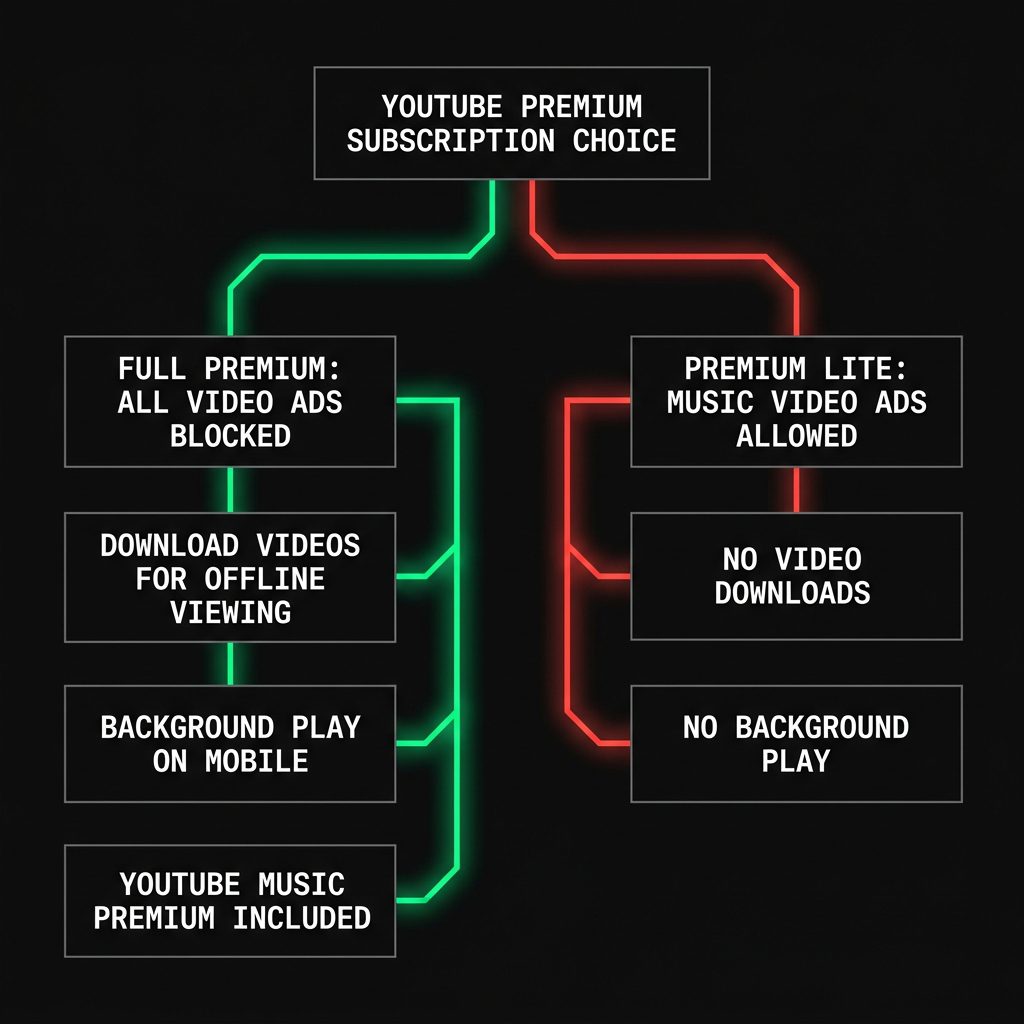
This is where most of the confusion starts, and it is exactly where YouTube’s marketing does its most effective work.
There are two YouTube subscription tiers, and the difference between them is significant.
YouTube Premium (full plan) — $15.99 per month in the US. This removes pre-roll video ads, mid-roll video ads, display banners, and overlay ads from the vast majority of YouTube content. It includes YouTube Music Premium, background play, and offline downloads.
YouTube Premium Lite — a cheaper tier available in select regions. This removes ads from *most* videos — but not all. Music videos still have ads on Lite. YouTube Shorts still have ads. Promoted placements in search results and on the homepage remain. And crucially: YouTube Music Premium is not included.
Go to youtube.com/premium right now and check which plan you are actually on. A significant number of people who believe they have full Premium are on Lite — often because they signed up during a promotion, switched plans to save money, or were added to the wrong tier by a family member.
That gap between what Lite promises and what it delivers is not an accident. It is a business decision — and understanding it explains a lot about why you are still watching ads.
And here is something neither plan changes: how Google tracks your interests even when you think you have opted out continues operating underneath your subscription regardless of what you pay. Premium removes the ads you see. It does not remove you from Google’s data collection. You are still being profiled. The targeting machine keeps running. You have just paid to stop seeing the output of it.
The Three Types of YouTube Premium Ads That Neither Plan Removes
Whether you are on Lite or full Premium, there are three categories of promotional content that your subscription was never designed to remove. These are not bugs. They are deliberate features of YouTube’s product architecture — features that benefit YouTube, not you.
1. Music Video Ads on Premium Lite
If you are on the Lite plan and watching official music videos, covers, or anything that triggers YouTube’s Content ID system for licensed music — you will see ads. Every time. This is by design.
YouTube has licensing agreements with the major music labels: Universal, Sony, Warner. Those deals cost money, and YouTube passes a portion of that cost to subscribers. The full Premium plan covers the music licensing tier. Lite does not. The ads you are seeing on music content are not a glitch in your account — they are YouTube’s way of telling you that you have not paid enough to unlock that category.
YouTube does not explain this prominently anywhere in the sign-up flow. You find out after you subscribe and the ads keep playing.
The fix: upgrade to full Premium, or switch to YouTube Music Premium as a standalone product if music is the main reason you subscribed.
2. Creator Sponsored Segments — Baked Into the Video Itself
This is the most common reason full Premium subscribers still feel like they are watching ads — and it causes genuine confusion because the experience is indistinguishable from a regular ad.
When a creator says “this video is brought to you by NordVPN” or cuts to a 60-second segment reading copy for a sponsor, that is not a YouTube ad. That is a private brand deal negotiated directly between the creator and an advertiser, recorded by the creator, and edited directly into the video file.
YouTube Premium cannot remove it because there is no separate file to intercept. The sponsored segment is part of the content itself — baked in at the editing stage, before the video is ever uploaded. There is no technical mechanism for YouTube to identify and surgically remove a portion of a creator’s own video, and even if there were, YouTube has no financial reason to do so. These deals happen entirely outside YouTube’s monetisation system.
This is how creators earn money outside YouTube’s ad revenue share. Direct brand deals typically pay significantly more per viewer than standard ad CPM rates. For many creators, sponsored segments are their primary income — not the ads YouTube serves.
Nothing removes these except skipping them manually. On a desktop browser, the open-source extension SponsorBlock — crowdsourced timestamps of sponsored segments, auto-skipped by the extension — handles this well. It does not work inside the official YouTube mobile app.
3. Full Premium Subscribers Seeing Ads — The Cache and Cookie Problem
Here is something YouTube will never proactively communicate to you: even with a valid, active full Premium subscription, some users see ads. Not because their subscription is broken — but because their device’s cached session data has gone stale.
YouTube checks your subscription status when the app or browser loads. If your browser has old cookies, conflicting session data, or a corrupted authentication cache, it can fail to correctly read your Premium status — and defaults to the ad-supported experience.
The fix: clear your browser’s cookies and cache, sign out of your Google account, sign back in, and reload. On the YouTube mobile app: Settings > Clear Cache. For most people reporting this issue, that resolves it immediately.
YouTube has never sent a notification about this. They have never published a prominent help article addressing it. The community figured it out through Reddit threads — real, frustrated Premium subscribers saying things like “it’s like an ad blocker that works when it wants to” and “what’s the point of paying for it if it doesn’t block ads.” They are not imagining it. They are not doing anything wrong. And YouTube has never once acknowledged the issue directly.
The Honest Alternative — Something YouTube Would Rather I Didn’t Tell You
uBlock Origin, installed on Firefox, is free. And for removing ads on YouTube on a desktop browser, it is more effective than YouTube Premium.
That is not a controversial statement in technical circles. uBlock Origin is an open-source browser extension that blocks ads at the network request level — before they even load. On Firefox, which maintains the full extension API that Chrome is being systematically restricted from, it works extremely well against YouTube’s ad delivery system.
The caveats, because I do not hide limitations:
It only works on desktop in Firefox – The full version of uBlock Origin is no longer available in the Chrome Web Store. Google made this happen through a platform policy change called Manifest V3, which restricted the browser extension capabilities that make powerful ad blockers function. Google owns YouTube. Google owns Chrome. The conflict of interest is not subtle.
It does not work in the YouTube mobile app or on Smart TVs – If most of your YouTube watching happens on your phone or television, uBlock Origin is not a replacement for Premium.
YouTube periodically updates its systems to counteract it – The uBlock Origin team updates their filter lists rapidly — usually within hours of a new countermeasure — but there are brief windows where ads can slip through.
If you watch YouTube primarily on a desktop browser and you are paying $15.99 a month specifically to avoid ads: uBlock Origin on Firefox does the same job at no cost. Whether that trade is worth making is your decision. I just think you deserve all the information before you decide.
The Hover Trick I Discovered — Full Video, No Ad
This is something I found myself, and I have not seen it written up clearly anywhere else.
On both Android and desktop, YouTube autoplays video previews before you officially open them. Most people scroll past these. But here is what I noticed: if you let them keep playing, they keep playing — all the way through the full video. And YouTube’s ad system never fires.
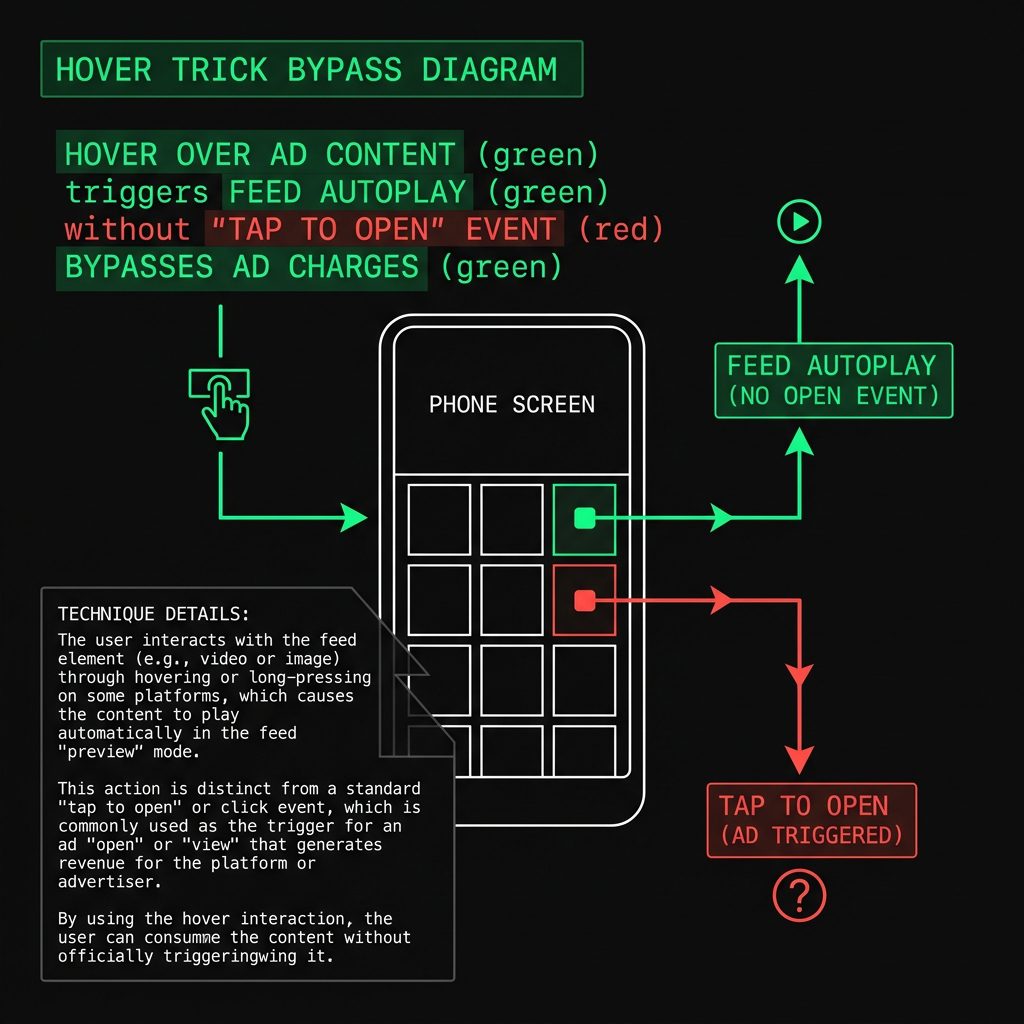
Here is exactly how it works on each platform:
On Mobile:
As you scroll through your YouTube feed, videos begin autoplaying inline as you pause on them. You do not tap anything. The preview starts automatically.
What most people miss: if you stop scrolling and let that preview keep running, it continues into the full video. You are watching the complete content — without a pre-roll ad, without a mid-roll ad, without anything. From YouTube’s system perspective, you never performed the tap that opens a video. The ad trigger fires on that open event. The feed autoplay bypasses it entirely.
To use this deliberately: scroll to the video you want. Stop scrolling. Let the preview play. Do not tap the thumbnail. Watch it from within the feed.
On Desktop:
Hover your cursor over a video thumbnail. YouTube begins autoplaying a preview. Keep your cursor on the thumbnail and let it play. The video continues playing through the full content.
Same result — you have not clicked into the video, so the open event that triggers the ad system never fires.
I found this by accident — a video played out in my feed without me ever tapping it, and no ad played. I tested it deliberately after that. It works consistently on Android and on desktop. I have not tested it on iPhone and I am not going to speculate on what I have not verified.
This is not a permanent guarantee. YouTube updates its systems regularly and this could change. But right now, it works. And it costs nothing to try.
5 Things to Do Right Now
1. Check which plan you are actually on
Go to youtube.com/premium. If you are on Premium Lite and seeing ads on music videos or Shorts, that is expected — not a bug. You need the full plan to remove those.
2. If you are on full Premium and seeing ads — clear your cache first
On desktop: clear cookies and cache for YouTube in your browser settings. On mobile: YouTube app > Settings > Clear Cache. Sign out and sign back in. This resolves the issue for most full Premium subscribers reporting ads.
3. Check whether the “ad” is actually a creator sponsored segment
If someone is speaking directly to camera and referencing a brand — no subscription, no extension, no workaround removes that. It is part of the video. Skip it manually or use SponsorBlock in a desktop browser.
4. Try the hover trick.
On Android: let feed previews autoplay without tapping. On desktop: hover over a thumbnail and let the preview run through. No ad triggers on either platform because you never fired the open event.
5. Consider uBlock Origin on Firefox if you watch mainly on desktop
Free. No subscription. More effective than Premium for desktop ad removal. Install from the Firefox Add-ons store. Requires Firefox — not Chrome. Will not help on mobile or TV.
The Bottom Line
YouTube Premium is a real product. It removes a real category of ads — the pre-roll and mid-roll interruptions that make free YouTube genuinely unpleasant.
But it does not do what most people assume when they hand over their payment details. The marketing says “ad-free.” The reality is “fewer ads, on most content, on the right plan tier, when your session data is working correctly.”
Some of the ads you are seeing are by design. Some are a technical session issue YouTube has never communicated a fix for. Some are creator business decisions that no subscription will ever touch.
I investigated this for the people being charged every month and still watching ads. Now you know exactly what is happening — and what you can actually do about it.


Hello there, just became aware of your blog through Google,
and found that it is truly informative. I’m gonna watch out for
brussels. I will be grateful if you continue this in future.
A lot of people will be benefited from your writing.
Cheers!
Once I am scrutinizing the world wide web, usually I like
to browse content I discover. Usually, I can find cutting edge advice, or a innovative tool for
analyzing points that I had not regarded earlier.
In such a situation, I’m often grateful. Considering the fact that I might not
have the opportunity to search on-line much, on account
of my work as an massage in home therapist, I endeavor to make
the most of my activities on line.
It’s actually a nice and useful piece of info. I am happy that you just
shared this useful information with us. Please keep us informed like this.
Thanks for sharing.